

Pika H3 Flex came out at the end of October. It's a fast, low-cost video model that lets you edit a clip you already have, which makes it handy for testing ad variations.
I went through Pika's docs and pricing to see what it costs to make ads with it and where it falls short. Here's what I found.
Pika H3 Flex: TL;DR
- In short: Pika H3 Flex is one of the fastest ways to iterate on short video ads with sound. It drafts at 768p for a few cents a second, then upscales only the takes you keep.
- It's built for variant-heavy ad testing. Up to 12 references keep a product recognizable across shots, and reference-guided editing lets you replace a prop, an outfit, or the setting while keeping the original performance and timing.
- The catch: clips cap at 15 seconds, native output tops out at 768p, and the 4K upscaler and audio stems only exist on Pika's hosted version.
- Pricing moves fast. Pika still lists half-price launch rates, and its launch promo of 15 free generations a day for Creator, Fancy, and Pika API Club members ran through November 15, 2026, so check the live price before you budget.
- Ads are allowed on paid plans. Pika's commercial license starts on the $10/month Starter plan, and no plan adds a watermark.
What Is Pika H3 Flex?
Pika H3 Flex is a video and audio generation model that Pika post-trained on MiniMax H3 and launched on October 29, 2026. Pika cut the generation process from 50 denoising steps down to six, then tuned the faster model for quality and control.
It ships two ways: as a hosted model on pika.art and the Pika API, and as open weights you can run on your own hardware.
At launch, Pika reported that Flex ranked #7 overall and #1 among open-weights models on DesignArena's text-to-video leaderboard (a launch-day snapshot, so treat the rank as a moving target).
Here are the specs ad teams will lean on, all from Pika's product page:
| 🧩 Spec | 📏 Pika H3 Flex |
|---|---|
| Clip length | 3 to 15 seconds, set in whole seconds |
| Native resolution | 480p or 768p |
| Finished resolution | 1080p, 2K, or 4K through Pika's hosted upsampler |
| Frame rate | 24 fps |
| Aspect ratios | 11 options, including 9:16, 4:5, 1:1, 16:9, and 21:9 |
| References | 12 in total, with up to 9 images, 3 videos, and 3 audio clips |
| Audio | Synchronized stereo at 32 kHz |
| Audio stems | Dialogue, Music, and Effect as separate WAV files |
| Prompt length | Up to 8,000 characters |
| Modes | Text-to-video, first/last-frame image-to-video, reference-to-video, and reference-guided video editing |
| Output | MP4 (H.264 video, AAC audio) |
Clips can run as short as 3 seconds, which is handy when you want a quick bumper or a 6-second cut.
How Fast Is Pika H3 Flex in Practice?
Pika H3 Flex can finish the core computation for a 15-second 768p clip in as little as seven seconds, though your wait will run longer.
Pika's own footnote explains that seven seconds measures transformer (DiT) compute in a controlled benchmark. References, higher-resolution finishing, audio-stem separation, and normal service overhead all add time on top.
The more useful number for an ad team is relative. Pika says Flex runs up to 1.8x faster and up to 80% cheaper than H3Max on average across matched text-to-video, image-to-video, and reference-to-video comparisons.
Speed counts here: creative testing is mostly being wrong, cheaply and often (every media buyer already knows this, sorry).
Pika H3 Flex Pricing
Pika H3 Flex pricing is charged per second of output video, and the rate depends on the resolution and whether you use references. On Pika Create (the pika.art app), Pika lists Flex rates in credits at 1 credit = $0.01, though plan credits cost a little more than that (Starter's 600 credits for $10 work out to about $0.017 each).
Text, Image, and Keyframe Generation
These rates come straight from Pika's H3 Flex pricing table, checked on November 15, 2026:
| 📐 Output | 💵 Regular price per second | 🏷️ Launch price per second |
|---|---|---|
| 480p | $0.02 | $0.01 |
| 768p | $0.04 | $0.02 |
| 1080p | $0.07 | $0.035 |
| 2K | $0.08 | $0.04 |
| 4K | $0.16 | $0.08 |
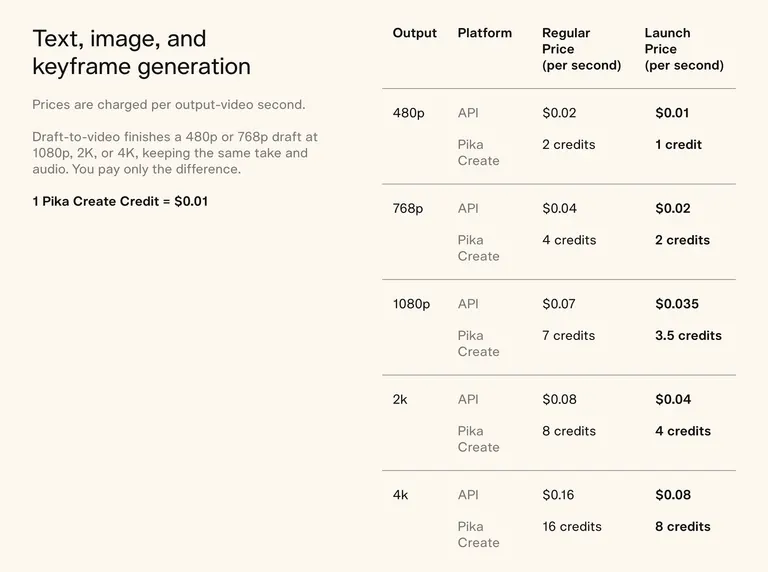
Pika doesn't post an end date for the launch column, so don't build a quarterly budget on it.
Reference-to-Video Costs More
Reference-to-video, the mode you'll use most for product ads, has its own higher rates: $0.12 per second at 768p and $0.15 at 1080p on regular pricing (half that at launch pricing).
Image and audio references are free to attach. A video reference is different: Pika charges the same per-second rate for the input video's seconds plus the output's.
Upscaling, Stems, and the Prompt Rewriter
Draft-to-video finishes a 480p or 768p draft at 1080p, 2K, or 4K while keeping the same take and audio, and you pay only the difference between the two resolutions.
Audio stems cost $0.001 per second on the API. If you self-host the open weights, Pika's prompt rewriter costs $0.02 per request (it's included free on the hosted model).
Pika Plans
If you'd rather use the pika.art app than the API, Pika's plans look like this:
- Free: $0/month with no monthly credits, so you buy credit packs to generate.
- Starter: $10/month for 600 credits.
- Creator: $35/month for 2,600 credits.
- Fancy: $95 to $880/month for 8,550 credits and up.
Annual billing knocks 20% off. The commercial license you need for ads starts on Starter, since Free doesn't include it, and no plan adds a watermark. One more gotcha: top-up credit packs work in Pika Create and Pika's MCP, but not on the API.
What Five 15-Second Ad Variants Cost
Say you're testing five hooks for one product video. Each variant is 15 seconds in 9:16, built from product photos as references, drafted at 768p. You finish the two winners at 1080p with audio stems so your editor can remix the sound.
| 🧾 Line item | 💵 Regular pricing | 🏷️ Launch pricing |
|---|---|---|
| 5 drafts × 15s at 768p reference-to-video | $9.00 | $4.50 |
| Finish 2 winners at 1080p (pay the difference on 30s) | $0.90 | $0.45 |
| Audio stems on 2 winners (30s) | $0.03 | $0.03 |
| Total | $9.93 | $4.98 |
Add a 5-second product-spin video as a reference on every draft and you pay for those input seconds too: another $3.00 at regular pricing.
That works out to about $5 per finished, remixable ad at regular pricing, or about half that at launch rates (cheaper than the lunch you'll eat while reviewing them).
How to Use Pika H3 Flex for Video Ads
Pika H3 Flex works best for ads when you treat one generation as a template and spend your effort on controlled variations. Pika itself pitches product films ("Sell it") as a core use case, and its product page promises to keep products recognizable while changing angles, environments, pacing, camera movement, and soundtrack.
Here's the workflow I'd run for a paid social test.
1. Load Product Shots as References
Start with clean product photos: a hero angle, the packaging, a close-up of the detail that sells it (the texture, the label, the clasp). Add a lifestyle shot if you have one.
Then tell Flex what each reference should contribute in the prompt, like "use image 1 for the bottle, image 3 for the kitchen setting," and direct the shot around it, which is what Pika's own guidance recommends.
Reference mode needs at least one image or video, so a voice sample has to ride along with a product shot.
2. Pick the Aspect Ratio for Each Placement
Flex supports 11 aspect ratios, so generate for the placement you're buying. Cropping a 16:9 master down to 9:16 is how products end up half out of frame.
| 🎯 Placement | 📐 Aspect ratio to generate |
|---|---|
| Reels, Stories, TikTok | 9:16 |
| Facebook and Instagram feed | 4:5 or 1:1 |
| YouTube and in-stream | 16:9 |
Meta's own aspect-ratio guidance points to 9:16 for Stories and Reels because it fills the whole phone screen. If you need a refresher on where each format runs, our breakdown of placement specs for Facebook video ads and this guide to Instagram Reels ads cover the details.
3. Write the Prompt Like a Shot List
You get up to 8,000 characters, so use them like a shot list. Put the hook in the first two or three seconds, then the body, then the payoff.
Flex handles camera direction in plain language: an overhead opening, a crane down to table height, a whip pan, an orbit, all in one clip. It can also do hard cuts, dialogue, and sound inside a single 15-second generation.
A prompt that reads like a brief ("0-2s: close-up of the cap twisting off, crisp pop sound; 2-8s: hand applies serum, slow push-in…") beats a prompt that reads like a vibe.
4. Spin Hook Variants Without Starting Over
Flex earns its name here. Reference-guided editing lets you replace an outfit, a prop, or the setting while keeping the performance and timing of the original clip.
For ad testing, that means you can hold the body of the ad constant and change only the opening: a different first frame, a new setting, a different on-screen action. Flex also supports seed control, so you can rerun a variant with the same seed while you change one variable in the prompt.
If you change the hook, the music, and the setting at once, you won't know which one moved your CPA.
5. Swap Voiceover and Music With Audio Stems
Through the API, every generation can return the video plus separate Dialogue, Music, and Effect WAV files. Separation defaults to mono, with stereo on request, and the clip's original mixed audio stays intact.
That opens two cheap tests:
- Music tests: keep the same visuals and dialogue, swap the track in your editor.
- Localization: keep the music and effects, replace the dialogue stem with a translated voiceover.
6. Draft at 768p, Finish Only the Winners
Generate every variant at 768p, review them, and only upscale the ones worth spending on. Draft-to-video keeps the same take and audio and charges just the resolution difference.
Then run the test. Flex gives you the variants, but it can't tell you which one wins (that part is still on you and your ad account). If you're building out that side of the stack, here's how the main ad creative testing platforms compare.
Where You Can Use Pika H3 Flex
You've got three routes, and they don't all include the same features.
The Pika H3 Flex App on pika.art
The app runs on Pika Create credits and includes the hosted extras: the 1080p, 2K, and 4K upsampler, audio stems, and prompt enhancement. It's the fastest way for a creative strategist to start testing without touching code.
The Pika API
Developers get access through the Pika API Club at dev.pika.art. This is the route for batch generation, pipelines, and pulling audio stems programmatically. Remember that top-up credit packs from the app can't be spent here.
Open Weights on Hugging Face
Pika released Flex's generator adapters and inference code, with weights on Hugging Face and ready-made ComfyUI workflows for text-to-video, reference-to-video, and first/last-frame generation.
Two things to know before you download 33 billion parameters:
- The local release stops at 480p and 768p. The upsampler, audio-stem separation, prompt enhancement, and Pika's accelerated serving stack stay hosted.
- Hardware is serious. Pika's model card reports representative runs on an H100 80GB GPU, with CPU offload for large requests.
Pika H3 Flex Limits to Know Before You Build Ads on It
A few of Flex's limits will bite an ad team:
- 15-second ceiling: anything longer means stitching clips or picking another model.
- Native resolution is 768p: 1080p, 2K, and 4K all run through Pika's hosted upsampler.
- Licensing on the open weights: Pika's adapters are Model Derivatives of MiniMax H3 under the MiniMax H3 Community License Agreement. The example code is Apache 2.0, but that license doesn't cover the model weights. Get the license read before you put self-hosted output into paid ads.
- Stem count depends on which page you read: Pika's launch post mentions five stems, while the product page and FAQ list three (Dialogue, Music, and Effect). Plan your edit around three.
- Video references cost double duty: you pay for the input video's seconds and the output's.
- Launch pricing is temporary: the half-price column will end at some point, and Pika hasn't said when.
Pika H3 Flex vs MiniMax H3 vs Seedance 2.5
Pika hosts all three models, and its own model menu puts them side by side. Here's how they compare for ad work:
| 🎬 Model | ⏱️ Max length | 🖼️ References | 📐 Resolution | 💵 Price on Pika | 🎯 Best ad use |
|---|---|---|---|---|---|
| Pika H3 Flex | 15 seconds | 12 total (up to 9 images, 3 videos, 3 audio) | 480p/768p native, up to 4K upscaled | $0.04/s at 768p ($0.12/s with references) | Fast hook and placement variants |
| MiniMax H3 | 15 seconds (4 to 15) | 15 (9 images, 3 clips, 3 audio) | 720p or 2K | Not listed on Pika's model page | Higher-resolution hero takes |
| Seedance 2.5 | 30 seconds | Up to 50 | 480p to 4K native | About 122 credits per 5s at 720p (roughly $0.22 to $0.27/s) | Longer multi-shot story ads |
Specs for MiniMax H3 and Seedance 2.5 come from Pika's MiniMax H3 and Seedance 2.5 pages.
My pick: Flex for testing volume, Seedance 2.5 for the 30-second hero spot once you know which concept wins. Platforms like Higgsfield bundle several AI video models under one subscription if you'd rather not manage credits per model, and if your team works in Google's tools, our Gemini Omni 1.2 Flash breakdown covers Google's take on editable ad video.
Is Pika H3 Flex Worth It for Ad Teams?
Yes, if your bottleneck is variant volume. At a few dollars per finished 15-second ad, Flex makes it cheap to test hooks, settings, and placements against each other, and the stems save a trip back to the generator for every music or voiceover change.
It's less convincing as a one-stop production tool. The 15-second cap and 768p native output push longer or higher-end spots to other models.
Skip Pika H3 Flex If You:
- Need 30-second spots in a single generation.
- Need native 4K without depending on Pika's hosted upsampler.
- Plan to self-host for paid ads and can't get the MiniMax license reviewed.
- Want avatar-led UGC with a talking presenter (dedicated tools in our roundup of Creatify alternatives fit that better).
Plan Your Pika H3 Flex Ads With Atria
Pika H3 Flex makes the variants cheap, but somebody still has to decide which hooks deserve the five slots and work out which finished ad won.
Both questions come down to performance data: what's working in your account, and what's working in your competitors' ads.
Atria covers the step before production and the step after launch. Raya, its AI creative strategist built on more than $12 billion in real ad spend, tells you what to make next. For the video itself, you'd pair it with a generator like Flex or one of the other AI ad generators for video and images.
With Atria, teams can:
- Pull competitor hooks, angles, and personas from the brands they follow.
- Turn customer reviews into ad angles worth testing.
- Build briefs and write hooks, scripts, and copy from their own account's performance data.
- Bulk-upload finished creative straight to Meta.
- Grade every ad with Radar, which scores the hook, retention, click-through, and conversion and recommends what to fix.
- Flag creatives that start to fatigue in a scheduled Slack digest, before they drag down ROAS.
Ipsy's 14-person growth team doubled its creative volume and saw a 25% ROAS increase with Atria. When the brief comes from real performance data, every Flex generation starts from a hook with a reason to exist.
Start today for free with 1,000 credits included and no credit card.
Frequently Asked Questions
Is Pika H3 Flex free?
Pika H3 Flex isn't free on Pika's hosted platform. A launch promo gave Creator, Fancy, and Pika API Club members 15 free Flex generations a day through November 15, 2026, and Pika's Free plan includes no monthly credits. You can also run the open weights on your own GPU under the MiniMax H3 Community License, but you'll need serious hardware.
Is Pika H3 Flex open source?
Partly: Pika H3 Flex has open weights on Hugging Face plus inference code on GitHub. The weights fall under the MiniMax H3 Community License Agreement. The example code is Apache 2.0, and that code license doesn't cover the weights.
Can Pika H3 Flex make 4K videos?
Yes, Pika H3 Flex can deliver 4K through Pika's hosted upsampler, which also offers 1080p and 2K. The model generates natively at 480p or 768p, and the local open-weights release doesn't include the upsampler.
How long can Pika H3 Flex videos be?
Pika H3 Flex videos run 3 to 15 seconds per generation, set in whole seconds at 24 fps. For anything longer, you'll need to stitch clips or use a model like Seedance 2.5, which goes up to 30 seconds.
Can I use Pika H3 Flex videos in paid ads?
Yes, on a paid Pika plan. Pika's commercial license starts with the Starter plan at $10/month, and no Pika plan adds a watermark. Self-hosted output falls under the MiniMax H3 Community License, so check its terms first.