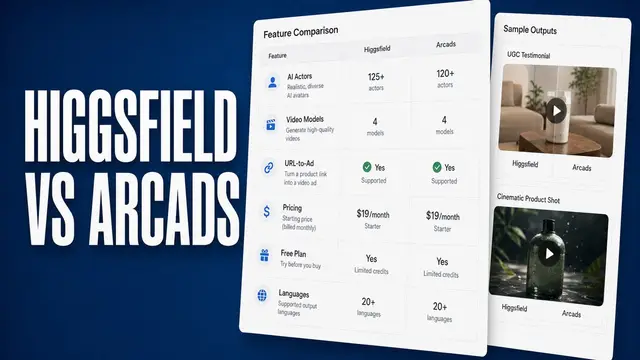

Product videos online often share a signature look, like a slow push-in or a crash-zoom that suddenly tightens the frame for drama. Higgsfield is one of the tools behind that look, even when viewers scrolling past have no idea which tool made it.
I put two days into this Higgsfield AI review. That meant running my own product-video test and going through Higgsfield's pricing and feature pages. I also looked at what real users ran into once they signed up and started generating for real.
This Higgsfield review walks through whether the credit math works for what you want to make.
Higgsfield Review: TL;DR
- In short: It’s worth it if you want built-in camera moves, like a push-in or a bullet-time move, plus several AI image and video models in one subscription. You'll still need to read the credit math before you pick a plan.
- It falls short if you want one cheap, simple clip. Premium video models can burn a month of credits several times faster than the cheap image models.
- It's built for social and marketing teams who want a production-crew look without the crew.
- The free signup gets you free generations on select models. Higgsfield's DoP camera-move presets aren't among them, so testing those takes credits instead.
- Higgsfield went through a rough patch, which included X suspending Higgsfield’s account in February 2026, offensive marketing content, and an earlier mass bot-fraud cleanup. That history deserves a look before you pay, even though the product itself works normally today.
What Is Higgsfield?
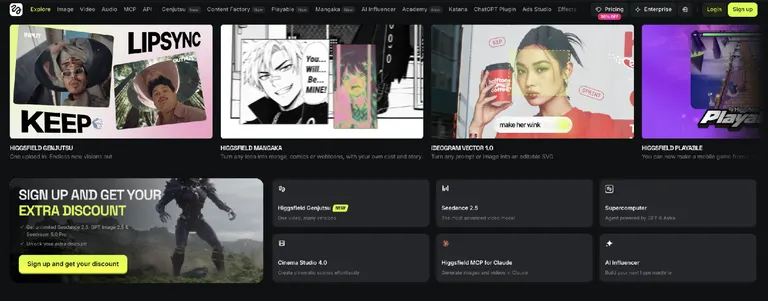
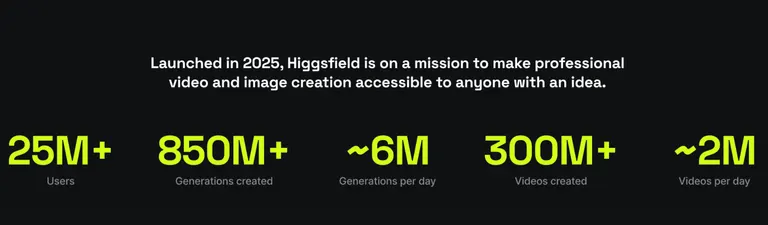
Higgsfield is an AI-native creative suite that spans image, video, and audio generation. It also offers API and MCP access so other tools can plug into its models. Higgsfield reports 25 million users since its 2025 launch.
It's built for creators, marketers, and social-content teams who want cinematic camera work and consistent characters. They also want to skip hiring a production crew or learning prompt engineering.
A generic AI video shot has no camera control built in. Higgsfield gives you camera language on top of several different AI models in one place.
Features
Higgsfield breaks down into six core capabilities.
DoP
DoP (Director of Photography) is Higgsfield's own image-to-video model. You upload a still, pick a camera-move or effect preset, and it generates a directed shot.
Forbes reported Higgsfield’s full library at 400 camera-motion and visual-effect presets. The DoP selector includes moves like a crash zoom and bullet time.
DoP appears as “Higgsfield Standard” in the model selector, and each clip runs 3 or 5 seconds, with the credit cost shown on the Generate button before you confirm.
That library turns a flat clip into something that reads as directed, but it takes time to learn before it pays off, since the presets only make sense once you understand what each move changes.
Multiple AI Models in One Place
Higgsfield bundles access to image models like Nano Banana Pro, Seedream, and GPT Image, and video models like Seedance, Kling, Veo, and Wan, into one subscription.
That convenience has a cost, since each model draws credits at its own rate, and the plans below break down what that actually buys.
Speak
Speak turns a script into a talking avatar, matching mouth movement to the words. It sits inside Higgsfield's Lipsync Studio alongside several third-party voice models, and it's available starting on the Pro plan.
Higgsfield’s help center says you can adjust the delivery with emotion sliders before you generate.
Inpaint
Inpaint fixes one part of a frame (a hand, a logo, a background detail) without redoing the whole shot. Higgsfield's image-editing tools let you edit only the area you brush over, but it can’t rescue a shot that’s wrong overall.
Turbo Variants
Turbo variants trade some quality for speed, and the pattern shows up across several models. Higgsfield's Kling guide confirms that a Turbo variant caps at 1080p, while a full-quality render reaches 4K.
The faster mode loses some fine detail in exchange, which matters most if the output is headed somewhere high-resolution.
Marketing Studio
Marketing Studio turns a single product photo into ready-to-post ad content. Its template library is organized by task, with templates for product shots, motion clips, UGC-style videos, posters, and marketplace images.
A Product Link tool can build an ad straight from a product URL, and an Ad Reference tool recreates another ad's structure with your product in place of the original. Marketing Studio focuses on ad creative, while DoP handles narrative camera work.
Pricing
There’s a Free plan and three paid individual tiers (Basic, Pro, Max), plus two per-seat business tiers (Team, Scale) and Enterprise.
New signups can land promo credits from a code or as compensation; Higgsfield has given out more than $3 million in free promo codes to drive signups, Forbes reported, though the amount per offer isn't fixed.
What you end up paying depends on how far your credits go on the model you pick.
Individual-plan credits also reset each billing cycle, so unused credits don't carry into the next month.
Here's how each tier breaks down:
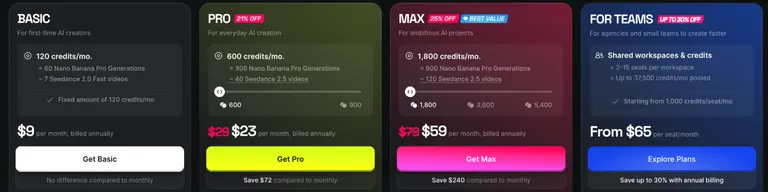
- Basic: $9/month on either billing option, 120 credits a month, enough for about 60 Nano Banana Pro images or 7 Seedance 2.0 Fast videos.
- Pro: $29/month ($23/month, billed annually), 600 credits a month, enough for about 300 Nano Banana Pro images or 40 Seedance 2.5 videos. Pro also adds seven days of unlimited generations on a rotating set of models.
- Max: $79/month ($59/month, billed annually), 1,800 credits a month, scaling to 3,600 or 5,400. Higgsfield marks Max as its “Best Value” tier.
The common complaint that Higgsfield costs too much has a clear cause. A single premium-model video can eat into a month's credits far quicker than a cheap image does. Spend a bad afternoon on a handful of premium-model renders and the rest of the month runs tight.
Higgsfield Pros and Cons from Real Users
Higgsfield holds a 4.0 TrustScore, rated "Great" across 5,200+ Trustpilot reviews. The same handful of points repeat across review platforms.
Pros
- Camera control that looks deliberately directed: DoP's presets turn a still into a shot with an intentional camera move.
- One subscription covers several AI models: Higgsfield's pricing page lists Kling, Veo, Wan, Seedance, Nano Banana Pro, and GPT Image under one plan.
- Support that resolves account and credit issues: Multiple reviewers on Trustpilot and G2 say the support team fixed billing and technical problems quickly, though Trustpilot’s own review summary describes customer-service feedback as ambiguous.
- No credit card required to start: The signup flow includes free generations without asking for payment details.
Cons
- The credit math punishes premium models: A single video on a higher-end model can cost several times what one image costs on the same plan. That gap is the most common complaint about Higgsfield's pricing.
- "Unlimited" doesn't always behave like unlimited: Several users report that “unlimited” turned out to mean a handful of videos a day. One reviewer said it effectively means a maximum of four videos a day.
Higgsfield’s own Unlimited explainer says unlimited runs in the standard queue. Credit-based generations get the faster priority queue.
- Characters and products can drift across a multi-shot sequence: Identity consistency is a documented weak spot once a request runs past one or two cuts. Higgsfield’s own multi-shot guidance recommends locking a character as an Element to keep it consistent.
My Personal Take on Higgsfield
I gave Higgsfield this brief for a product shot of a skincare serum bottle, under 20 seconds. I needed two matching versions of it, one square and one vertical:
I need a video for a new skincare serum. Open on the glass bottle on a marble counter in soft morning light, with a slow push-in on the bottle for the first five seconds. Then cut to the same bottle being picked up and tilted so the light catches the liquid inside. I need it to still look like the exact same bottle and label, not a slightly different one. Keep the whole thing under 20 seconds and skip anything that needs a different camera angle mid-shot. I want something simple enough that a small team could use it without three rounds of fixes.
I generated both versions on Minimax H3 Highspeed at 768p, which ran 30 credits per video.
The slow push-in on the bottle, the cut to it being picked up and tilted, and the under-20-second length all came out exactly as asked, in both versions.
That said, Higgsfield has you set the aspect ratio per generation, so the square and vertical versions were two separate renders. The vertical one came out with slightly different framing, even though I hadn’t changed any other setting, and a rerun fixed it.
Across both cuts, the serum bottle kept its shape, and the label stayed in place, but the label's text came out as gibberish in both versions, and the rerun didn't fix it.
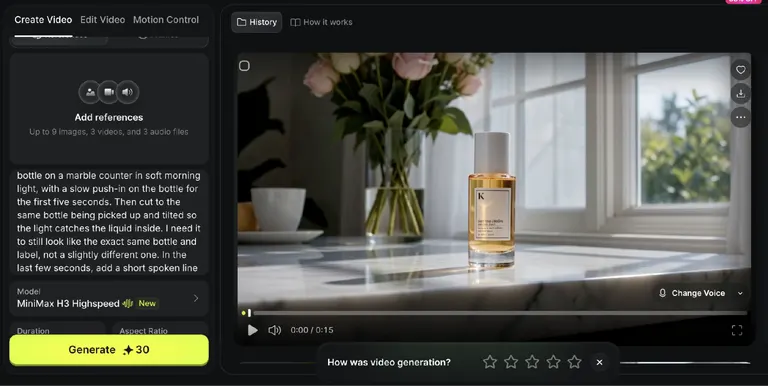
Each version came as an MP4 export at the right resolution, ready to drop straight into Premiere without converting it first, though the label would need fixing before the clip could run as an ad.
DoP's camera language is worth learning for anyone who'd otherwise be stuck with a single flat AI shot. My test skipped DoP, so the camera moves are the next thing I’d try.
If your video needs a voiceover, you’ll need to move up from the cheapest plan, since Speak isn’t included on it. You're better off knowing that ahead of time than finding it out halfway through a billing month.
Is Higgsfield Right for You?
Who will love it:
- A marketing or social team producing ad creative, especially one also weighing other AI ad generators, since camera control sets Higgsfield apart from a plain prompt-to-video tool.
- Someone who already pays for a handful of AI subscriptions and wants several models combined under one login and one bill.
Who should avoid it:
- Someone who wants one cheap, simple clip and has no interest in working out credit costs before they generate.
- Someone who can't tolerate Higgsfield's strict refund window, which requires a request within seven days (zero credits used, renewals excluded), or an occasional slow queue during a busy stretch.
Also, the "unlimited" friction (the toggle resets, the lower-than-expected output counts) repeats across user reviews too.
One unlimited-toggle reviewer describes being capped to one active generation at a time. Their waits ran 45 minutes to several hours, against two to three minutes on the credit-based plans.
Higgsfield’s own Unlimited explainer says unlimited generations run in the standard queue, while credit generations get the faster priority queue.
Higgsfield's 2025-26 Controversy
Account Suspension and Marketing Backlash
The bigger story broke in February 2026. Forbes reported that X suspended Higgsfield's own account, and Higgsfield said X told it the reason was "inauthentic behavior."
In the same investigation, Forbes found that Higgsfield's marketing team had shared stock footage with creators as if it were AI-generated output.
The team also shared offensive AI-generated videos, including nonconsensual celebrity deepfakes, as part of a paid-promotion program. The company confirmed this happened and called it a mistake.
The Bot-Fraud Bans
Separately, Forbes reported that Higgsfield shut down around 40,000 accounts between December 2025 and January 2026.
The company said the takedowns targeted bot fraud and were 99.5% accurate. Co-founder Mahi de Silva told Forbes that heavy traffic had slowed the platform and blamed some of those slowdowns on the bots. Higgsfield said it has refunded $1.35 million to genuine users affected by the slowdowns.
Refund complaints show up for other AI ad tools too.
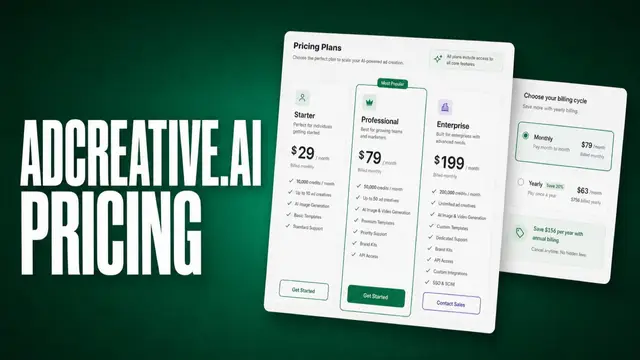
AdCreative.ai, a different AI ad-creative tool, draws the same complaint on Trustpilot. One reviewer waited from late April into July 2026 for a promised refund and started a bank dispute before it finally arrived.
Atria's own review of AdCreative.ai's pricing and refunds covers that refund problem in more depth.
Read the credit and refund terms closely no matter which tool you pick. Higgsfield’s recent problems are exactly why you check the fine print before you sign up through one of its promo codes.
Plan Your Higgsfield Ads With Atria
If you came to Higgsfield for ad creative that performs, the strategy work before a single frame gets made matters as much as the video. That means picking the hook and writing the brief first.
Atria is built around Raya, an AI creative strategist that analyzes your ad account, your competitors, and your customers' reviews. Raya then tells you what's working, what's missing, and what to make next.
Raya builds the brief and generates the hooks, scripts, copy, and image ad variants from your own account's real performance data. Raya is trained on more than $12 billion in ad spend.
Then Atria bulk-uploads the finished creative straight to Meta. Radar, its grading engine, grades your Meta and TikTok ads within a timeframe you set (30 days is the suggested start).
It keeps updating as you launch new ones. Radar then groups each ad into three categories:
- Winners: your strongest ads, ready to scale
- High iteration potential: ads close to winning, where one area such as the hook or conversion is holding them back
- Iteration candidates: ads with good early signs but not enough spend yet to be sure
For an ad worth iterating on, Radar also pulls reference ads from Atria's ad library to suggest which format or hook to try next.
Atria covers the step before production, which means choosing the hook, angle, and format to make. For the video itself, you'd still pair it with a generator like Higgsfield.
That strategy step answers questions like which hook to test, which angle converts, or which of last month’s winners is already starting to fade.
If that strategy step is missing from your setup, see what Raya finds in your ad account. Raya works natively in Slack, and you start with 1,000 free credits and no credit card.
Final Verdict
Higgsfield earns its keep if you want real camera control and several AI models under one subscription. You also need to be willing to check the credit costs and the refund policy before you commit a card.
It doesn't earn its keep for someone who wants one cheap clip, as premium models burn through a plan faster than the sticker price suggests.
You should be aware of Higgsfield's rough stretch before you subscribe. It includes X suspending Higgsfield’s account in February 2026 and offensive marketing material, plus the earlier bot-fraud bans.
Weigh that stretch alongside what the tool does well today. This Higgsfield review leaves you with a capable tool whose pricing model and recent history both reward doing your homework first.
Frequently Asked Questions
Does Higgsfield work as advertised?
Yes, for camera control and multi-model access. The exception is Unlimited access, which runs in the standard queue rather than the faster priority queue, with purchased video bundles capped at one generation at a time.
Is it safe to use Higgsfield AI?
Yes, Higgsfield AI is a legitimate company with a free sign-up and working paid plans.
It has had documented problems (X suspending its account, offensive marketing content, and mass bot-fraud bans). Read its credit and refund terms closely before you pay, especially if you sign up through a promo code.
How many people use Higgsfield?
Higgsfield reports 25 million users and 850 million generations created since its 2025 launch. Those are company-reported figures.
Why is Higgsfield AI so expensive?
Higgsfield feels expensive because premium models burn through credits far faster than cheap ones.
A premium video model can cost many times more per output than a cheap image model. A plan's monthly credits can cover hundreds of images but run out after a handful of videos.
What is Higgsfield AI used for?
Higgsfield is used for generating cinematic AI video and images for marketing, social content, and creative projects. It has built-in camera control for directed shots. It's a common pick for ad creative teams, including anyone comparing tools for Facebook ad generation.
Is Higgsfield AI free?
Yes, Higgsfield is free to start. The signup gives you free generations before you ever pick a paid plan. It doesn't ask for a credit card. Once you need more volume, the paid plans start at $9/month for Basic, and access to all models starts on Pro.