

Gemini Omni 1.2 Flash is Google's new video model, released on November 5. It makes short clips with sound and lets you edit them by typing what you want changed, which is useful when you need several versions of the same ad.
I read Google's docs and pricing to see what it costs and what its limits are for ad work. Here's what I found.
Gemini Omni 1.2 Flash: TL;DR
- In short: Gemini Omni 1.2 Flash makes 3- to 15-second videos with sound from text, images, and short clips, then lets you edit the same clip turn by turn.
- It's cheap to draft. A 15-second 720p clip costs about $1.04 on the Gemini API, and 360p drafts cost about a third of that.
- You edit clips by typing. Change one thing, like the product or the background, and the rest of the clip stays put. That's how most ad variants get made anyway.
- Limits for social ads: the API only outputs 9:16 and 16:9, audio references aren't supported, and 1080p and 4K come from upscaling.
- There's a free route. Google Vids makes 15-second Omni clips at no extra cost with a Google account or Workspace plan.
What Is Gemini Omni 1.2 Flash?
Gemini Omni 1.2 Flash is a multimodal model from Google that generates and edits video with native audio from text, image, and video inputs. Google released it on November 5, 2026, and it's generally available on the Gemini API and Google Cloud.
Google DeepMind's model card describes it as a step toward models that can "create and edit anything from any input," starting with video.
The specs, from the Gemini API documentation:
| 🧩 Spec | 📏 Gemini Omni 1.2 Flash |
|---|---|
| Clip length | 3 to 15 seconds in one-second steps (10 seconds by default) |
| Extension | Add 3 to 10 seconds per turn, up to 30 seconds total |
| Aspect ratios (API) | 9:16 or 16:9 (16:9 by default) |
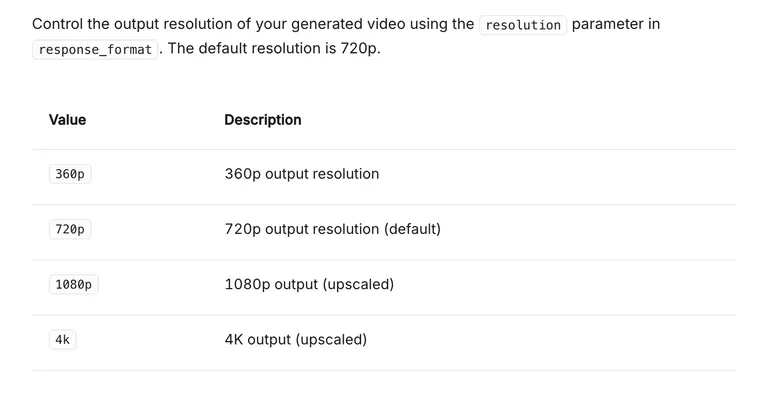
| Resolution | 360p or 720p native; 1080p and 4K upscaled |
| Reference images | Up to 6 |
| Reference videos | Up to 3 clips of 3 seconds for 3-10s videos; 1 clip for 11-15s videos |
| Audio | Native audio with dialogue, music, and sound effects |
| Editing | Multi-turn conversational editing of clips up to 15 seconds |
| Watermark | Invisible SynthID on every output |
| Model ID | gemini-omni-1.2-flash |
What Changed From Gemini Omni 1.1
If you used Omni 1.1, four things changed:
- Longer clips: native generation went from 10 seconds to 15.
- Lower price: Google cut the per-second price by 30%.
- Better reference adherence: Google says faces, garments, packaging typography, and brand colors hold steadier across camera angles.
- Editing across full clips: multi-turn editing now works on the full 15 seconds.
Starting December 3, 2026, API calls to gemini-omni-1.1-flash automatically route to 1.2 and bill at the new rates.
Gemini Omni 1.2 Flash Pricing
Gemini Omni 1.2 Flash bills video output by the token, which Google converts into per-second rates on its Gemini API pricing page. Input costs $1.50 per million tokens, and there's no free tier on the API.
| 📐 Resolution | 💵 Price per second | 🎬 One 15-second clip |
|---|---|---|
| 360p | About $0.023 | About $0.35 |
| 720p | About $0.07 | About $1.04 |
| 1080p (upscaled) | About $0.104 | About $1.56 |
| 4K (upscaled) | About $0.209 | About $3.13 |
Google charges $12 per million output tokens for video, and a second of 720p video uses 5,792 tokens.
What Five Ad Variants Cost
Say you're testing five versions of a 15-second 9:16 product spot. That's 75 seconds of output:
| 🧾 Batch of 5 × 15-second clips | 💵 Approximate cost |
|---|---|
| All at 360p (rough drafts) | $1.74 |
| All at 720p | $5.21 |
| All at 1080p (upscaled) | $7.82 |
| All at 4K (upscaled) | $15.64 |
Editing has a cost too. Each edit turn produces a new video, and API billing is based on output tokens, so plan on a 15-second 720p edit costing about what a new clip does (about $1.04), plus input tokens. Five rounds of "change the background" adds roughly another $5.
The Free and Subscription Routes
You can also use Omni without the API:
- Google Vids: generate 15-second clips at no additional cost with a Google account or Google Workspace subscription.
- Gemini app: 15-second videos are rolling out to Google AI Ultra subscribers.
- Flow: direct scenes and run multi-turn edits.
For a solo media buyer testing hooks, Vids is the obvious place to start.
How to Use Gemini Omni 1.2 Flash for Video Ads
Gemini Omni 1.2 Flash fits ad work best when you build one strong spot and edit your way to the variants. Google aims the model right at this, saying conversational editing makes it easy "to produce ad variants for different audiences and placements without re-briefing or re-generating."
1. Start From Product and Character References
Upload up to six reference images: product shots from two or three angles, the packaging, and a character sheet if a person appears in the ad. Google says Omni 1.2 holds onto those details "from start to finish."
Two rules from the docs will save you a few wasted generations:
- Images of certain recognizable people aren't supported. Use a model release shot of your own talent or a generated character.
- Reference videos are for visuals. Any audio in a reference clip is ignored, and audio references aren't supported in the current API.
2. Write One Spot With Timed Beats
Omni understands timing in plain language, so write the ad as a beat sheet: "0-2s: the cap twists off with a crisp pop. 2-8s: close-up of the serum on skin. 8-15s: product on the counter, voiceover delivers the offer."
Two tips from Google's prompt guide help with ads:
- Ask for a single shot if you want one. By default, Omni tries to build a short narrative with a few different shots.
- Describe the audio. Omni picks a soundtrack on its own, so if you want calm background music or a high-energy beat, say so.
Negative prompts aren't supported as a setting, but you can write "Do not show any text on screen" straight into the prompt.
3. Make Variants by Conversation
Once the base spot works, change one thing per turn and end each request with "Keep everything else the same." Google's docs recommend exactly that phrase to stop the model from drifting.
Good single-variable edits for ad testing:
- Setting: "Change the bathroom to a sunlit kitchen. Keep everything else the same."
- Product: swap one SKU for another using a new reference image.
- Mood: "Change the lighting to be more dramatic."
- On-screen text: "Change the text on the sign to say 20% off."
Keep the edits simple. The docs warn that long, complicated edit prompts can trigger unintended changes.
4. Switch the Aspect Ratio for Each Placement
The API outputs 9:16 for Reels, Stories, and TikTok, and 16:9 for YouTube and in-stream. Google's post also lists switching the aspect ratio as an edit you can ask for, so you can turn your 16:9 master into a vertical cut in the same conversation.
There's no 4:5 or 1:1 option in the API, even though Meta's own aspect-ratio guidance lists 4:5 alongside 9:16 as a vertical format. For feed placements, you'll be cropping 9:16 in your editor (our Facebook video ad specs breakdown covers where each format runs).
5. Extend the Winner for a Longer Cut
When a 15-second spot tests well, extension adds 3 to 10 seconds at a time, up to 30 seconds total. Omni looks at the last 10 seconds of the clip to continue it, so mention any product or character that appeared earlier.
It only adds to the end, so you can't add a new opening or stretch the middle.
6. Draft Low, Finish High
Google's own advice is to draft at 360p or 720p, fix details with follow-up edits, then upscale the best versions to 1080p or 4K. At roughly $0.35 per 15-second 360p draft, you can afford to throw most of them away.
Then run them as real ads and let the results pick the winner. If you're comparing tools for that half of the job, here's how the main ad creative testing platforms stack up.
Where Gemini Omni 1.2 Flash Runs
Omni 1.2 Flash shows up across Google's products, so pick the one that matches how you work:
- Gemini API and Google AI Studio: the developer route, billed per output token (about $0.07 a second at 720p), with multi-turn editing through the Interactions API.
- Google Cloud (Gemini Enterprise Agent Platform): enterprise access with Google Cloud security and Provisioned Throughput.
- Google Ads: Google says you can scale video campaigns with Omni in Google Ads, linking to Asset Studio.
- Google Vids, Flow, and the Gemini app: the no-API routes covered in the pricing section.
If most of your spend runs on Meta and TikTok, the API or Vids is the practical route, since you'll be exporting files anyway. Our TikTok ad strategy guide covers what to do with vertical cuts once you have them.
Gemini Omni 1.2 Flash Limits for Ad Teams
Google lists where Omni still struggles, and the docs add a few more limits:
- Physics and fast action: Google says it's still improving "fast sports action, rapid script changes and complex physics." Skip Omni for a sneaker-in-motion hero shot.
- Two aspect ratios: 9:16 and 16:9 only, so feed formats need cropping.
- 15 seconds per generation: longer cuts need extension, up to 30 seconds.
- No audio references in the API and no voice editing: the current Gemini API won't take a brand voice sample, and you can't fix a line read.
- Recognizable people: images of certain recognizable people can't be uploaded.
- Regional limits: editing or extending uploaded videos isn't available in the EEA, Switzerland, or the UK, though editing Omni's own generations works there.
- English first: English is fully supported, but Google hasn't evaluated other languages, so localized dialogue is a gamble.
Gemini Omni 1.2 Flash vs Kling 4.0 vs Pika H3 Flex
All three shipped between mid-October and early November 2026, and they solve different ad problems:
| 🎬 Model | ⏱️ Max length | 🖼️ References | 📐 Aspect ratios | 💵 Price | 🎯 Best ad use |
|---|---|---|---|---|---|
| Gemini Omni 1.2 Flash | 15s (30s with extension) | 6 images + up to 3 short clips | 9:16, 16:9 | About $0.07/s at 720p | Variants by conversational editing |
| Kling 4.0 | 30s in one generation | Up to 15 total (up to 10 images and 5 videos, plus elements and voice) | 21:9, 16:9, 1:1, 9:16 | Not listed in Kling's 4.0 guide | Longer story spots |
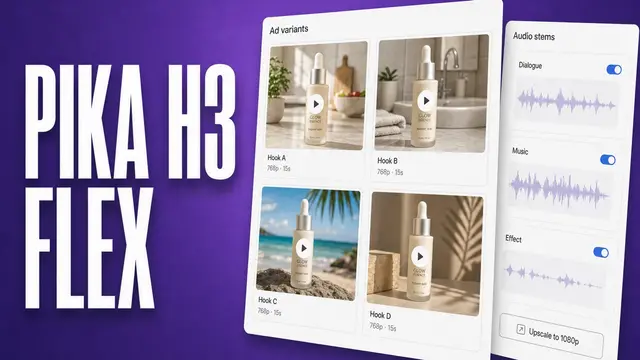
| Pika H3 Flex | 15s | 12 total (up to 9 images, 3 videos, 3 audio) | 11, incl. 4:5 and 1:1 | $0.04/s at 768p ($0.12/s with references) | Feed-ready variants with audio stems |
Specs come from Kling's 4.0 user guide and Pika's H3 Flex page. Kling lists 10-bit HDR output at 4K and 1080p as coming soon.
My pick: Omni when you want to edit one spot into many, Pika H3 Flex when you need 4:5 and 1:1 straight out of the model (our Pika H3 Flex review runs the numbers), and Kling 4.0 when you need 30 seconds in one take. Platforms like Higgsfield bundle several AI video models (see our Higgsfield review) if you'd rather not pick.
Should Ad Teams Use Gemini Omni 1.2 Flash?
Yes, especially if your team already lives in Google's tools. The editing loop fits how ad variants get made. 720p is cheap enough to test a lot, and you can try it free in Vids.
Skip Gemini Omni 1.2 Flash If You:
- Need native 4:5 or 1:1 video for Facebook and Instagram feeds.
- Rely on a specific brand voice, since the API doesn't accept audio references and voice editing isn't supported.
- Shoot fast action or complex product physics, like sports gear in motion.
- Need to edit uploaded footage from the EEA, Switzerland, or the UK.
Feed Omni a Better Brief With Atria
Omni follows a timed beat sheet, but the beats in step 2 (a hook in the first two seconds, a proof shot, an offer) are guesses unless they come from data on what's already converting in your account and category.
Atria is the creative-intelligence layer that writes that beat sheet. Raya, its AI creative strategist, draws on more than $12 billion in real ad spend to recommend which hooks and angles to test, and hands you the brief and script to paste into Omni or any of the AI ad generators for video and images. Once the ads run, Radar grades them.
With Atria, teams can:
- See which hooks and angles are winning for the competitors they follow.
- Mine customer reviews for ad angles worth scripting.
- Get briefs, hooks, scripts, and copy built from their own account's performance data.
- Bulk-upload finished creative to Meta in one go.
- Grade every ad with Radar on hook, retention, click-through, and conversion, with a recommendation on what to fix.
- Get a scheduled creative-fatigue digest from Raya in Slack, so a declining ad doesn't slip past you.
SelfMade cut its iteration cycle from 2-3 weeks to 2-4 days and improved ROAS 33% after moving its creative decisions onto Atria.
Try Atria free with 1,000 credits and no credit card required.
Frequently Asked Questions
Is Gemini Omni 1.2 Flash free?
Gemini Omni 1.2 Flash is free to use in Google Vids, which generates 15-second clips at no additional cost with a Google account or Workspace subscription. The Gemini API has no free tier and charges about $0.07 per second at 720p.
How long can Gemini Omni 1.2 Flash videos be?
Gemini Omni 1.2 Flash videos run 3 to 15 seconds per generation, set in one-second steps. Extension adds 3 to 10 seconds per turn, up to 30 seconds total.
Can Gemini Omni 1.2 Flash make 4K video?
Yes, Gemini Omni 1.2 Flash outputs 4K through upscaling, at about $0.209 per second. It generates natively at 360p or 720p, and 1080p is also available as an upscaled option.
Can I use Gemini Omni 1.2 Flash in Google Ads?
Yes, Google says Gemini Omni 1.2 Flash can scale video campaigns in Google Ads, and its launch post points to Asset Studio. You can also export clips from the API or Vids and upload them to any ad platform.
What's the difference between Gemini Omni and Veo?
Gemini Omni and Veo are separate Google DeepMind model lines. DeepMind lists Veo for generating cinematic video with audio, while Omni is built to create and edit from any input, so editing is its main feature.