
A video export stalls at 99% for 10 minutes, then fails. A small edit request burns through most of a month's credit balance before you've even seen a second draft. Those two moments are what push people toward Creatify alternatives.
I considered 18 tools for this list. Most got the same hands-on test over five days. Some rendered clean on the first try. A few needed a retry before the Spanish dub matched the English cut's pacing.
This list covers the 10 worth your time. Some nail actor realism. Others handle dozens of languages without sounding robotic. One answers a question most of the video tools can't: what the ad should say before you even build it.
Creatify Alternatives: TL;DR
- Atria: Best for building the ad brief and hooks before you build the video.
- Arcads: Best for realistic AI actors who hold your product on camera.
- HeyGen: Best for a multilingual dub that doesn't sound robotic.
- Synthesia: Best for a polished, corporate-safe look.
- JoggAI: Best for a product-in-hand ad once the render finishes.
- KreadoAI: Best for testing a full cut for free before you pay for anything.
- Fliki: Best for the fastest usable draft on a free-forever plan.
- Captions: Best for dubbing and translating footage you already shot.
- Topview: Best for one workflow that covers the product-to-video step.
- InVideo: Best for a team of editors working in one shared workspace.
Why Look for Creatify Alternatives?
People start a Creatify alternatives search for a specific, practical reason: the cost, the avatar realism, the language coverage, or the free plan's watermark.
Creatify is a cheap, fast way to turn a product link into a UGC-style ad: paste a URL, pick an actor, and get a rough cut back in minutes. For one simple, English-only ad, it still does that job well.
The four reasons people look for a Creatify alternative:
- Cost: The Standard plan runs $15/month ($10/month, billed annually) for 55 credits a month, more than five times the free plan's 10 credits. Its free 10-credit allowance covers about two video ads or 20 image ads before you need to upgrade.
- Avatar and lip-sync consistency: A recurring complaint, raised in Creatify's own G2 reviews, is lip-sync that needs manual tweaking to look natural, or a cut that looks fine in preview and rough once it exports.
- Language coverage: Creatify supports 75-plus languages, more than Synthesia’s 70-plus but well behind HeyGen’s 175-plus and KreadoAI’s 140, a problem the moment your audience includes non-English speakers.
- The free plan's watermark: Those free exports carry a watermark until you upgrade, so the 10 free credits that look like a usable test still leave you with a branded clip you can't post as-is.
Creatify's URL-to-Video flow turns a product link into a rough ad in minutes. Its separate Creatify Agent researches your brand and what's trending in your category before it writes a concept and script, tackling the same question Atria is built around: what the ad should say.
Atria never got this exact brief. A fairer test is whether the brief and hooks it produces are strong enough to feed into one of the tools above, and that's the test its section further down covers.
My comparison here focuses on AI video advertising workflows, with Atria covering creative planning and Captions handling the localization of existing footage. If the bottleneck is image ad volume instead, try the 6 best AI ad generators for video and images.
How I Tested These Creatify Alternatives
Of the 18 tools I considered, eight didn't make the cut:
- Wireflow: It's a different kind of product, a pipeline you connect to the AI tools you already use, like Claude or ChatGPT, built for a different job than Creatify's ready-made UGC generator.
- MakeUGC: Product-in-hand video, the format this list covers, needs its $149/month Pro plan, while JoggAI and HeyGen include it from $29 a month. It also covers 50-plus languages, fewer than Creatify’s own 75-plus.
- Superscale: It bundles video generation with ad-strategy tools like competitor spying and scheduling. Atria, already part of this list, covers that same ground more thoroughly. That leaves Superscale's video output in the same category as the tools tested here.
- AdCreative.ai: It generates ad banners, product shots, and photo-to-video ads, and also offers AI avatar videos in the same UGC style, either a talking presenter or a product held in-frame. It wasn't part of the hands-on shortlist, so this review doesn't show how that UGC output compares with the seven video tools tested here.
- Colossyan is built for training and course video, integrated with a school or corporate learning platform through the SCORM standard, a different product category than a UGC ad generator.
- Pictory turns scripts, articles, and blog posts into video and supports talking-head AI avatars, though they appear as a presenter overlay rather than a product-in-hand. This list covers the product-in-hand UGC style.
- Tasy AI is built for the same talking-avatar UGC format this list covers. Its own marketing and reviews are squarely aimed at German-speaking e-commerce brands, which is a narrower market than the global, English-first audience the ten tools in this list target.
- Tagshop AI: It covers similar ground to Creatify, from URL-to-video to a 300-plus avatar library, but its listed features don't include a dedicated video-translation or dubbing tool, so it doesn't fix the language gap driving people to look elsewhere.
Topview and Captions are covered from their own site, pricing, and reviews as opposed to the hands-on brief below.
Over those five days, I also checked each tool's site, help center, and pricing page live. Here's the exact brief I ran through each of the seven video tools, word for word:
"I run marketing for Pathwell, a small company that sells one thing: a 24-ounce insulated steel water bottle. We're launching a holiday bundle, two bottles and a travel sleeve for $68, which is 20% off buying them separately, and I need one short video ad for Instagram Reels and TikTok. Make it vertical and under 30 seconds. Open with a hook about staying hydrated through holiday travel and long airport lines. Have the presenter actually hold the bottle on screen for most of the video, not just stand near it. Say the $68 price and the 20% savings out loud, not just in on-screen text. Close with a clear line telling people to tap the link and order before the bundle sells out. I also need a second version of the exact same ad with the voice and captions in Spanish, because a good chunk of our audience is Spanish-speaking, and it needs to actually sound like a real person, not a flat robotic dub. Export both versions at 1080p with no watermark, since this is on a paid plan. If something about this isn't possible on the plan I'm using, tell me plainly before I spend the credits finding out the hard way."
Every tool tested here that offers a free plan or trial ran on it, so the brief's 1080p, no-watermark export was more than most free tiers allow.
The brief was written for a paid plan on purpose, to see which tools would warn me before spending credits on something the free tier can’t export.
Atria didn’t get this exact brief, and it doesn't render video. Its section further down covers a different test of how it builds the brief and the hooks that would feed one of the tools above.
10 Best Creatify Alternatives: At a Glance
How the 10 stack up:
| Platform | Best for | Price |
|---|---|---|
| Atria | Ad strategy and hooks | $159/month |
| Arcads | Realistic AI actors | Not public, shown after signup |
| HeyGen | Multilingual dubs | $29/month |
| Synthesia | Corporate-safe look | $29/month |
| JoggAI | Product-in-hand ads | $29/month |
| KreadoAI | A free test before paying | $19/month |
| Fliki | Fastest free draft | Standard plan at $28/month |
| Captions | Dubbing footage you shot | $24.99/month |
| Topview | All-in-one workflow | $8/month |
| InVideo | Team-based editing | $9/seat/month |
Which Creatify Alternative Should You Choose?
A quick fit guide, before the full breakdowns below:
- Choose Atria if you want the strategy, grading, and hooks worked out with real ad-spend data before you spend money on a video tool. This review covers that workflow.
- Choose Arcads if actor realism is the deciding factor and you're fine with seeing the price only after you sign up.
- Choose HeyGen if you need a multilingual dub that sounds like a person speaking.
- Choose Synthesia if the ad needs a corporate-safe, polished look.
- Choose JoggAI if you want a dedicated product-in-hand tool and can tolerate an occasional stalled render.
- Choose KreadoAI if you want to test a full cut for free before paying for anything.
- Choose Fliki if speed and cost outweigh avatar depth for you.
- Choose Captions if you already have footage and need it dubbed or translated.
- Choose Topview if you want product-to-video, script, and voiceover handled in one place.
- Choose InVideo if a team of editors needs to edit together in one shared workspace.
- Stick with Creatify if you only need one simple, English-only product ad on the smallest possible budget. It still turns a product link into a rough cut in minutes.
A brand running a lot of ad variants on Meta has a different job than one perfecting a single video. If that's your need, software built for bulk Facebook ad creation handles that job better.
1. Atria: Best for the Ad Brief Before the Build
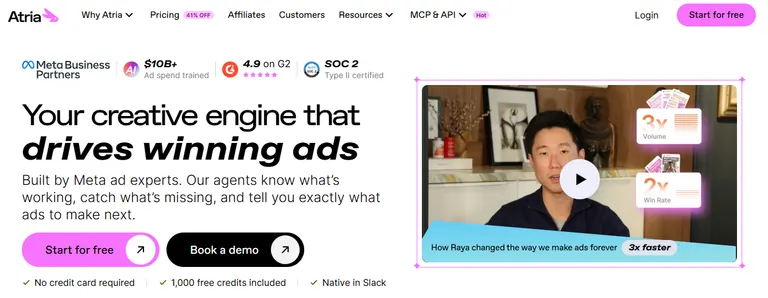
Raya, Atria's creative teammate, checked whether Pathwell was already a connected brand. It wasn't, so Raya built the hooks from patterns in Atria's $12B-plus of trained ad-spend data.
The only input was the same two-bottle, $68 holiday bundle given to the video tools below. The video brief itself never reached Raya.
In about two minutes, Raya returned 16 hooks across five angles, from gifting under time pressure to the case for why the bundle holds two bottles instead of one. One hook flipped the gift objection outright: "They already have a water bottle. Get them a second one."
Raya also said what it wouldn't write. It had no cold-hold time, lid details, or return policy to work from, so it skipped every performance claim, social-proof line, and urgency push. It listed the facts it would need for stronger hooks instead of guessing at them.
Radar's part comes later. Once a hook becomes a running ad, Radar grades it against the goal you set, such as a target ROAS or CPA, over a timeframe you pick, with 30 days as Atria’s suggested starting point.
It sorts ads into winners to scale and near-winners worth iterating on, then drafts a brief with new hooks for the fix. Atria's research side also follows named competitor brands.
If your bottleneck is the ad angle, start here before you open a video tool. You'll still need one of the tools below to render the ad.
Key Features
- Raya's creative briefs and hooks: Built from over $12B in ad-spend data.
- Radar's ad grading: Grades video ads on Hook, Retention, click-through rate, and conversion against the goal you set. Static ads get click-through and conversion grades only, since Hook and Retention apply to video.
- Review and URL mining: Pulls angles straight from customer reviews and a product page.
Pros
- ✅ Gives you a data-backed angle before you spend money rendering video.
- ✅ Grades ad performance against the goal you set, and keeps updating as you launch new ads.
- ✅ Tracks what named competitors are currently running.
- ✅ A free plan exists, no credit card required, on top of the paid Core/Plus/Business tiers.
Cons
- ❌ Core starts at $159 a month, which some creators may find expensive.
- ❌ A team that grows past five seats adds a charge that repeats every billing cycle.
Best For
Reach for Atria if you're:
- A team that keeps generating video ads with no clear angle behind them.
- An agency that needs to show a client why they made a creative choice.
Pricing
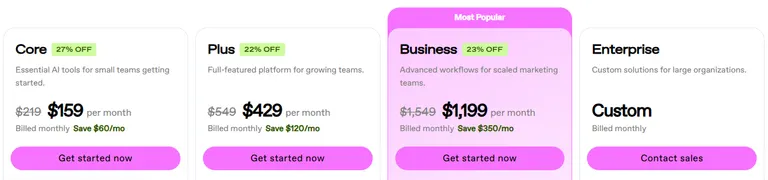
Core normally costs $159/month. It includes 4,000 AI credits, five seats, both Raya and Radar, and analyzes up to $500K in monthly ad spend.
Plus runs $429/month and raises that ceiling to $1M in monthly ad spend, while Business runs $1,199/month and removes the ad-spend cap entirely. Each tier also raises the credit, seat, and brand limits. Extra seats cost $20/month each on any paid tier. Enterprise pricing is custom, through a sales call.
Atria's competitor-tracking side gets a deeper look in a roundup of ad-research tool alternatives.
2. Arcads: Best for Realistic AI Actors
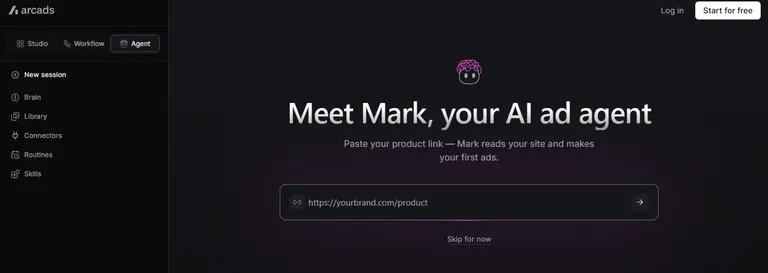
Translate Video costs 240 credits for every 30-second block of video you start, even a partial one, per language.
Arcads' pricing is generation-based, so every regeneration or translation pass draws down credits. Arcads does offer separate tools, like Translate Video and Change Voice, for revisions without a full regeneration.
One Trustpilot review describes a single unrequested re-render eating roughly 3,000 credits after a request for one small fix, the charge landing unannounced.
In my test, the English cut came out strong and used 800 of the trial's 1,000 credits, which left too few for a Spanish version.
The trial runs 72 hours, and its 1,000 credits don't stretch far once a full video and a translation pass both draw from the same balance. Budget for the Starter plan up front if the brief needs more than one language.
Key Features
- 1,000+ AI actor library: A wide pool of actors to put in front of the camera.
- Natural product holding: Actors hold and interact with the product throughout the shot.
- Language support: Talking actors in 74 languages, and 176 language-and-accent options through Translate Video.
Pros
- ✅ The English cut rendered clean and strong on the first try.
- ✅ Arcads automatically refunds failed generations.
- ✅ The trial needs no upfront charge beyond the card on file.
Cons
- ❌ At least one user reports a small fix triggering a full, billed re-render.
- ❌ The trial's credit balance disappears fast once you start iterating.
- ❌ You can't compare the price anywhere until you've already signed up.
Best For
Arcads makes the most sense for:
- A brand that cares more about actor realism than price transparency.
- A team testing one or two hero ads, with no need for a long list of variants.
Pricing
Arcads doesn't publish a dollar figure anywhere on its own site. Current prices are on the pricing page in the app, visible only after you sign up.
Six tiers are public, each defined by its monthly credit pool: Starter (8,000 credits), Creator (16,000), Pro (48,000), Scale (96,000), Business (192,000), and Enterprise (custom).
A single talking-actor video of up to two minutes on the Arcads 1.0 model costs 800 credits, so Starter covers roughly 10 such videos a month.
Starter and Creator pause once you hit the monthly cap, and Pro and above bill overage instead and let credits roll over. Yearly billing cuts every tier's cost by 20%.
3. HeyGen: Best for a Multilingual Dub That Doesn't Sound Robotic
Both cuts, English and Spanish, finished in a single render pass each, clean on the first try. Of all the tools that got a Spanish cut, HeyGen's sounded the most natural. It didn't have the flat, mechanical cadence a machine dub usually carries.
HeyGen's Creator plan adds 175-plus supported languages, among the widest dubbing libraries of the tools here. You can also build a custom avatar from your own voice whenever you want one, and set it up yourself in a few clicks.
HeyGen's Video Agent feature can also turn a short text prompt into a first-pass script, voiceover, and avatar video on its own, so you don't start from a blank page.
HeyGen's Free plan caps you at three watermarked videos a month, each up to one minute long. The Creator plan removes that cap and the watermark, and raises exports to full 1080p.
Both versions came in under the brief's 30-second cap and rendered in the vertical format Reels and TikTok need. If most of your audience speaks English only, you're paying for language reach you'll never use. Save that upgrade for a second or third market somewhere down the line.
Key Features
- 700+ stock avatars: A large built-in actor library to pick from.
- Custom video avatar: Build an avatar from your own voice and likeness.
- 175+ languages: Among the widest dubbing libraries in this roundup, alongside Arcads' Translate Video.
- Video Agent: Included on every tier, from Free up, with expanded access on Creator and maximum access on Pro. Turns a short text prompt into a full first-draft video, script and voiceover included.
Pros
- ✅ The Spanish dub was the most natural-sounding of anything tested.
- ✅ Neither render needed a retry.
- ✅ 175+ languages cover a wide range of markets, though that reach only matters once you sell into more than one market.
- ✅ Business-tier teams that burn through credits fast can turn on auto-reload and keep working past the monthly cap.
Cons
- ❌ The Free plan's watermark and three-video cap fall short of the brief's 1080p, no-watermark spec.
- ❌ The Free and Creator tiers only get a taste of Video Agent; the full version starts on Pro.
Best For
HeyGen works best for:
- A brand selling into several language markets at once.
- Anyone who got burned by a robotic-sounding dub somewhere else.
Pricing
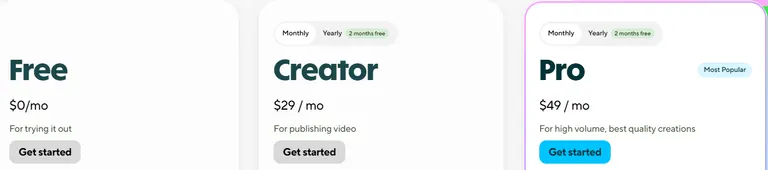
Creator costs $29/month ($24/month, billed annually), with 600 credits a month. Pro runs $49/month (about $41/month, billed annually) for 1,000 credits. Business runs $149/month plus $20 per seat, for teams that need to create and collaborate together.
Creator and Pro users upgrade to a higher tier for more credits. Business users can instead buy one-time credit packs or turn on auto-reload.
4. Synthesia: Best for a Polished, Corporate-Safe Look
The output was clean on both cuts, but it read more like an internal training video than a casual product ad. The brief called for the presenter to hold the bottle on screen; the actor stood behind a desk, bottle resting on it.
The Spanish dub needed one re-generation after the first pass mispronounced "Pathwell" as two separate words, a mispronunciation that would have stayed in the final cut if I hadn't caught it.
Synthesia's Starter plan includes 125-plus AI avatars and dubs into 70-plus languages, both strong numbers next to most tools here. Its AI Video Assistant turns a finished script into a video draft, with the avatar, voiceover, and visuals already assembled.
AI Dubbing is what let the Spanish cut above get fixed with one quick re-generation, with no manual re-record required.
The Basic (free) plan gives you 10 minutes of video a month plus 500 credits that kick in once those minutes run out, and both reset every billing period. More than 90% of Fortune 100 companies already use it in some form, according to the website.
Pick Synthesia when the ad needs to look safe and polished. Skip it if the ad needs to feel like a customer talking, since Synthesia’s avatars read more like a company spokesperson.
Key Features
- 125+ AI avatars on Starter: A wide pool, skewed toward a professional look.
- AI Dubbing into 70+ languages: Generates a translated version of an existing video, with optional lip sync, on every plan (140+ on Enterprise).
- AI Video Assistant: Included from the Starter plan up. Turns a finished script into a video draft, avatar and voiceover included, in one step.
Pros
- ✅ The output never looked glitchy or off-model on either cut.
- ✅ 70-plus dubbing languages cover nearly any market you'd need.
- ✅ The monthly credit cap doesn't force an immediate upgrade once you hit it. Extra credits or a higher tier both keep creation going.
Cons
- ❌ The jump from Starter to Pro roughly triples the price, from $29/month to $89/month.
- ❌ A mispronounced brand name still needed a manual re-run to catch.
Best For
Synthesia earns its spot for:
- A brand that prioritizes a polished, corporate presentation style.
- Internal or B2B content where a spokesperson tone is the right call.
Pricing
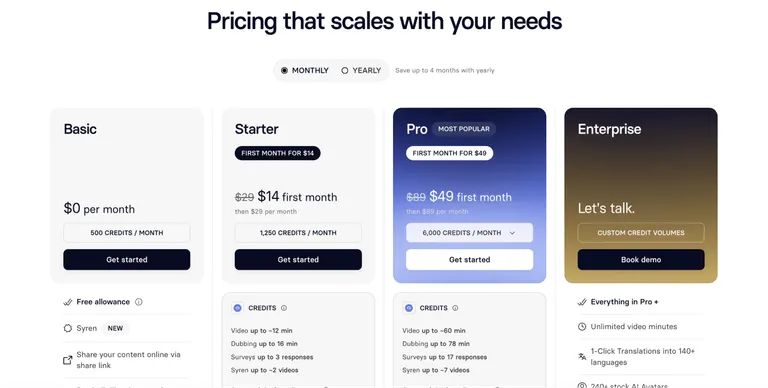
Starter costs $29/month. Pro runs $89/month with a larger credit allotment and more avatars.
If you go over the monthly credit allowance, video creation pauses until the plan renews, unless you buy extra credits or move up a Pro credit tier. Enterprise pricing is custom, through a sales call. Prices can vary by region.
5. JoggAI: Best for a Product-in-Hand Ad
The first English render stalled at 99% and needed a full rerun before it finished. That’s the exact failure a Trustpilot review describes, and JoggAI’s reply acknowledges failed renders.
Once it did finish, it delivered a basic avatar video, not the product-in-hand shot the paid tiers support.
The Free plan gives 200 credits, valid for 31 days, enough for about one short avatar video with no card required to start.
The Product Avatar and Product Video Shoot tools are Starter-plan features, so this free-plan test didn't cover them. A Spanish cut wasn't tested either, due to the plan limitations. Watch that 31-day expiry.
The Starter upgrade also removes the watermark these free exports carry.
The Product Avatar and Product Video Shoot tools suit a product-in-hand ad like this one. Budget extra time for a retry, since the Trustpilot review above describes the same 99% stall.
The closing CTA came through clearly, telling people to tap the link before the bundle sells out. JoggAI's URL-to-Video tool can pull straight from a product page, which would have saved setup time if Pathwell had a real storefront.
Key Features
- Product Avatar: Built specifically for a product-in-hand ad that keeps the product itself on screen as the focus.
- URL-to-Video: Turns a product page into a draft ad automatically.
- Video Translator: Dubs a finished cut into another language.
- Watermark removal on Starter: No branding baked into the export.
Pros
- ✅ On monthly billing, unused Starter credits roll over for up to three months.
- ✅ No card was needed to start, and the free credits covered about a minute of avatar video.
Cons
- ❌ A render stalling at 99% isn't a one-off. My test and a Trustpilot review both hit it.
- ❌ The free plan's credits expire after 31 days, unlike a true free-forever tier.
Best For
JoggAI is the right call for:
- A product-focused ad where the item in hand is the whole point.
- A team that can tolerate an occasional retry for a strong finished result.
Pricing
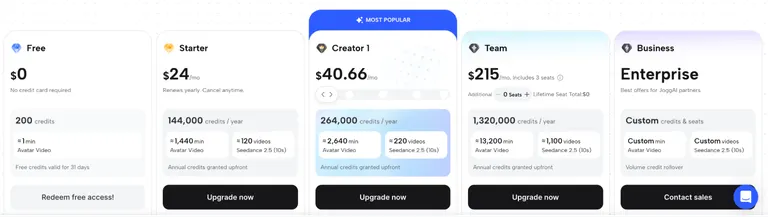
Starter costs $29/month ($24/month, billed annually), with 12,000 credits a month, and on monthly billing its unused credits roll over for up to three months.
Creator 1 runs $49/month ($40.66/month, billed annually) for 22,000 credits, and scales up through four higher Creator tiers for teams that need more. Team costs $215/month, billed annually only, for three seats and 1,320,000 credits a year. Business pricing is custom, through a sales call.
6. KreadoAI: Best for Testing Before You Pay
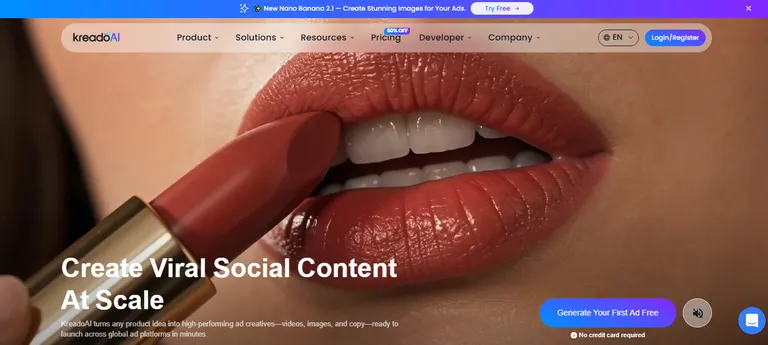
The Free plan produced a usable cut of the Pathwell bottle ad with no surprises. It was clean enough to show whether the tool could handle a holiday-bundle brief like this one, without needing to pay for the upgraded tier.
The Spanish cut's lip-sync needed a second pass to match the pacing of the English cut. One retry fixed it, with no full re-render from scratch.
KreadoAI's voice library runs 40,000-plus voices across 140 languages on paid plans (the Free plan covers 120-plus voices in 31 languages). The Premium plan adds 700-plus AI avatars along with instant avatar cloning from your footage.
The Free plan gives 10 K-coins with no card required, which is enough to confirm the tool's output quality before committing to a paid tier.
The Spanish voice options were a notch behind HeyGen's and Synthesia's for natural phrasing. Apart from the lip-sync retry above, the rest of the product handled the English and Spanish cuts cleanly.
The Pathwell bottle stayed in frame for most of both cuts, meeting the brief's ask. This was one of the easiest on-ramps of the seven video tools, right behind Fliki.
Key Features
- 700+ AI avatars on Premium: A large library once you move past the free tier.
- 40,000+ voices across 140 languages: One of the widest voice libraries in this roundup.
- Instant avatar clone: Build a usable avatar from your own short clip.
- URL-to-Video: Pastes a product link and returns a ready-to-publish draft in minutes.
Pros
- ✅ The free tier alone was enough to judge whether the tool fit the brief.
- ✅ An unplanned overage costs less than a fresh month's plan, thanks to the discounted top-up option.
- ✅ 140 voice languages cover nearly every market you'd realistically need.
Cons
- ❌ The wider avatar library, 700-plus on Premium and 1,000-plus on Pro, isn't available on the free tier.
- ❌ Credits scale on a sliding K-coin tier, so pinning down the exact monthly cost takes more effort than with a simple fixed plan.
Best For
KreadoAI works well for:
- Someone who wants to confirm fit before paying for anything.
- A team that needs a wide voice library more than top-tier realism.
Pricing
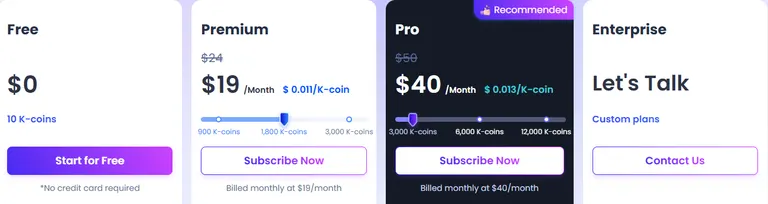
Premium costs $19/month ($12/month, billed annually) at the default 1,800 K-coin tier. The price moves up with more K-coins if you need a bigger monthly allotment.
Pro starts at $40/month ($25/month, billed annually) and includes 1,000-plus avatars and unlimited instant avatar clones. If you run out of K-coins mid-cycle, you can buy a top-up, discounted 15% on Premium and 30% on Pro, or renew early. Enterprise pricing is custom, through a sales call.
7. Fliki: Best for the Fastest Free Draft
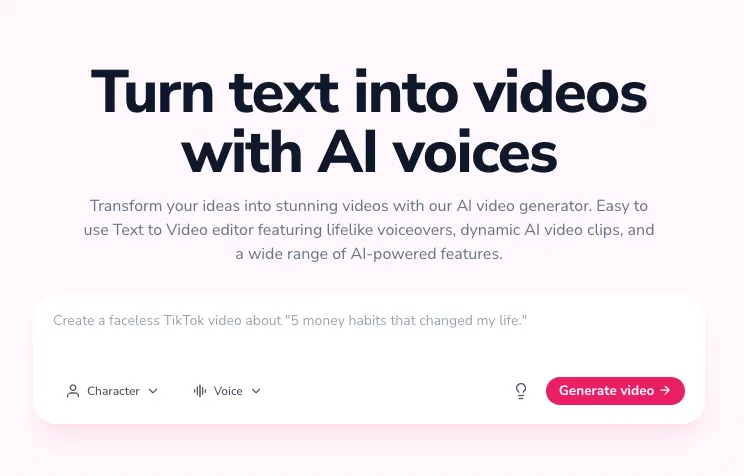
This tool beat the other six video tools to a usable first draft of the Pathwell bottle ad. Both cuts, English and Spanish, also rendered clean on the first attempt, all on the free-forever plan with no card required, though the free tier caps exports at 720p with a Fliki watermark.
Fliki's voice library covers 80-plus languages. The Spanish voiceover sounded natural enough that it didn't need a second pass to fix pacing or pronunciation.
Voice cloning is also available if you'd rather the narration sound like a specific person than a stock voice. Fliki also turns a blog post or a plain written idea directly into a storyboard.
That made it easy to go from the Pathwell brief's text straight into a working draft, with every scene built automatically.
This is the easiest on-ramp of the seven video tools. Fliki's free plan doesn't include AI avatars (Standard adds a limited set), so the cut leaned on voiceover narration over product shots.
That's a limitation for a presenter-led brief, but someone who weighs speed and cost over screen presence won't mind the gap. The free-forever plan allows three credits a month, plenty for a short ad.
Key Features
- 80+ language voice library: Covers nearly any market without an avatar needed.
- Voice cloning: Clone a specific voice to narrate the ad.
- Blog or article-to-video: Turns written content into a draft video directly.
Pros
- ✅ Fliki needed no separate storyboarding step. The brief's wording became the draft directly.
- ✅ Fliki didn't need a retry to get the localized version's timing right, unlike some of the other builds in testing.
- ✅ The 80+ language count held up for Spanish, the one language tested.
- ✅ Voice cloning ships as a standard feature, included from the Standard plan up.
- ✅ The free-forever plan never expires, unlike JoggAI's free credits, which run out after 31 days.
Cons
- ❌ Avatar options are thinner than HeyGen's, Synthesia's, or KreadoAI's.
- ❌ The lower tiers cap longer, more complex edits.
Best For
Fliki is the right pick for:
- Someone who wants a working draft today, before a credit card.
- A team whose priority is speed and cost ahead of avatar realism.
Pricing
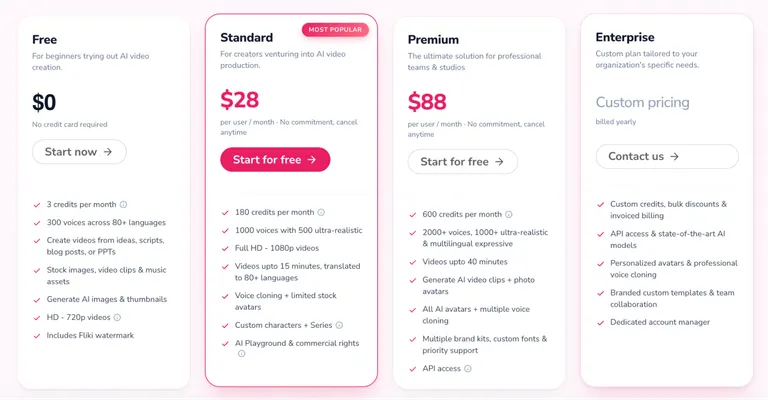
Standard costs $28/month. Premium runs $88/month for 600 credits and longer exports. Enterprise pricing is custom, through a sales call.
8. Captions: Best for Dubbing Footage You Already Shot
Captions handles dubbing and translation for existing clips.
Its AI Translate and AI Lipdub tools handle lip-sync and caption retiming automatically. Eye-contact correction fixes a gaze that drifts off-camera in the same clip, with no separate export step. Captions built the whole workflow around footage shot on a phone.
Captions splits its plans into Free, Max, and several Frontier tiers, plus Enterprise, and even the Free tier keeps the core editing and captioning tools.
The Max plan includes 500 AI credits a month, and Frontier roughly triples that to 1,400 credits a month for more clips. Captions can also generate footage using its own AI actors, a separate track from the dubbing and editing tools described above.
Key Features
- Eye-contact correction: Fixes a gaze that drifts off-camera directly in the existing clip.
- AI Translate and AI Lipdub: Replaces the voice track with one in another language, in place.
- Mobile-first editing: Built around footage shot on a phone.
Pros
- ✅ Unused credits roll over, so a quiet month isn’t wasted.
- ✅ A free tier exists, with the core editing tools included.
- ✅ Eye-contact correction and caption retiming apply automatically, with no separate export step.
Cons
- ❌ Listed prices are the iOS prices. A yearly discount exists in its FAQ, but no pricing card shows the yearly figure.
- ❌ Heavy dubbing and translation work still draws down the monthly credits, though unused credits roll over (up to three months’ worth).
Best For
Captions is the pick for:
- A brand that already shoots real UGC and needs it localized.
- Anyone who wants a quick touch-up on footage already in hand.
Pricing
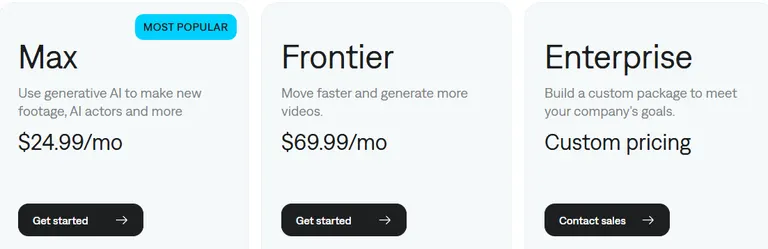
Max costs $24.99/month, with 500 AI credits a month. Frontier runs $69.99/month, with 1,400 credits and Captions' most advanced generative models. A yearly plan exists at a discounted rate in its FAQ, but neither pricing card shows the dollar figure. Its free tier includes no AI generation credits.
9. Topview: Best for One All-in-One Workflow
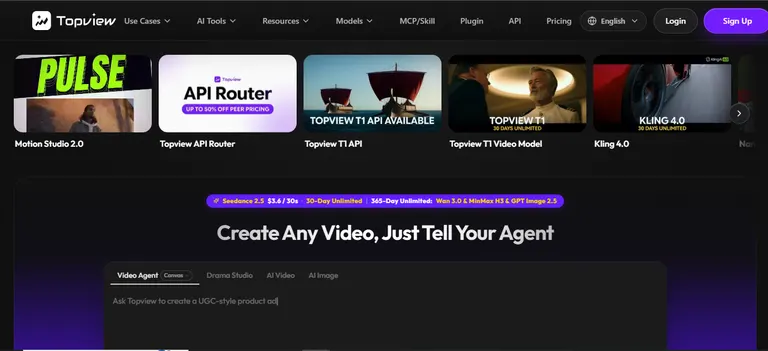
Topview pairs a product-to-video pipeline with a wide model library in one connected project. A single project carries a product link through script generation, avatar creation, and voiceover, all without switching tools.
Topview's models page lists 20 named models across its library, 14 for video and six for image. They include Seedance, Kling, Wan, and MiniMax, all selectable inside the same project without extra logins.
The Plus plan includes 100 credits a month, roughly 66 seconds of Seedance 2.5 video at 720p by Topview's estimate, or around 500 generated images.
The biggest advantage is never leaving the project to switch tools between the script, the avatar, and the voiceover. That convenience comes with queue waits, which vary with task compute cost, recent usage, and system demand.
Key Features
- One connected workflow: Product link, script, avatar, and voiceover in a single project.
- 20 selectable models: Seedance, Kling, Wan, and MiniMax available without switching tools.
- Models Topview lists as unlimited: Several named models run outside the credit system on paid plans.
Pros
- ✅ Covers more of the production pipeline in one place, from product link to voiceover.
- ✅ A wide model selection without needing a separate account for each one.
Cons
- ❌ There's no standalone free plan, only paid tiers.
- ❌ The credit system spans more than a dozen models, which takes time to learn.
- ❌ Credits don't roll over, so anything unused expires at renewal, though extra credits can be purchased anytime mid-cycle.
Best For
Topview is worth considering for:
- A team that wants product-to-video, script, and voiceover in one workflow.
- Someone comfortable learning a credit system that spans many models.
Pricing
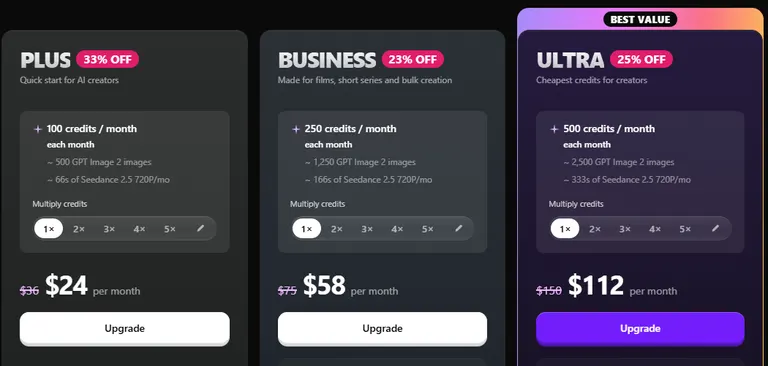
Basic costs $8/month with 50 credits a month, and Plus costs $24/month with 100 credits a month. Business runs $58/month, and Ultra runs $112/month, each adding more credits and more models that Topview lists as unlimited.
Team runs $118/month per seat for shared workspace use. Enterprise pricing is custom. Contact sales for a quote. Monthly credits don't roll over on any of these tiers, but Topview lets you buy extra credits anytime if you run out mid-cycle.
10. InVideo: Best for Team-Based Editing
The English cut finished clean, but the Spanish pass needed a manual realignment after the dubbed voiceover drifted out of sync with the captions right before export.
A seat on the Pro plan gets 1,000 credits a month, which InVideo's own math puts at roughly 52 short AI-generated clips. The cheaper Basic tier leaves out Seedance 2.5 entirely.
That model produced the sharpest footage in this lineup during testing, and the editor itself worked as advertised. Reopening the project, I found the sync issue still there, ready to fix.
Key Features
- Up to 20 seats on Ultra: Multiple editors work in the same workspace, each seat with its own monthly credits.
- Full timeline editor on every tier: Multiplayer editing, color, audio, and 3D tools included from Basic up.
- Seedance model access: Full access to Seedance 2.5 and 2.0 starting on Pro.
- AI frontier agents: Automates parts of the edit. The Basic plan only gets the Lite agent, while the Pro and Ultra plans also unlock InVideo's two higher agent levels.
Pros
- ✅ All plans get the same full timeline editor.
- ✅ Each paid seat comes with its own monthly credits, so adding an editor also adds capacity.
- ✅ A client added as a guest doesn't eat into the team's own paid-seat count on Pro or Ultra.
- ✅ Up to 20 seats on Ultra without needing a separate enterprise sales call.
Cons
- ❌ Basic's media allowance trails every higher tier by a wide margin.
- ❌ InVideo's free plan gives a small credit allowance that resets weekly and won't cover a full production run.
Best For
InVideo stands out for:
- A small team editing the same campaign together.
- A brand already using Seedance-family models elsewhere in its workflow.
Pricing
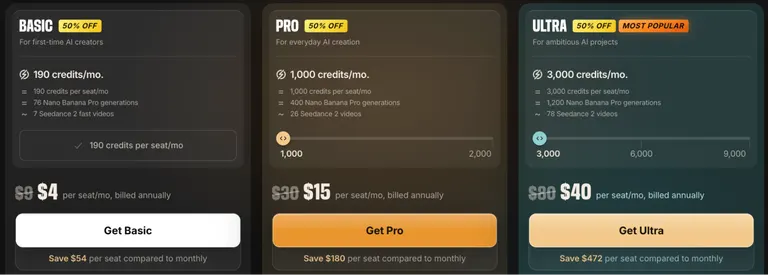
Basic costs $9/seat/month with 190 credits a month. Pro runs $30/seat/month with 1,000 credits, and Ultra runs $80/seat/month with 3,000 credits. Paying annually roughly halves each of those, to $4, $15, and $40.
How to Evaluate Creatify Alternatives
Ask these questions to cut through the noise:
- Product in hand: Does the finished ad show the product in someone's hand? An actor standing near a bottle reads differently than one holding and using it. Arcads builds specifically for this, so check a sample clip before you commit to a tool that doesn't.
- Natural-sounding languages: How many languages can the same script go out in without sounding robotic? A wide language count on a pricing page doesn't guarantee a natural dub. Listen to an actual sample in the language you need.
- Edit cost: Does a small edit burn the whole month's budget, or only the part that changed? Some tools re-render an entire clip for a one-line fix. Ask this before you pay, before a surprise bill arrives.
- Free-tier runway: Can you finish and export a usable clip before the free allotment runs out? A free tier that expires in days isn't much good for a full project. Check the expiry date ahead of the credit count.
- The angle itself: Does the tool help decide what the ad should say at all? Most tools here only generate output once you already know the angle.
If you need help figuring out the angle first, Atria builds hooks from your own ad-performance data and the competitor brands you track, before you open a video tool.
Pick the Tool That Matches Your Actual Bottleneck
Beyond realism, what separates these Creatify alternatives is whether a tool also tells you what the ad should say before you spend money generating it. Most of them assume you already know the angle and need it rendered well.
Creatify’s own Agent, Arcads’ in-app agent, and HeyGen’s Video Agent can all draft a script from a brief or a trend scan.
Atria is the one built around your own ad account instead: Radar grades what's already running, and Raya turns those results, your reviews, and the competitor brands you track into the next brief.
That gives you a brief worth testing before you spend credits finding out the hard way.
Try Atria free with 1,000 credits and no card, and see what Raya finds in your own ad account before you build the next one.
Frequently Asked Questions
What are some free alternatives to Creatify AI?
HeyGen, JoggAI, KreadoAI, and Fliki each offer a free plan with no card required. Atria’s free plan (1,000 credits, no card) covers the ad brief and hooks, not the video itself.
Synthesia's Basic plan is free as well. Captions also has a free tier that includes only the core editing and captioning tools.
Which AI avatar creator tool is the best?
Arcads and HeyGen are the top picks for AI avatar creation among Creatify alternatives. Arcads produces the most realistic actors on screen, and HeyGen's 175-plus languages win out for a multilingual dub.
Synthesia is the better pick when the ad needs a corporate-safe, polished look. KreadoAI gives you a free avatar to test before paying for anything.
What's better than Synthesia?
Arcads and HeyGen both produce more natural-looking actors than Synthesia for a casual product ad, since Synthesia's avatars read as more corporate and presentation-style. Fliki and KreadoAI are better picks when the budget is tight, and avatar polish is a lower priority.
What is a better alternative to Creatify AI?
Arcads and HeyGen are the stronger Creatify AI alternatives for avatar realism, Fliki and KreadoAI for cost, and Atria for building the ad angle and hooks from ad-spend data, reviews, and competitor tracking before any video gets made.
Each one fixes a different Creatify limitation, so the better alternative depends on which limitation is costing you time or money.
How much does Creatify cost in 2026?
Creatify's Standard plan costs $15/month ($10/month, billed annually) for 55 credits. A Free plan gives 10 credits a month, enough for about two video ads or 20 image ads before you need to upgrade.