You've got a list of your best customers sitting in a CSV somewhere. A few thousand people who bought, came back, and told a friend.
A lookalike audience is how you hand that list to Meta and say, "Go find me ten thousand more people who act like these ones." That's the whole idea.
I've built and torn down lookalikes across dozens of Meta accounts, from six-figure DTC brands to agencies juggling a dozen client pixels. The seed and the size decide the outcome every time, and I'll show you how to nail both.
What is a lookalike audience?
A lookalike audience is a group of new people an ad platform finds because they share traits and behaviors with a "seed" audience of people you already know.
You give the platform a source (a customer list, your pixel converters, your video viewers), and it finds more people who match them. I’d say it’s kind of like cloning your best customers, minus the ethical horror.
Facebook introduced the feature back in 2013, and every other major platform copied it. The name changes a little across platforms, but the mechanic is the same everywhere.
The reason media buyers reach for lookalikes is simple. Your converter list is finite, and interest targeting gets you strangers. A lookalike sits in between: cold traffic that's already been filtered for people who probably resemble someone who pays you.
How lookalike audiences work
Meta's system looks at your seed list and finds patterns like age, what people buy, and how they act on the app. Then, it scores everyone else based on how closely they match those patterns.
The closer the match, the more likely that person lands in your new audience.
A small, tight seed list beats a big, messy one, because a consistent group of people gives the system a clearer pattern to copy. Two thousand repeat buyers will outperform fifty thousand people who clicked an ad once.
Meta says something similar in its own guidance: a list of your best customers works better than a list with every customer you've ever had, good or bad.
How to pick and clean your seed list
A good seed list is a group of your highest-value customers with clean, current contact records.
I’d pick the seed by value before size. Start with these groups:
- Repeat buyers: Customers who bought 2 or more times show the behavior you want Meta to find again.
- High lifetime value customers: Rank your list by total spend and start with the top group, which also gives you a base for a value-based lookalike.
- Recent purchasers: Buyers from the past year or so reflect who responds to your offer today.
Then clean the list before you upload it:
- Duplicates and junk: Remove repeat emails, test orders, and fake sign-ups.
- Refunds and chargebacks: I’d cut customers who returned the product or disputed the charge, since they don’t match the buyer you want more of.
- Employees and partners: Strip out internal accounts and resellers.
- Mixed sources: Keep 1 goal per seed, so newsletter subscribers and paying customers go in separate lists.
- Contact fields: Include email and phone for each person where you have them, since more identifiers often improve how many contacts Meta can match.
If your list comes up short after cleaning, I’d rebuild it from a wider purchase window before I’d add weaker contacts like email subscribers.
How to build a lookalike audience in Meta
Building one in Meta takes about five minutes once your source is ready. Here's the setup, step by step:
Step 1: Prep your source audience
This is the step that actually matters, so don't rush it. Pick a custom audience worth cloning, like a customer list, pixel or Conversions API purchasers, or high-value engagers.
You need at least 100 people in your source, and Meta recommends a source of 1,000 to 5,000 people.
Step 2: Open Audiences
In Ads Manager, go to Audiences, click Create audience, then Lookalike audience. Keep in mind that saved audiences can't be used as a source.
Step 3: Choose your source
Select the custom audience you prepped. Meta automatically excludes the people in your source from the lookalike, so you're not paying to re-reach folks you already have.
Step 4: Set the size
Use the percentage slider, starting at 1% to 3%. You can spin up several sizes at once, and you can create up to 500 lookalikes from a single source. More on how to choose the number in a second.
Step 5: Create it, then watch the status
Meta now sets the location from your ad set instead of asking you to pick one when you create the lookalike. That means you won't see an estimated audience size until you drop it into an ad set.
After you hit create, the audience shows as Populating (up to three days), Ready, or Audience not created, usually a sign your source was too small. You can start running ads as soon as it's usable.
How to choose your lookalike percentage
The percentage tells Meta how far down the list to go.
A 1% lookalike matches your seed the closest. It's the smallest group, but it usually gives you the strongest CPA when you're starting out.
A 10% lookalike reaches more people. It's a looser match, and it leaves more room to waste money.
A tight 1% group can get expensive too. The pool is so small that Meta has less room to find cheap impressions, which can push your CPMs up even though you're reaching fewer people. Going wider doesn't automatically save you money either.
That said, don't stress over picking the perfect number. Test a few ranges and let your CPA tell you where to land:
- Start at 1% to 3%: Use this when you have a proven offer and a strong seed list. Most accounts should start here.
- Go 5% to 10%: Use this when your seed is small, your budget is big, or you've already worn out the tight pool and need fresh reach.
Lookalike audience vs. custom audience vs. retargeting
If you're newer to Meta, it's easy to mix these three up, so let's clear it up once and for all:
| Audience type | Who it reaches | Data source | Funnel stage | Best for |
|---|---|---|---|---|
| Custom audience | People who already know you | Your first-party data (lists, pixel, engagement) | Warm | Re-engaging known prospects and customers |
| Retargeting | People who took a specific action | A custom audience of visitors or cart-adds | Warmest | Closing people who almost converted |
| Lookalike audience | New people similar to your customers | Modeled from a custom audience seed | Cold but qualified | Prospecting at scale beyond your list |
Put together, your custom audience acts as the seed for the other two. Retargeting works the warm end of your funnel, chasing people who almost converted. The lookalike works the cold-but-qualified end, finding new people worth reaching in the first place.
Lookalike audiences on other platforms (Google, LinkedIn, TikTok)
Meta got there first, and everyone else followed, though each platform handles it a little differently:
- Google Ads: Google shut down its original "similar audiences" feature back in 2023. It's since brought a version of lookalikes back inside Demand Gen campaigns, built from your own customer data, but it's now a narrower tool than it used to be.
- LinkedIn: LinkedIn went further. It retired lookalikes entirely in 2024 and replaced them with predictive audiences, which lean on LinkedIn's AI to guess who's likely to convert. This is useful for B2B, but LinkedIn just doesn't have as much behavioral data to work with as Meta does.
- TikTok: TikTok still lets you build a lookalike straight from a custom audience. That's worth knowing if your creative already lives on the platform.
Treat every platform's lookalike as its own test, since what works on Meta won't automatically work the same way somewhere else.
How Meta's AI is changing lookalike audiences in 2026
The hand-built 1% lookalike isn't the automatic winning move it was three years ago.
Meta now pushes you toward Advantage+ audience and Advantage lookalike. You hand the system an audience suggestion, often your old seed, and its AI expands delivery whenever it finds better performance outside that group. Your audience becomes a starting point.
The reason sits one layer deeper: Meta's Andromeda rebuilt how ad delivery works. It evaluates tens of millions of ad candidates per auction and matches individual people to individual ads in real time.
When I dug into how Andromeda reshaped Meta ad targeting, the pattern held up across account after account: broad, creative-led setups started beating tightly built manual audiences.
So when does a manual lookalike still earn its place? It works for:
- Small or niche accounts: Broad targeting doesn't have enough signal to work with yet.
- A strong first-party seed: Especially a value-based lookalike built from your highest-LTV customers.
- Tight ROAS control: You want a named, auditable audience you can inspect and defend.
So when should you just let the AI run? When you've got a big budget, a wide total market, and enough fresh creative to keep it fed. In 2026, your seed and your creative do most of the work, and the audience setting matters less than it used to.
What to do after your lookalike audience goes live
A lookalike audience needs testing, a refresh schedule, and exclusions once it launches, because the setup decides less of the result than the first few weeks of running it.
Do these when your audience is live:
Test sizes against each other
Run each size band in its own ad set with the same creative and budget, so the audience is the only thing that changes.
Pick bands that start where the last one ends, like 0% to 1%, 1% to 3%, and 3% to 5%, so the same people don’t sit in 2 test groups. Let each ad set finish Meta’s learning phase before you compare, then judge the winner on CPA.
Refresh your seed on a schedule
A stale seed builds a stale lookalike, so rebuild the source on a set schedule. I’d refresh every 1 to 3 months if you sell often and every 6 months if buying is slow.
Swap in new buyers, drop old ones, and test the new lookalike against the current one before you retire anything.
Set exclusions and watch overlap
Exclusions keep your lookalike from paying to reach people who already bought. Add your purchasers and existing customers as excluded custom audiences on every prospecting ad set.
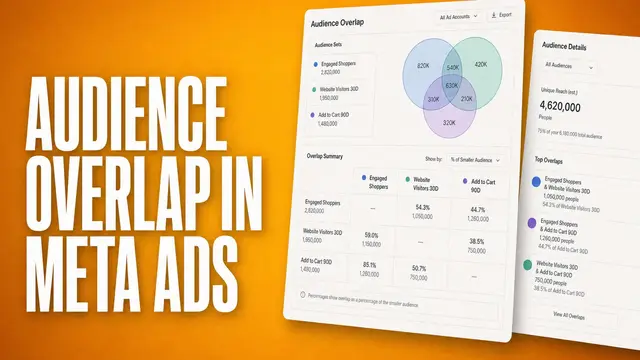
Overlap can also push your costs up. Two lookalikes built from near-identical seeds can reach many of the same people, so their ad sets can compete in the same auction.
If both post similar CPA, I’d keep 1 and move the budget to a seed with a different angle, like repeat buyers vs. high-LTV customers.
Common lookalike audience mistakes (and how to avoid them)
Many lookalike problems trace back to the seed. When a lookalike pushes your CPA up, check your seed first, right alongside the other causes of Facebook ad decline.
Here are the most common mistakes, and the fix for each:
| Mistake | Fix |
|---|---|
| Seed is too small or full of junk records | Consolidate high-intent sources; feed clean pixel or CAPI purchase data |
| Seeding on "all customers" instead of best customers | Build a value-based lookalike from repeat and high-LTV buyers |
| Stale seed that hasn't been refreshed in months | Rebuild the source on a schedule so it reflects current buyers |
| Jumping straight to a 10% audience on day one | Start at 1% to 3%, then widen once you have data |
| Ignoring restricted ad categories | Check the rules before you build |
That last row carries legal weight, because Meta limits or blocks lookalike audiences for ads about housing, employment, and financial products and services, which replaced the old credit category in October 2024. This isn't a minor technicality.
In 2022, the DOJ named Meta's Special Ad Audiences tool in a discrimination settlement, and Meta agreed to stop using it for housing ads. If you advertise in those verticals, read Meta's policy before you build anything.
💡 Tip: If your CPA is climbing even with a strong audience, check out our guide on Meta creative fatigue.
How Atria helps your lookalike audience convert
Building a lookalike audience is a great start, but you also need to consider the seed quality and creative behind it, and that's where many teams stall.
Atria is a creative intelligence platform built for Meta and TikTok. Raya is its AI ads strategist, trained on $9B+ in real ad spend and native to Slack, so your team works where it already talks.
Raya digs into what your best customers actually respond to, then turns that into creative briefs, scripts, and images worth testing against your lookalike.
Radar is Atria's grading engine. It watches every live ad, grades it in plain English, and flags fatigue before it drags your CPA up, so the creative behind your lookalike doesn't go stale without you noticing.
Want to build lookalikes that convert? Try Atria for free today.
Frequently asked questions
How big does my seed audience need to be for a lookalike?
Meta needs at least 100 people from one country to build a lookalike. It recommends 1,000 to 5,000 people for the best results. A small, high-quality list works better than a huge, messy one, so a tight list of your top buyers beats a big list of casual clickers.
What's the difference between a custom audience and a lookalike audience?
The main difference between a custom audience and a lookalike audience is who they reach. A custom audience is people who already know you, like your customer list or site visitors.
A lookalike audience is brand-new people who look like that group. Meta builds it by using your custom audience as the starting list.
What lookalike percentage should I start with?
Start at 1% to 3% because it gives you the tightest match and often the lowest cost per acquisition (CPA) on a proven offer. Once you have data, test wider ranges like 1% to 3% and 3% to 5%. Smaller percentages mean a closer match. Larger percentages mean more reach, but a looser match.
Are lookalike audiences still worth it with Meta's AI targeting?
Yes, especially if you have a strong customer list or a lookalike built from your highest lifetime value (LTV) customers, the people who've spent the most with you over time.
For big budgets and wide markets, Meta's Advantage+ audience tool often matches or beats a manual lookalike. Your list quality and creative still decide most outcomes.
How many lookalike audiences can I create from one source?
You can create up to 500 lookalike audiences from a single source, and run several at once in one ad set. Meta automatically leaves out the people already in your source list, so you won't accidentally show ads to existing customers again.