I've spent a decent chunk of my not-so-young life pulling competitor ads for brands and agencies that manage multiple accounts. In that time, I've tested almost every free library, manual trick, and paid tool out there.
Today, I'll give you 12 working ways to find your competitors' ads, from free platform libraries to tools that will help you turn that research into your next brief.
Before you start: work out what you're looking for
Competitor research goes wrong when you open a library before deciding what question you're answering. The method you want follows from that, and picking in the other order is how you end up with 40 screenshots and no read on any of them.
I ask every team I work with the same question before they open anything: what are you going to do with this once you have it?
Settle which of these four you're after:
- Creative and messaging: You want hooks, formats, and angles for your next brief. The free native libraries cover this well, and you can start in the next 30 seconds.
- Spend and scale: You want to know how much a competitor is putting behind a channel. No free library reports this, so you'll need a paid tool from the back half of this list.
- Targeting and funnel: You want to see who they're chasing and how they nurture. That comes from getting served their ads yourself, which no library will do for you.
- Ongoing tracking: You're watching the same 3-5 competitors every week. One-off lookups stop working fast here, and in my experience this is the point where people start paying for a tool.
One more thing worth deciding upfront is how much history you need. Meta's library shows only what's running today, while Google's and LinkedIn's keep a back catalog. If knowing what a competitor tried and killed matters to you, that narrows this list considerably.
12 ways to find your competitors' ads
Methods 1 through 7 are free and need no login, so you can work through the lot of them in an afternoon. Methods 8 through 12 are paid tools built for this job specifically, and they tend to earn their keep once you're tracking the same competitors on a schedule.
Even when I know a team is going to buy something, I'd still start with the free ones. They tell you whether there's anything worth finding before you pay to find it.
1. Meta Ad Library
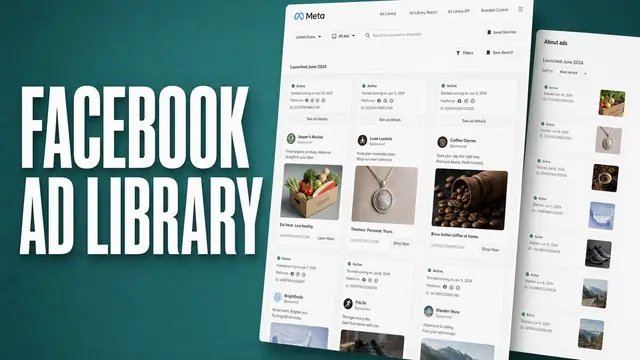
Meta's Ad Library is a free, public database of every ad currently running across Meta technologies, which covers Facebook, Instagram, Messenger, and the Audience Network.
Head over to the Meta Ad Library and look up your competitor by brand or Page name. You don't need an account or any special access. Once you find them, you'll see every ad they're currently running, including the copy, creative, format, and how long each one has been live.
One limit worth knowing upfront: the library holds active ads only. Meta archives inactive ads for political and social-issue advertising, and for ads served into the EU and UK, but for a typical DTC competitor you're seeing today's account and nothing before it.
You need to already know your competitor's exact brand or Page name, and results can be all over the place if that name is generic or shared with other businesses.
While you're at it, also check whether your competitor is running the same ad with multiple creative variants (different image, same copy, or vice versa). That's usually a sign they're actively testing rather than just running one static campaign.
For the filters most people never touch, and a fuller account of what the tool withholds, see our guide to the Facebook Ad Library.
In my experience, Meta Ad Library is best suited for creative and messaging research rather than performance or spend insights.
It doesn't give you hard numbers. You're just looking at what your competitor is saying and showing but overlooking how well it's working. However, it's often safe to assume an ad is doing well if it's been live for a long time.
When to use it: You want fast, free visibility into a specific competitor's current Meta creative. It's my go-to for a quick weekly check, or right before I sit down to brief a new ad.
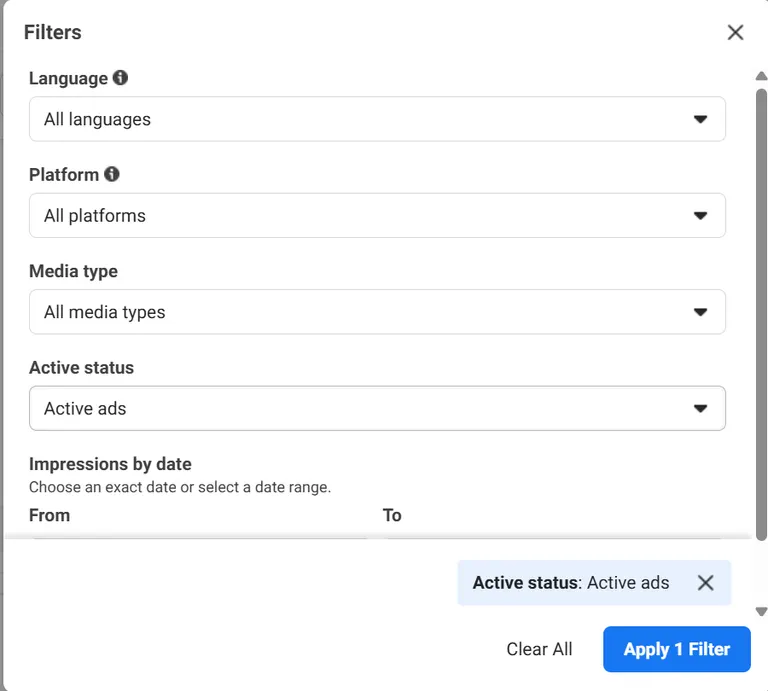
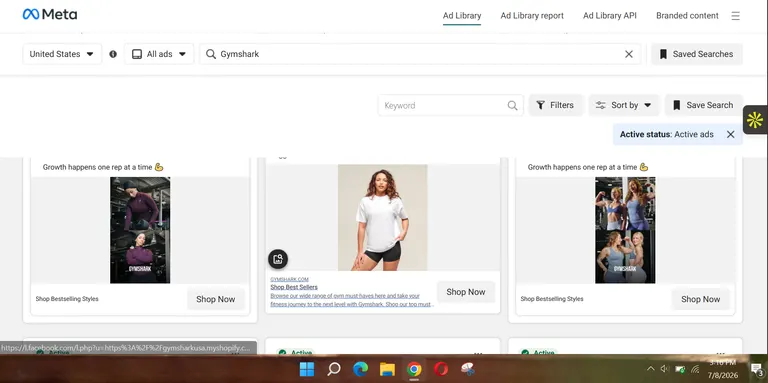
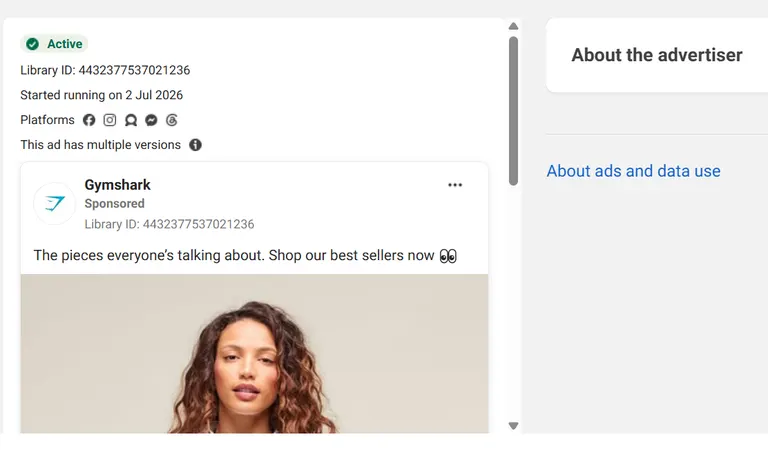
Example: I went to the Meta Ad Library and searched for "Gymshark". Then I chose the United States and set the filter to "active" to see only Gymshark ads that are currently running. Meta served me all the ads Gymshark is currently running. I clicked on "see ad details" to view one of the ads in more detail, and could see this ad started running on different Meta platforms on July 2, 2026.
2. Google Ads Transparency Center
Google's Ads Transparency Center is the public record of active and past ads that advertisers have run across Search, YouTube, and Display.
Search your competitor's name or domain, then filter by location, date range, and ad format. Unlike the Meta Ad Library, the Google Ads Transparency Center pulls ads from three different portals into one place, and it keeps a back catalog you can scroll through.
You can see whether a competitor is running a text search ad, a YouTube video ad, or a display banner without checking three separate places.
For me, filtering by date range is where this tool really comes alive. You can spot when a competitor ramped up ad spend on a particular format, which often aligns with a launch, a seasonal push, or a shift in strategy.
Filtering by location also helps if you're only competing in certain markets and want to rule out ads that aren't relevant to your audience.
As with Meta's library, you're only seeing creative and copy here, not keyword-level data or spend figures. It tells you what they're running and where, not how much they're paying for it or how it's performing.
When to use it: You want a read on a competitor's Google-side presence specifically, or you're working out which format (search, YouTube, or display) they're prioritizing.
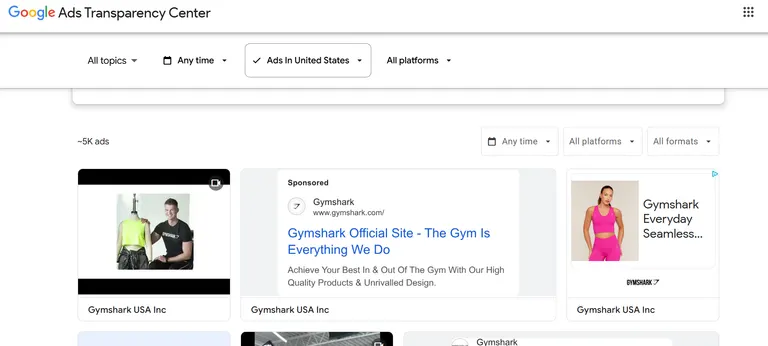
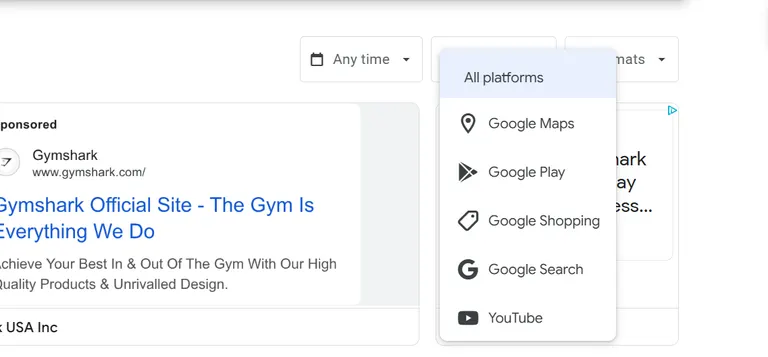
Example: I, once again, looked up "Gymshark" in Google Ads Transparency Center. When I checked, they were running roughly 5,000 ads in the United States alone. Not surprising, considering their size. Of course, you can filter by platform or time; go even deeper if you wish.
3. TikTok Creative Center
TikTok's Creative Center is the platform's answer to the Meta Ad Library, searchable by industry, objective, and performance.
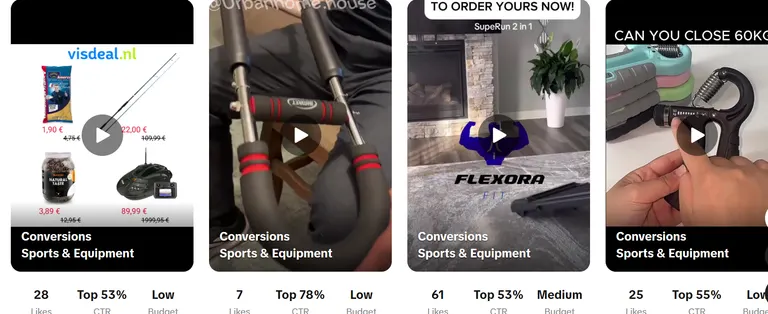
Search or browse by industry and campaign objective, then filter by how long an ad has been running. What sets this apart from Meta's and Google's libraries is that TikTok shows a basic performance breakdown for each ad and lets you sort by the top-performing video within a category.
That gives you a signal for what's working, which none of the other native libraries offer.
This makes it easier to separate a genuinely strong-performing ad from one that's barely getting by. A competitor might have five ads running, but if you can sort by engagement, you'll usually find one or two are doing most of the work.
Those are the ones I'd study closely for hook, pacing, and format.
Because TikTok trends move fast, this library is also one of the better places to catch creative patterns early, before they spread to Meta or other platforms. If you're seeing the same format pop up across several unrelated brands, that's usually a sign it's about to blow up for your category.
When to use it: Your competitors run TikTok ads, or you want early visibility into creative trends before they show up elsewhere.
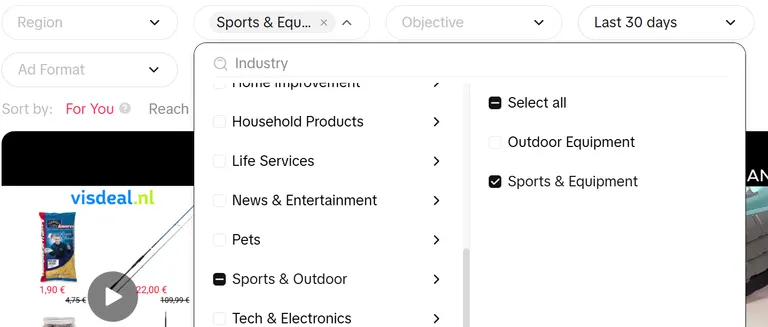
Example: I visited TikTok's Ad Center and set my industry to "Sports and Equipment". If I were in the niche, I'd browse around to find my competitors and study trends in the last 30 days.
4. LinkedIn Ads Library
LinkedIn's Ad Library holds sponsored content from any company Page, including ads that have already stopped running.
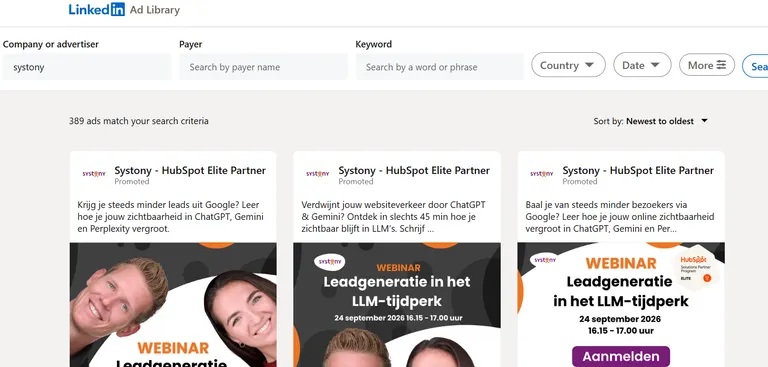
Search a company Page directly and you'll see their sponsored posts, video ads, and document ads. It's less discoverable than Meta's or Google's tools, so you generally need to know exactly who you're looking for before you start.
The history here is better than most people expect. LinkedIn keeps ads that ran after June 1, 2023, and holds each one for a year after its last impression, so you can see what a competitor was pushing last quarter and not only what's live today.
What you won't find is spend or performance data, so I treat it as a positioning archive.
Document ads are worth paying particular attention to on LinkedIn, since they're less common on other platforms and usually signal a lead-gen or content-nurture play rather than a direct-response offer.
Seeing what a competitor gates behind a document ad (a report, a template, a guide) tells you a lot about how they're building their funnel.
When to use it: You're in B2B and want to see how a competitor positions to a professional audience, or you want to compare gated content offers across the past year.
5. Ask Google
The simplest method on this list is a plain Google search for your competitor's brand name or the service they sell.
Search your competitor's brand name, or a service term you know they bid on, and see what comes up. If they're running search ads, you'll see the ad copy and landing page directly in the results.
The tradeoff is that you're only seeing a single snapshot at a single moment, for whichever keyword you happened to search. You won't get keyword lists, spend estimates, or position tracking over time.
For that, you'd need one of the paid tools later in this list. I treat this one as a gut check, and I'd still run it before every competitive brief, purely because it takes ten seconds.
Try searching for a couple of variations. Let's say the exact brand name, a common misspelling, and the core service term. Competitors sometimes bid differently across each.
You might find a competitor bidding on your own branded keyword this way too, which is worth knowing regardless of what you're researching.
When to use it: It's great for a fast, zero-cost check on whether a competitor is running search ads at all, without pulling out a paid tool or logging into anything.
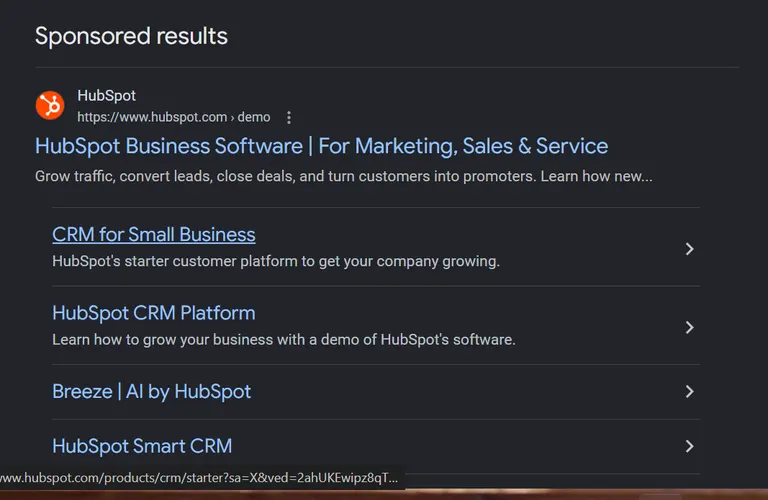
Example: I did a simple search for "HubSpot", which immediately revealed an ad.
6. Play around on a competitor's website
This one is about deliberately triggering a competitor's retargeting pixel by browsing their site, then watching how and where their ads "stalk" you afterwards.
Visit their site a few times over a short window, click into different pages, and take a few actions. Adding an item to the cart, signing up for a newsletter, or viewing a pricing page all tend to do the job.
Retargeting pixels track this kind of behavior. So over the next few days to weeks, you'll likely start seeing their ads follow you across social feeds and other sites you browse.
I'd give it a week before reading anything into what shows up. Any sooner and you're mostly seeing their broadest campaign.
The thing I always pay attention to is which specific pages triggered which ads.
A generic homepage visit might just get you a broad brand awareness ad, while viewing a pricing page or a specific product might trigger something much more targeted like a discount, a comparison ad, or an objection-handling message.
That difference tells you how sophisticated their retargeting segmentation is.
This is also one of the only ways to see retargeting ads at all, since none of the ad libraries show you ads that are only served to people who've already visited a site.
When to use it: You want to see a competitor's retargeting funnel specifically, and you have a few days to let it build.
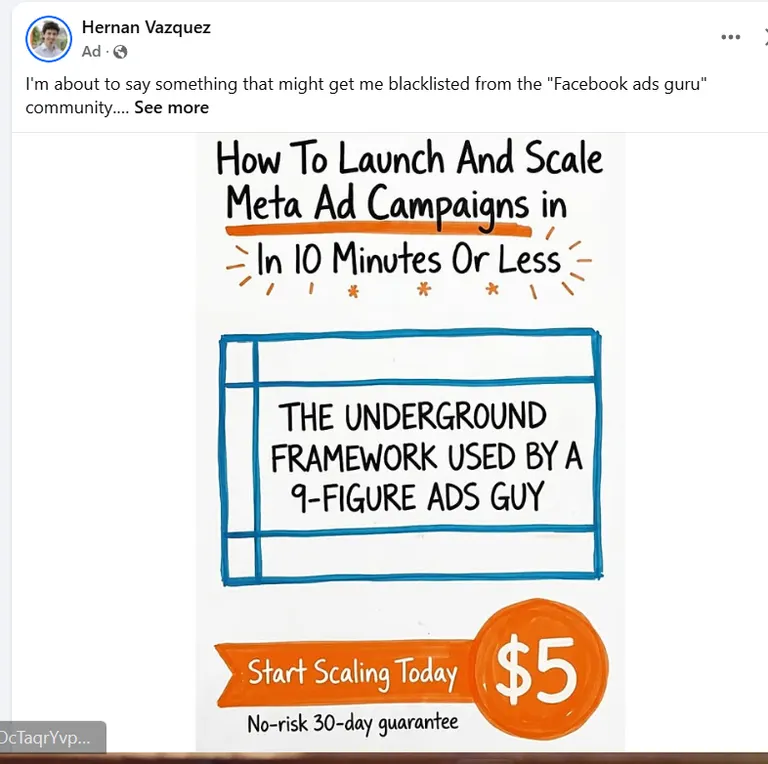
7. Scroll Facebook and click on the ad
Facebook's own "Why am I seeing this ad?" feature digs into the targeting behind any ad that's already been served to you.
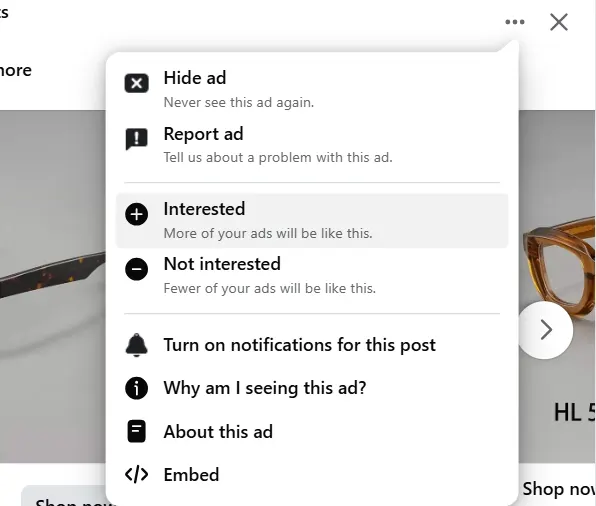
When a competitor's ad shows up organically in your feed, click the three dots in the upper right corner and select "Why am I seeing this ad?" Facebook will show you a breakdown of why you specifically were served that ad.
It could be your age range, general interest categories, or whether you're part of a custom audience list your competitor uploaded.
Clicking into "Advertiser choices" from there usually gives you even more detail, like whether you're being targeted as part of a hashed (anonymized) customer list, a lookalike audience, or broader interest-based targeting.
You can't get this info from any ad library, since it's specific to why you were shown the ad rather than what the ad says.
I've learned more about how competitors segment from this one click than from any library, purely by looking whenever their ads turn up.
The catch is that this only works passively. You can't search for it the way you can with a library. You have to be served the ad first, which means this method works best as a habit (paying attention whenever a competitor's ad appears on your feed) rather than something you can do on demand.
When to use it: When you're already seeing a competitor's ad organically and want a quick read on their targeting strategy.

8. Atria
Atria is a creative intelligence platform that treats competitor ads as raw material. Where a library hands you something to scroll, Atria pulls competitor hooks, personas, and landing pages in and reads them against your own performance data.
Atria's AI creative strategist, Raya, finds what your competitors are running, layers that intel on top of your own ad history to surface the patterns worth copying, then feeds them straight into a brief.
Where this differs from a pure ad library or spy tool is what follows after research.
Rather than saving screenshots or building a separate swipe file, the competitor insights feed into creative briefs within the same platform. A hook or format you spot in your competitor's ad can flow into an actual brief without switching tools. For worked examples of that analysis, see 10 ads to analyze.
In my experience, this matters most for teams managing volume across several accounts, where re-finding and re-organizing the same research every week eats the better part of a day.
Atria is built primarily for Meta, with TikTok support as well. It's most effective for teams whose competitive research and creative production center on these platforms.
When to use it: You're an agency or brand that wants competitor research to feed directly into your next brief, rather than treating research and ad creation as two separate steps.
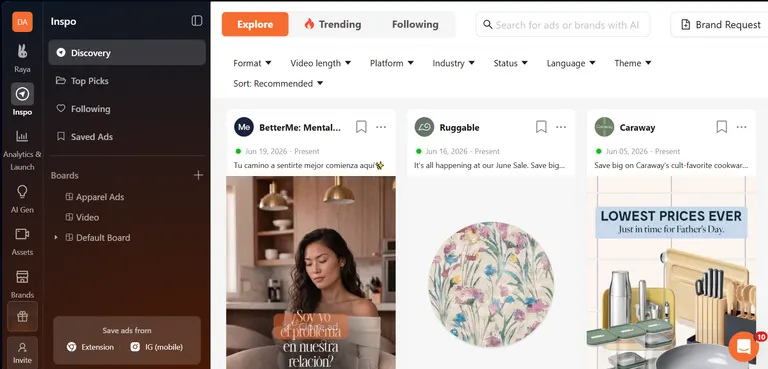
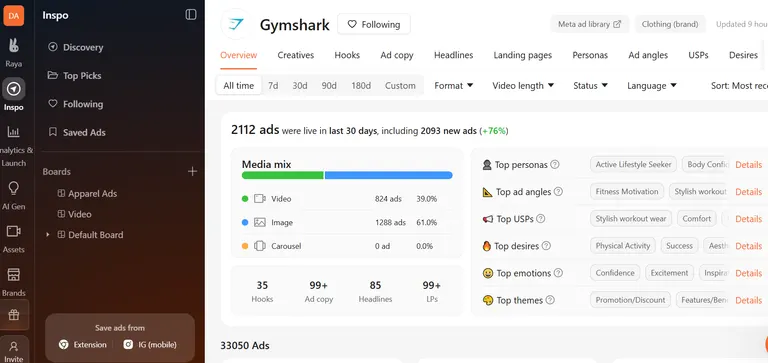
Example: Assuming I want to research my imaginary rival, Gymshark. First, I go to the "Inspo" tab, then "Discovery," and click on "Brand Request" in the top right. Next, a window appears where I input the Meta Ad Library URL of the brand (in my case, Gymshark) and hit "Submit request." Atria then pulls in Gymshark's advertising data.
The "Overview" tab gives me a summary of Gymshark's Meta ads picture at a glance. I can dig even deeper to see their highest-performing creatives, hooks, personas, etc. I can even go further, sorting them by time, format, video length, language, and status.
Best of all, I can then feed these insights into my briefs to improve ad performance.
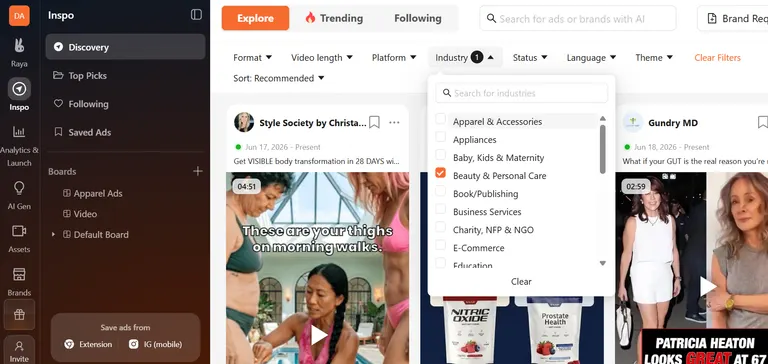
Filtering by niche is also useful if you're not researching direct competitors but want to see patterns across an entire category. For example, you want to see every personal care brand running video ads right now, not only the two or three you compete with directly. Just hit the "Discovery" tab, then filter by "Industry".
9. SEMrush
SEMrush is an SEO and PPC research tool with competitive ad intelligence built in, which lets you see a competitor's paid search activity alongside their organic performance.
Open "Domain overview" under the Competitive Analysis tab and pull up a competitor's paid keywords, sample ad copy, and estimated traffic and spend for those keywords.
Because SEMrush tracks this over time, you can also see how long a specific ad or keyword has been running.
If a competitor has kept the same ad live against the same keyword for months, I'd read that as a sign it's profitable enough to keep funding. Keywords and ads that dropped off after a short run, I'd assume tanked.
Consider it a valuable lesson (in what not to do) that you got without spending a dime.
SEMrush also ties keywords to specific landing pages. You can click through and see exactly where that traffic lands, which is useful for comparing your own funnel against theirs at every step, not just the ad itself.
When to use it: You want to combine organic data with paid ad research in one place. Or you're trying to figure out which of a competitor's keywords are worth bidding on yourself based on how long they've stuck around.
10. Similarweb
Similarweb is a competitive intelligence platform that surfaces a competitor's paid search keywords, display ads, and overall advertising strategy, alongside broader traffic and audience data.
Search a competitor's domain and Similarweb shows you their estimated ad spend, top paid keywords, and the display ads they're running.
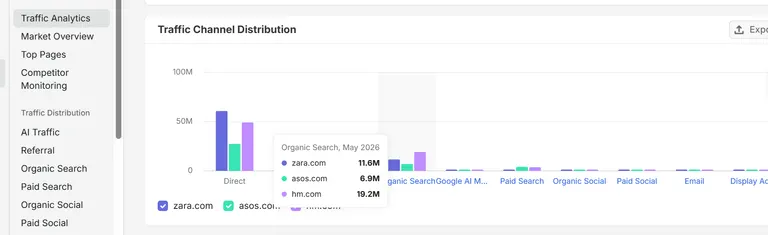
It's similar to SEMrush, but Similarweb leans further into traffic and audience insights alongside the ad data. That means you'll see what they're advertising, where their overall traffic comes from, and how paid fits into that broader mix.
It helps you gauge how central paid advertising is to a competitor's growth, which is the question I'm usually trying to answer before I tell anyone to match a competitor's spend.
A competitor might be running a handful of ads that look aggressive in an ad library, but if Similarweb shows the bulk of their traffic is organic or referral, paid might be a smaller part of their strategy than it appears.
The reverse happens too. A competitor with almost no visible ad creative might be spending big on channels that never show up in ad libraries.
Similarweb breaks out traffic share by channel over time, so you can see whether a competitor's paid investment is growing, shrinking, or holding steady.
When to use it: You want to understand how big a role paid advertising plays in a competitor's overall strategy. It's useful for market research and customer journey mapping rather than one-off creative inspiration.
11. Pathmatics
Pathmatics is a digital advertising intelligence platform for finding, analyzing, and monitoring competitors' advertising across channels, with a strong focus on spend and placement data.
Search a competitor and Pathmatics, now part of Sensor Tower, shows where their ads are running, what creative they're using, and the estimated spend behind each campaign.
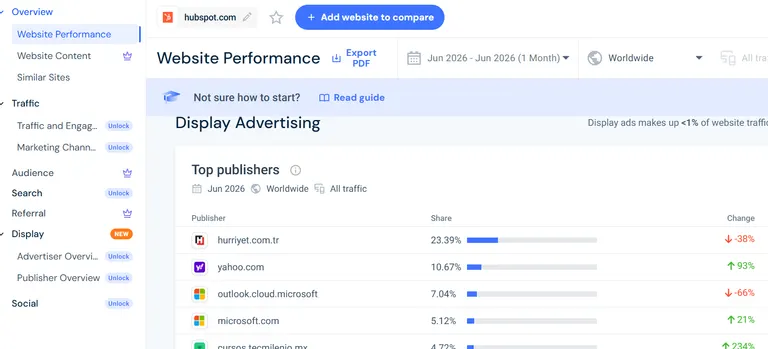
Compared to tools like SEMrush or Similarweb, Pathmatics leans more heavily into the media-buying side of things, showing you which publishers and placements a competitor is buying.
This placement-level detail is useful if you're trying to understand a competitor's programmatic or display strategy specifically. That's harder to piece together from ad libraries alone.
Meta and Google's transparency tools show you the ad, but not necessarily every site or app it's showing up on. Pathmatics fills that gap by tracking where ads actually appear across the open web.
Because it's built around spend estimates, this tool tends to be more useful for agencies and larger teams benchmarking competitive spend at a category level.
In my experience, it's overkill for a single brand watching three competitors. The teams I see getting their money's worth are the ones reporting on a whole category.
When to use it: You're benchmarking competitive ad spend at a category or account level, or you need visibility into exactly where a competitor's display and programmatic ads are placed.
12. Foreplay
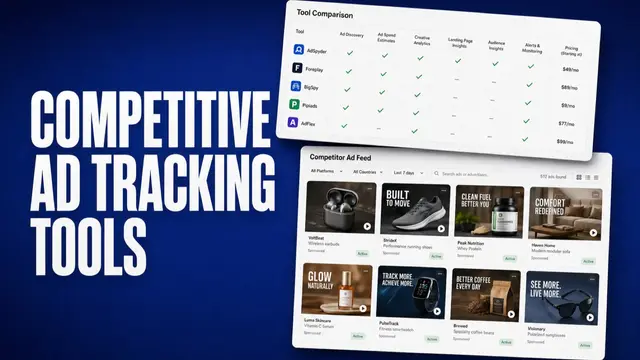
Foreplay is a paid swipe file and ad intelligence tool that lets you search competitor ads by platform, format, niche, and status.
Foreplay now offers competitor tracking (Spyder), creative analytics (Lens), and AI-powered briefs alongside the core swipe file.
Search for a competitor and Foreplay pulls up their ad history, filterable by whether the ad is currently active or has already been pulled.
That historical view is the key difference from Meta's library, which only holds what's currently running. Google and LinkedIn keep a back catalogue of their own, but Foreplay pulls history from several platforms into one searchable place.
Seeing what a competitor tried and killed is arguably more useful than seeing what's live, since it tells you what didn't work.
Beyond viewing ads, Foreplay's mainstay is building a swipe file your team can reference when briefing new creative. This makes it less of a one-off lookup tool and more of an ongoing research system.
The teams I see getting the most out of it are the ones with a fixed list of five or six competitors they check every week.
When to use it: You want to track a specific set of competitors over time, see ads they've pulled, and organize what you find into a reusable reference for your creative team.
Other tools worth mentioning
A few tools didn't make the cut but are worth mentioning. I've either found they overlap with something already covered above, or they serve a narrower use case:
- Adyntel: Search by company domain to pull active ad copy, creatives, CTAs, and formats across Google, Meta, and LinkedIn. It's functionally similar to Similarweb and Adsmom and worth trying if those don't fit your workflow.
- Adsmom: An AI-powered ad intelligence platform tracking over 200 million ads across Meta, TikTok, Google, YouTube, and LinkedIn. Broad coverage but less established than Atria or Foreplay for teams specifically looking to turn research into new creative.
- Pipiads: Built for dropshipping and ecom specifically. It helps you spot trending products early and deconstruct the video creatives and ad copy driving their sales. Most useful if you're doing product research alongside ad research. Less so if you're a service-based brand or B2B agency.
- Rephonic: Finds competitor ads running on podcasts specifically, including a Sponsors tab showing which brands are advertising on a given show, what they're promoting, and transcript context where available. Worth a look if podcast sponsorships are part of your competitor's (or your own) marketing mix. It's a different channel from everything else on this list.
Which method should you choose?
The right one depends on what platform your competitors advertise on, whether you need creative inspiration or spend data, and how much ongoing tracking you're planning to do.
If you're starting cold, I'd open the native library for whichever platform your competitors spend most on and work out from there. I'd only add a paid tool once you catch yourself redoing the same research every week.
| Method | Choose it if… |
|---|---|
| Meta Ad Library | Competitors mainly advertise on Facebook or Instagram, and you want free, instant access to their current creative |
| Google Ads Transparency Center | You want Search, YouTube, and Display in one place, and to spot timing or format shifts |
| TikTok Creative Center | Competitors run TikTok ads, and you want early trend visibility plus a built-in performance signal |
| LinkedIn Ads Library | You're in B2B, want professional-audience positioning, and need up to a year of ad history |
| Search on Google | You need a fast, free check on whether search ads are running, with no need for historical or spend data |
| Get Retargeted on a Competitor's Website | You want to see their retargeting funnel and can spend a few days triggering it |
| Scroll Facebook and Click Into the Ad | A competitor's ad already appeared in your feed, and you want quick targeting insight |
| Foreplay | You want to organize research into a swipe file and track competitors' ads over time, including pulled ones |
| SEMrush | You want paid ad data combined with organic and keyword research to spot bid-worthy keywords |
| Similarweb | You want to gauge how central paid is to a competitor's strategy, with traffic and audience context |
| Pathmatics | You're benchmarking spend at a category level and need placement-level detail |
| Atria | You want competitor research to feed directly into briefs while managing creative across accounts |
| Other Tools Worth Mentioning | Your needs are channel-specific (podcasts, dropshipping), or you want an alternative to a tool above |
Best practices for finding your competitors' ads
Whichever methods you pick, a few habits separate the teams who get something out of this from the teams who just collect screenshots. These are the ones I keep coming back to.
- Track patterns instead of fixating on single ads: One ad means little. A competitor might pull it next week. The signals I watch for are a hook, format, or offer repeating across ads and across weeks (Atria flags this automatically). That repetition means it's working.
- Note how long an ad has been running: I'd treat a months-long ad as a good bet that it's profitable, and ones pulled within days usually weren't. That said, a short run can also mean a planned test window, so I take it as a signal more than hard proof.
- Check the landing page in addition to the ad: A strong hook can lead to a page that doesn't convert, and vice versa. Click through to see whether messaging and design are consistent. In my experience it's the step people skip most, and it's often where the sale is won or lost.
- Build a repeatable review routine: One-time research gets old fast. I'd check your top 3-5 competitors' active ads weekly or biweekly to catch new offers or messaging shifts while they're still fresh.
- Use what you find as a starting point: Work out why an ad works: the pain point, format, or funnel stage. Then build your own version. I've never seen a word-for-word copy land as well as the original, since your audience and your offer are different.
Turn what you find into your next winning ad
Every method above works. Most of them stop at showing you the ad, which leaves you to save it, tag it, and work out on your own what it means for the brief you're about to write.
That gap is where I watch most competitor research die.
Atria solves this problem by pulling competitor research directly into the same workflow where you build and launch your own ads.
Here's how Atria helps with finding your competitors' ads:
- Automatic competitor pulls: Instead of manually searching each ad library one competitor at a time, Atria pulls and groups competitor hooks, personas, and landing pages automatically. So the research is already waiting for you rather than something you have to go find.
- Research tied to your own performance data: Atria layers competitor intel on top of your own ad history. So in addition to seeing what a competitor is running, you get to see how it compares to what's already working (or not) in your own account.
- Straight from insight to brief: You don't need to screenshot and drop a competitor hook or format into a separate doc. You can move directly into a creative brief within the same platform, cutting out the step most other tools leave you to do by hand.
- Built for teams managing volume: If you're an agency or brand running ad creative across multiple accounts, Atria keeps competitor research organized and accessible per account. You don't need to redo the same manual research every time you brief a new batch of ads.
You don't have to rebuild your competitor research from scratch every week. Get it running inside the same platform where you brief and launch ads.
VaynerCommerce, an e-commerce growth agency, replaced Motion and Foreplay with Atria, doubled their iteration speed, and lifted their winning creative hit rate by 30%.
VP of Paid Media, Angelito Tanglao, says,
"We were on Motion plus Foreplay and then went to Atria, and we haven't looked back. Atria had the AI, so we got the same features we wanted in Motion and then some. It's helped us save time, build client trust, visibility, and transparency."
Try Atria for free today.
Frequently asked questions
How long does it take to find your competitors' ads?
Finding your competitors' ads typically takes five to ten minutes per competitor using the native libraries (Meta, Google, TikTok, LinkedIn).
If you're doing a more thorough pass (checking multiple platforms, comparing spend data, and reviewing landing pages), I'd budget up to an hour per competitor for a proper first pass. Then a few minutes for ongoing weekly checks once you know what to look for.
What's the hardest part of finding competitors' ads?
Finding competitors' ads is typically not hard at all, and most of the methods on this list take minutes. The hard part is turning what you find into something useful.
It's easy to end up with a folder of screenshots and no clear read on which patterns matter and which ads were one-off tests that didn't work.
Do I need a paid tool to find competitor ads?
No. The native ad libraries (Meta, Google, TikTok, LinkedIn) are all free, and manual methods like searching Google or getting retargeted cost nothing apart from time.
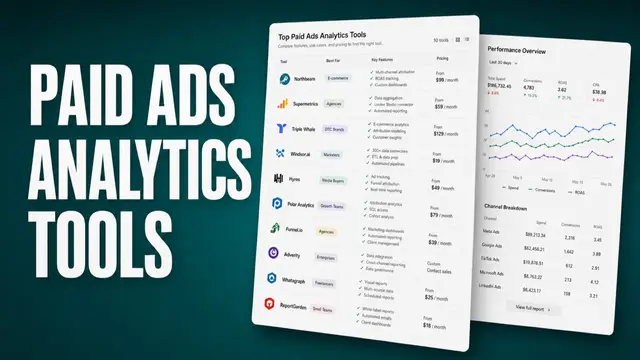
Paid tools like Atria, SEMrush, or Similarweb become worth it once you need historical data, spend estimates, or a way to organize research across multiple competitors and accounts.
Can Atria help me find competitor ads?
Yes. Atria automatically pulls competitor hooks, personas, and landing pages, and layers that intel on top of your own ad performance data. Instead of manually searching libraries and organizing what you find, the research is ready to go and connects directly into your next creative brief.
What if a competitor isn't running any ads I can find?
If you're struggling to find a competitor's ads, it's possible they're not advertising heavily right now, or they're running ads only on a platform you haven't checked yet. Try LinkedIn or TikTok if you've only looked at Meta and Google.
It's also worth checking again in a week or two, since ad libraries only show what's currently or recently active. Campaigns start and stop often.