You're staring at a competitor's ad that's clearly printing money. It's the same offer you've been too nervous to run, with a better hook than anything in your account, and you have no clue how long it's been live or why it's working.
The Facebook Ad Library can tell you most of that, for free, with no login and no Meta account. Meta built it for ad transparency, and media buyers turned it into a useful free competitor research tool.
Here's how to get helpful intel out of it, and the honest list of what it won't show you.
What the Facebook Ad Library is
The Facebook Ad Library is a free, public record of every ad currently running across Meta technologies, including Facebook and Instagram, each one tied to the Page running it.
Meta introduced the tool as part of its political-ad transparency efforts. Ads about social issues, elections, and politics stay archived for seven years, with spend, reach, and funding details attached.
Today, it also lets anyone search active commercial ads across Meta technologies, though those ads come with far less transparency data attached.
In the EU and UK, commercial ads stay visible for one year after their last impression. Outside the EU, Meta doesn't publicly document how long a paused commercial ad stays searchable, and in practice, active status is the safest thing to rely on.
No account, login, or cost is required. New ads and updates can take up to 24 hours to appear, so a fresh launch might not show up on the first search.
💡 Note: Meta renamed it the Meta Ad Library, but most people still call it the Facebook Ad Library, so this guide uses both names.
How to access the Facebook Ad Library
Getting in takes about 10 seconds. Go to facebook.com/ads/library, pick a country, and choose an ad category.
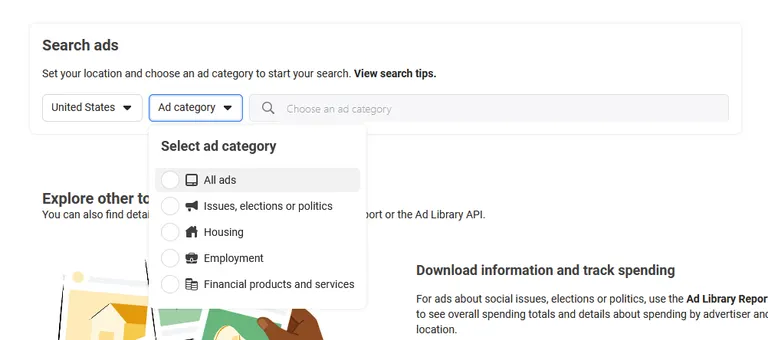
Then, you've got two ways to search:
- By advertiser: Type a brand or Page name to pull up its active ads.
- By keyword: Type a product or problem ("cold plunge," "bloating," "CRM for plumbers") to see everyone bidding on that space.
The category dropdown is easy to overlook. Choose All ads for commercial-ad research.
Ads about social issues, elections, and politics come with extra transparency data, including advertiser and location-level spending details through the Ad Library Report.
10 ways to use the Facebook Ad Library
The Library gives you a free look at active ads across Meta’s platforms. Here are 10 ways to turn that into intel and spy on competitors with it:
1. Search by keyword to find competitors you didn't know you had
Search by the problem you solve. Type in the pain point, like "acne scars," "bloating," or "leaky gut." Every business chasing that customer turns up, whether they’re DTC brands, dermatology clinics, device makers, or supplement companies.
I do this before almost any brand-name search, because it catches the competitors taking your customers before you'd otherwise notice, while a brand-name search only turns up rivals you already had on your radar.
2. Pull a competitor's active ad set
Type a brand name to pull up the active ads tied to its Page. It's the fastest free read you'll get on a competitor's current activity.
In my experience, a large ad set usually means a brand is testing a lot of creative, while a smaller set might mean they're running fewer concepts, leaning on retargeting, or just working with a tighter budget. Either way, it's worth noting.
3. See how long an ad has been running
Longevity is the closest thing to a free performance metric. The Library won't tell you what's converting, but it will tell you what's still live.
An ad that's still running three months in is worth studying. Nobody keeps paying for a loser.
I scan a competitor's set for the oldest creatives still standing and study those first, since the shiny new tests might get killed next week.
4. Filter by country to read geo strategy
See which markets a brand is pushing hard right now.
Filtering by country shows you where a competitor is spending its attention, and you can use it as an early warning system for competitor expansion.
If a US brand suddenly runs a wall of ads in the UK and Australia, that can point to testing or expanding into new markets. I make it a habit to check the creative and landing page for more clues before I call it confirmed.
5. Check the platform list to see where an ad runs
Look at where the ad shows up. The Library shows which platforms an ad is running on: Facebook, Instagram, Messenger, WhatsApp, Threads, and Audience Network.
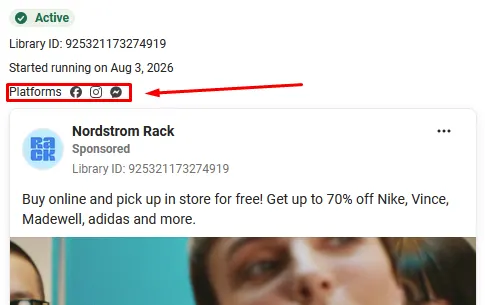
It won't break that down further into Feed, Stories, or Reels, so treat the platform list as a rough clue to a brand's reach.
6. Filter by media type to read the creative mix
Read the video-to-static ratio. Sorting by media type (image, video, or meme) shows a competitor's creative mix, though it won't tell you how they split their budget across those formats.
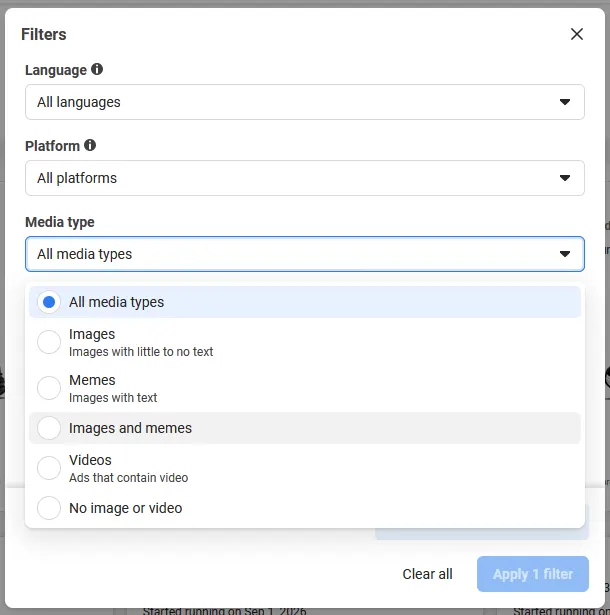
I still find it useful as a directional read, because a video-heavy mix tends to point to a video-first strategy, while a static-heavy mix tends to point to faster concept testing. I treat both as signals and keep in mind that neither one proves what anything costs to produce.
7. Analyze brand partnerships and branded content
Find out which creators a competitor is working with. Meta's branded-content search surfaces currently available Facebook and Instagram posts, Stories, videos, and Reels that disclose a paid partnership.
You'll see who a competitor's working with, minus the deal terms or campaign budget behind it.
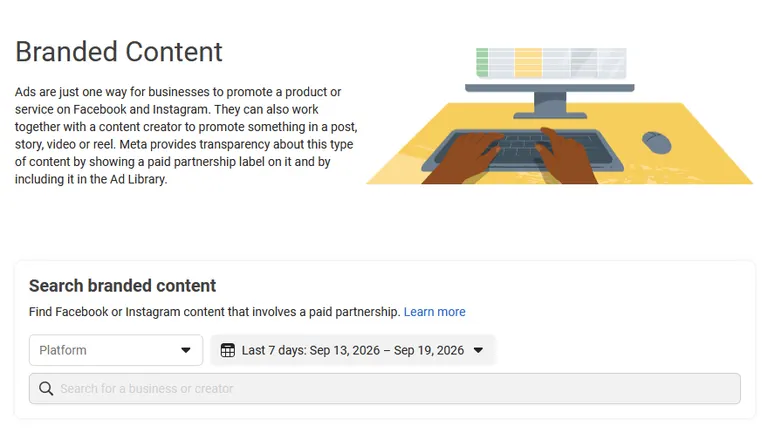
I've caught trends early this way. If three brands in your category start running the same style of creator content in the same quarter, that's a pattern worth watching.
8. Open the ad detail view to read the full offer
Read what the ad promises. A striking visual gets the click, but the offer is what usually seals the deal.
I make a habit of picking the offer apart. What's the hook, what's the promise, what's the risk-reversal, what's pushing urgency? A plain creative backed by a strong cash-back number or a strong guarantee will beat a gorgeous ad with nothing behind it, every time.
Hit "See ad details" and read the primary text and headline together. Now, the Library shows you the full copy as well as the thumbnail you see in the grid.
9. Build a swipe file of creative inspiration
Find the pieces worth keeping, and save those instead of the whole ad. Hit "See ad details" and "See more from this advertiser" to go deep on anyone who catches your eye.
I file what I find by element, which means strong hooks in one place, social-proof formats in another, CTAs in a third. A folder of 200 "cool ads" is great inspo but does nothing else for you, whereas a folder of 30 hooks you can adapt is a creative brief waiting to happen.
💡 Tip: For dedicated swipe-file and workflow tools that beat a screenshots folder, see our take on Foreplay alternatives.
10. Check Page Transparency for competitor context
Check a Page's history along with its ads. Most Facebook Pages carry a Transparency section showing when the Page was created and whether its name has changed. I've learned to treat this as its own signal.
A brand-new Page already running 50 ads is worth watching. It may be a new competitor moving fast, or an established brand launching a new Page, product line, or market.
A short Page history or a name change or two is worth flagging too, though it's not confirmation of anything shady on its own. It could just as easily be a rebrand or a normal business change.
I check the Transparency tab the same time I check the ads. It barely adds any time.
What the Facebook Ad Library doesn’t show you
The free Library has blind spots, and you should know them going in:
- No performance data: For commercial ads, you get zero spend, zero ROAS, and zero click-through. You see the ad, but never the results. Spend shows up only for political and issue ads, and EU reach shows up for anything delivered in the EU.
- No targeting data outside the EU and UK: for most ads you see the creative but not who it was aimed at. Ads delivered in the EU or UK are the exception, as Meta publishes the age, gender, and location targeting there.
- No real memory and no alerts: you can save a search, but there are no notifications and no way to compare a competitor month over month.
- A built-in ceiling on history and timing: Outside the EU, commercial ads disappear once paused, and new ones take time to index, so you're mostly working from a snapshot.
The Library is a useful free floor, and I still open it before almost anything else. It has a ceiling, and purpose-built competitor analysis tools exist specifically to add the history, alerts, and scoring the Library leaves out.
The Ad Library API and Ad Library Report
Two Meta tools sit next to the Library, and Meta's own transparency hub points to both, so they're worth knowing even if you rarely touch them.
The Ad Library Report is a downloadable dataset of political and issue-ad spending, broken down by advertiser and region, kept for seven years. It's useful if you work in a regulated space or you're researching political spend. For everyday creative research, it's overkill.
The Ad Library API lets you query ads with code instead of clicking around by hand, but it covers far less than the Library's own search: ads about social issues, elections and politics, plus ads delivered in the EU and UK. Ordinary commercial ads are not available through it.
You'll need to complete a registration and verification process before Meta grants access.
How Atria builds on Facebook Ad Library research
The Facebook Ad Library shows you what a competitor is running right now, but turning that into a shipped test is still manual work because you're tracking by hand, rebuilding the angle yourself, and checking back to see what's still live. Atria closes that gap.
Atria is a creative intelligence platform for Meta and TikTok ads. It's built around Raya, an AI creative strategist that works inside Slack, and Radar, its always-on grading engine.
Raya pulls a competitor's full playbook (hooks, personas, landing pages, and angles), builds data-driven briefs, and generates scripts, copy, and images your team can launch straight to Meta.
Radar picks up from there, running creative analysis on every live ad and flagging fatigue before performance drops.
Want to skip the manual grind? Try Atria for free today.
Frequently asked questions
Is the Facebook Ad Library free?
Yes, the Facebook Ad Library is completely free and public. You don't need a Facebook account, an ad account, or a login to search it, just a browser.
Does the Facebook Ad Library show all ads?
No, the Facebook Ad Library doesn't show every ad. For commercial ads, it shows what's active right now, and you can filter by platform.
Can you see how much a competitor spends on Facebook ads?
No, you can’t see exact ad spend for regular commercial ads. Meta only publishes spend and reach for political and issue ads. For everyday competitors, you can only estimate relative spend from how many ads they run and how long those ads stay live.
How far back does the Facebook Ad Library go?
Political and issue ads stay archived for seven years, with spend and funding details included.
In the EU and UK, ads that ran anytime in the past year stay searchable. Outside the EU, Meta doesn't publicly document how long a paused commercial ad stays searchable, so treat the active list as your best bet.
Is there a Facebook Ad Library API?
Yes, but access is limited. It covers ads about social issues, elections, and politics, plus ads delivered in the EU and UK. Meta requires registration and identity verification before granting access, and it isn't built for pulling bulk commercial ad data.