I've run a Facebook ads audit on several ad accounts for brands and agencies. The same problems show up almost every time: broken tracking, messy campaign structure, and creative nobody's touched in months.
None of it is hard to fix once you know where to look. This checklist walks you through every step, so you can find what's costing you money and fix it.
Facebook Ads Audit: 9 Steps to Run Through Your Account
Step 1: Check your account foundation
Before you touch a single campaign, look at the basics, since this is often where the problems are.
Start in Business Manager. Check who has access to your ad account, your Page, and your pixel. If someone who left the company a year ago still has admin access, sort that out today.
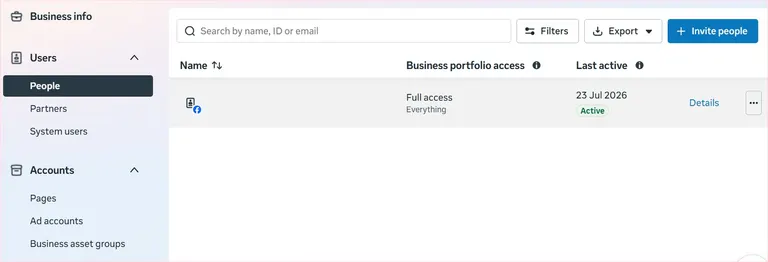
Checking access in Business Manager
Next, check your tracking. Open Events Manager and look at whether your Meta Pixel and Conversions API are both firing for the same events, like purchases or leads.
You want to see data coming in from the browser and the server. You're missing data if you're only getting one or the other, and Meta's algorithm is making decisions with an incomplete picture.
Broken tracking is like driving with a fogged-up windshield. You might still get somewhere, but probably not where you meant to go.
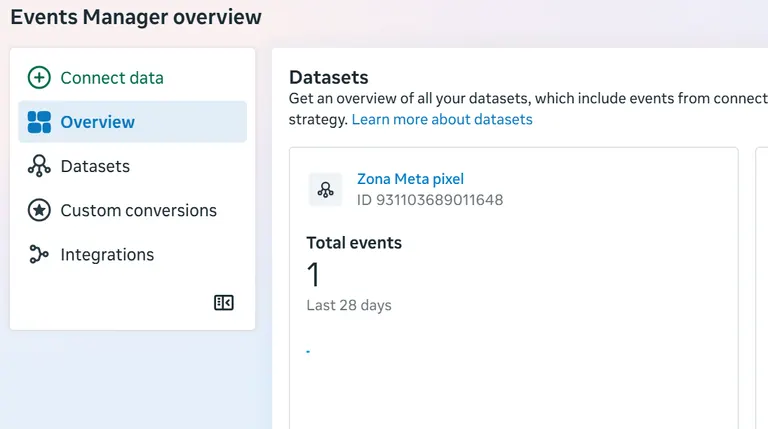
Checking tracking information in Events Manager
Last, check your attribution window: most accounts should be set to 7-day click, 1-day view.
Your numbers won't line up with each other if some of your campaigns are set differently, and you'll end up comparing results that don't mean the same thing.
Step 2: Review your campaign structure and budget
Once tracking is sorted, look at how your campaigns are built.
Check whether your campaign is using Advantage Campaign Budget (formerly called CBO) or Ad Set Budget Optimization (ABO). Advantage Campaign Budget lets Facebook move your budget to whichever ad set is doing best, and it's often the better default.
The one time you want ABO instead is during an A/B test, where each variable needs an even amount of budget for the test to be useful.
Then look at how many ad sets you're running at once. More than 5 to 7 live at the same time often means your budget is spread too thin for any of them to properly get going.
A good rule of thumb is that each ad set needs around 50 conversions a week to optimize well. If your budget can't support that across all your ad sets, you're better off consolidating into fewer of them.
Running 15 ad sets on a $50-a-day budget is like watering 15 plants with one small can. None of them get enough to grow.
Last, your campaign objective should match what you're trying to achieve. If your goal is purchases, your campaign should be optimizing for purchases and not traffic or engagement.
This mismatch occurs especially in accounts that have been running a long time and picked up old settings along the way.
Step 3: Audit your targeting and audience setup
Look at who your ads are reaching.
The new approach uses Advantage+ Audiences, where you supply geographic and demographic suggestions, and Meta's algorithm (Andromeda) goes and finds the best buyers.
It works best when you combine broad targeting with highly specific ad creatives that speak directly to your ideal customer.
If you're running a remarketing campaign, set your exclusion windows based on how often people repurchase. Usually something like 30 to 180 days depending on your business.
Last, look at your lookalike and custom audiences. These need refreshing every one to three months. An audience built off customer data from a year ago doesn't reflect who your customers are today. Using it without updating it means you're likely targeting the wrong people with the right settings.
Step 4: Check your geo-targeting and audience insights
If you're running campaigns across more than one country or region, pull a location breakdown before you judge the campaign as a whole. A campaign can look average in the top-line numbers while one region pulls strong results and another drags the average down.
Use that breakdown to shift budget toward what's working.
Next, open your demographic breakdown and look at the age and gender split of who's converting. I don't mean narrowing your targeting settings. Meta's algorithm is already finding the people most likely to buy.
This is useful for your messaging. If 80% or more of your buyers turn out to be one gender or age group, your ad copy can speak more directly to them without you touching your targeting at all.
Last, check your platform breakdown: Facebook versus Instagram. One will often outperform the other for a given offer.
You don't have to switch the underperformer off entirely, but you can channel the bulk of your budget and creative toward whichever platform is converting for that specific campaign.
Step 5: Check your ad placements and specs
Start with whether you're using Advantage+ placements or manual ones. Advantage+ lets Facebook spread your ads across every placement and optimize delivery on its own.
It's mostly the better choice unless you have a specific reason to limit where your ads show up.
If you're using manual placements, check that your creative fits Meta's current ad specs: 9:16 video works well on Stories and Reels but gets cut off in a regular feed placement. A 4:5 image works for feed but looks cramped in Stories.
Running the wrong format in the wrong placement is a common, easy-to-fix mistake.
Last, look at your Audience Network and rewarded video placements. These often underperform, but don't switch them off on general advice alone.
Pull a performance breakdown first and see how they're doing in your account. If the data backs it up, exclude them. If it doesn't, leave them on.
Step 6: Read your performance metrics like a pro
The value is in knowing which metrics matter and which ones are there to help you understand why something is happening.
Start with your primary metrics: CPR and ROAS should drive your decisions. If one ad is getting you a 4x ROAS and another is getting you 3x, keep the 4x ad and turn off the other one.
Don't let a better CTR or a lower CPC change that decision. Those numbers matter, but they're secondary and can lead you astray if you treat them as the main event.
Once you know which ads are winning, dig into the secondary metrics to understand why. You can now look at hook rate, CTR, CPM, and average play time.
None of these should be something you optimize toward directly. They're there to help you diagnose what's going on.
Don't judge by hook rate alone. It gets people in the door, but it doesn't convert them.
Consider these three video ads in the same ad set:
| Ad | Hook Rate | CPA |
|---|---|---|
| Ad A | 16.2% | $28 |
| Ad B | 13.6% | $25 |
| Ad C | 10.6% | $19 |
A (purely illustrative) worked example: the ad with the lowest hook rate also has the lowest CPA.
Ad A has the highest hook rate of the three, but it's also the highest CPA. Ad C has the lowest hook rate but the lowest CPA too.
If you optimized purely for hook rate, you'd pour more budget into Ad A and miss the one making you money. This is why primary metrics decide what remains, while secondary metrics only help explain why.A few patterns and what they mean:
- High hook rate, low CTR: people are engaged early on but not clicking through. This means the offer itself isn't convincing enough, or there isn't enough proof, like testimonials or reviews, to get people over the line.
- Good CTR, poor conversion rate: people are clicking but not buying. This is almost always a landing page problem. Check your page speed, whether the messaging matches the ad, and if there's enough trust built in once someone lands there.
- Big gap between link clicks and landing page views: something's off if a lot more people click your link than load your landing page. It could be a slow-loading page, but it could also mean your ads are showing in placements like the Audience Network where clicks happen by accident.
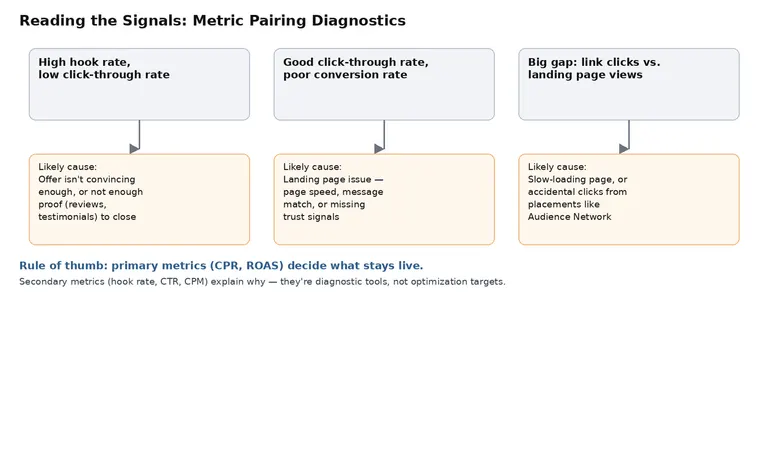
How to read the three most common metric mismatches, and what usually causes each one.
These metrics won't always line up the way you'd expect.
No single metric tells the whole story, which is exactly why you look at them together instead of one at a time.
As a rough guide, per Benly's 2026 ad creative benchmarks: a hook rate around 28% or higher on Meta is solid, and top performers push past 45%. Anything under roughly 18% needs reworking. Video CTR on Meta averages close to 1.6%, so above 2% is strong.
Step 7: Audit your ad creative
Your account can be set up perfectly and your targeting spot on. But none of it matters if your ad creative isn't working. Don't rush through this step, because it's the only one that's totally within your control to improve results.
Start with format variety. Are you running a mix of video, static images, and carousels? Or does the account have only one format because it worked once and nobody's revisited it since?
Different formats do different jobs. A video can build trust and explain something in a way an image can't, while a static image is quick to consume and pulls people in faster.
Next, check that your messaging and CTA match your landing page.
If your ad promises a discount and the landing page doesn't mention it anywhere, it will cost you conversions.
Your copy should shift depending on where someone is in the funnel. An ad that works for someone who's never heard of you (unaware) is the wrong ad to show someone who added your product to cart.
Here's what to do:
- Prospecting: lead with the problem you solve and your strongest, most provable claim. This audience doesn't know you yet, so clarity and credibility matter.
- Remarketing: address hesitation directly. Add proof (reviews, results, guarantees, testimonials) and a reason to act now, like a limited-time offer or a reminder of what's sitting in their cart.
- Retention: reward loyalty and introduce new offers. This audience already trusts you, so the job is to keep them engaged.
Then look for ad fatigue. If frequency is climbing and results are dropping at the same time, your audience has likely seen the same creative too many times. Bring in fresh creative before performance drops further.
How does your creative compare to what's working for other brands right now?
Auditing your own account in isolation only tells you half the story. Your hook rate can look decent and your frequency can be under control, and you'd still miss a competitor who recently launched a new angle pulling attention away from your ads.
Or your creative has been running so long it's starting to look stale next to what everyone else in your space is doing.
Atria can be helpful here. Its Radar feature grades every ad in your account and flags what to fix. And its competitor tracking shows what's winning across the market, so you get a benchmark beyond your own numbers.
This is where an insights platform for Meta ads like Atria earns its place. Its Radar feature grades every ad in your account and flags what to fix.
Meanwhile, its competitor tracking finds the winning formulas already working across the space so you're benchmarking against the market.
You can see which competitors are running ads right now, and how long those ads have been live.
An ad that's been running for months often means it's working. If a competitor's creative suddenly changes format or angle, that's a signal worth reacting to before your own numbers start falling.
Step 8: Check your landing page experience
Your ad's job is to get the click, and your landing page closes the deal. If your creative and targeting are good but conversions are low, the landing page is likely the problem.
Look at load speed. A slow landing page loses people before they even see what you're offering. It's a common reason for low conversions.
As I said above, check that the page matches the ad.
If someone clicks an ad about a specific product, they shouldn't land on your homepage and have to go find it themselves. Send them to the page that matches what they clicked on.
Look at how much proof is on the page, like reviews, testimonials, and other trust signals, especially for anyone who hasn't bought from you before.
Step 9: Put it on a schedule
A Facebook Ads audit isn't something you do once and forget about. Ad accounts drift, and audiences shift. Creative also fatigues. Without a regular check-in, these things will cost you money.
A simple rhythm works well for most accounts. Do a light check every month, looking over your core metrics. Then run a full audit every quarter, going through everything in this checklist, from account setup to creative.
A few events should trigger an audit outside your normal schedule. For example, a sudden drop in performance you can't explain, or testing a new strategy or campaign type. These are good reasons to go through the account properly and not wait for your next scheduled check.
A Facebook ads audit works best as a habit.
Want to see how you can improve your creative? Try Atria for free.
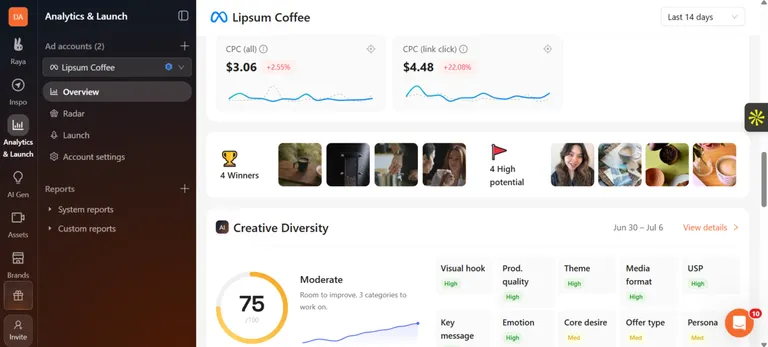 Rubix, a performance marketing agency, cut creative analysis time by 40% and lifted ROAS by 15% using Atria's tagging and reporting.
Founder and CEO Alex Realmuto says, "Atria is phenomenal, especially from a reporting standpoint. It's going to make your life easier, and it's an easy decision when you look at ROI."
FAQ
How often should I audit my Facebook ads?
Do a light check monthly and a full audit every quarter. On top of that, run one any time something specific happens, like launching a new strategy or noticing a sudden drop in performance.
What's the difference between a Facebook ads audit and checking Ads Manager daily?
A Facebook ads audit reviews your whole account on purpose. Checking Ads Manager daily only reacts to what's in front of you, like pausing an ad that's not working.
An audit covers account setup, tracking, targeting, and creative on a set schedule. It catches problems that daily glances at the numbers don't identify.
Can I audit my ads without an agency?
Yes. Most of what a Facebook ads audit covers is something you can do yourself if you know what to look for. This checklist covers that. Where it gets harder to DIY is the deeper performance diagnostics and creative comparisons, which is where a tool can help speed things up.
What tools help with a Facebook ads audit?
Meta's own Events Manager and Ads Manager cover most of the basics of a Facebook Ads audit, like tracking, campaign settings, and performance metrics.
But to see what creative is currently working for competitors or how long their ads have been running, a tool like Atria will help. See how it compares to other options.