You open Ads Manager to set up a Facebook ad campaign, click Create, and then stare at it. Campaign name, objective, buying type, ad set, audience, placement, schedule.
One wrong click here and you're three days into a campaign that was never going to work. You won't know why the numbers look nothing like what you expected.
I've set up, audited, and cleaned up more Meta campaigns than I can count. The platform is rarely the problem.
In the accounts I've audited, a mismatched objective and a budget too small to produce one real result cause most of the damage. The cause can be simpler than that: a pixel that got created and never connected to anything. Whether that budget sits on the ad set or the campaign is its own decision, covered in ABO vs CBO.
This is the walkthrough I wish existed when I started. You'll come out of it with a real Facebook ad campaign published, budgeted sensibly, and set up right the first time.
TL;DR: Building a Facebook Ad Campaign
- A Facebook ad campaign runs on three levels: Campaign (your objective), ad set (audience, budget, and schedule), and ad (the creative). Set them up in that order, and you're doing it right.
- Meta doesn't publish a fixed cost per click.
- In my experience, most first campaigns fail from setup mistakes. A mismatched objective, an underfunded budget, or a pixel that was created but never connected are the usual culprits.
- Expect a rocky first week. Ad sets usually need about 50 results in seven days before Meta's delivery system stabilizes.
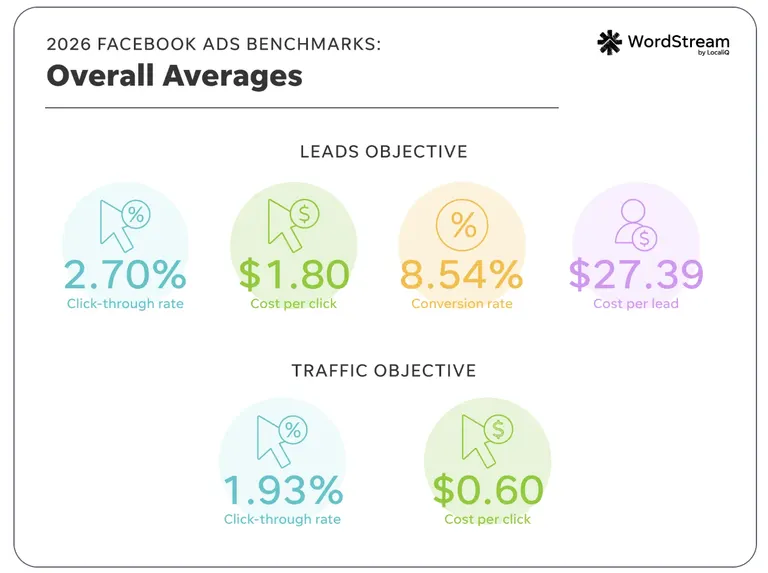
- Median cost per click runs about $0.60 on traffic campaigns and $1.80 on leads. If your bid strategy is cost per result, set your daily budget to at least five times that target number.
What Is a Facebook Ad Campaign?
A Facebook ad campaign is the top layer of Meta's advertising structure, the level where you set your objective and your buying type. Everything else nests underneath it.
Meta splits a campaign into three separate levels, and knowing what belongs where keeps you from rebuilding it later.
Campaign: Your objective (Sales, Leads, Traffic, Awareness, Engagement, or App promotion) and your buying type. Auction is the buying type behind nearly every objective and placement, letting Meta's system optimize delivery automatically.
Reservation exists too, but it's a narrower option built for large-reach brand awareness campaigns. A single campaign holds one or more ad sets.
Ad set: Your audience, placements (Facebook Feed, Instagram Stories, Messenger, and so on), budget, and schedule. Every ad inside one ad set shares those same settings.
Ad: The creative includes a single image or video, a carousel of multiple cards, or a collection format, plus your copy, headline, call-to-action button, and the Page or Instagram account representing your business.
You set the objective once, at the top, and it shapes everything Meta optimizes for underneath it.
What You'll Need Before You Start
Before you publish in Ads Manager, check these items:
- Time required: Budget 20 to 30 minutes to work through this list if every item below is already in place. Give yourself more time if you still need to create a Page, connect Instagram, or install a Pixel from scratch.
- A Facebook Page, or at least Page access that includes managing ads. Access now comes as full or partial control, plus task-based access covering ads specifically. You can't run ads without a Page attached to represent your business.
- An Instagram professional account: It's not a hard requirement the way a Page is. Connect one if you want the ad to use your Instagram identity. Without one, Meta can still run Instagram placements using your Facebook Page identity.
- An ad account: If you have a Facebook account, you already have one, created automatically when you signed up. You're capped at a single ad account ID until you make your first confirmed payment. Don't worry if you can't spin up several accounts on day one.
- A valid payment method attached to that ad account.
- A Meta Pixel or Conversions API connection on whatever site or landing page you're sending traffic to. If you're running Leads with an instant form, as I did here, the form captures the event inside Meta and you can skip this.
- A realistic budget window: Give yourself at least a week, ideally two, before judging whether a campaign is working. A three-day test tells you almost nothing.
I've made this exact mistake myself. I created the pixel inside the ad account, moved on to the next setup screen, and assumed it was connected. It wasn't.
I checked Events Manager and saw no real-time activity at all, even while I browsed the site myself to test it, because the pixel was never calling home. It’s an easy issue to miss, and it leaves a campaign with no way to confirm what it's producing.
How to Set Up a Facebook Ad Campaign: Step-by-Step
Step 1: Set Up Your Ads Manager Account
Go to Ads Manager and confirm you're looking at the right ad account, especially if you manage more than one.
Your business might run ads across multiple brands, or you might manage campaigns for more than one client. If so, set up a business portfolio in Meta Business Suite first.
A business portfolio brings your ad accounts, Pages, and team members together in one place, where everyone's access is managed from that single hub. An agency managing several client accounts at once needs that structure most, since checking each account separately wastes time.
Confirm your Page access covers ads, add or verify your payment method, and check that your ad account isn't sitting in a restricted or under-review state. Without this part, every step after it is wasted until the account can spend.
Step 2: Choose Your Campaign Objective
Click Create in Ads Manager, and the first decision you'll make is your objective. Meta currently organizes this into six simplified choices, each mapped to a specific business goal.
The six current objectives and what each one does:
| Objective | Business goal | Built for |
|---|---|---|
| Awareness | Get remembered | Brand-new business or a recent rebrand |
| Traffic | Send people somewhere | Website, Page, or app visits |
| Engagement | Start conversations | Messages, comments, on-ad actions |
| Leads | Collect information | Signups, calls, or messages |
| App promotion | Get installs | Installs or a specific in-app action |
| Sales | Drive purchases | Site, app, or catalog purchases |
Match the objective to the outcome you want. Choose Sales when purchases are the goal, even if a different option sounds closer at first glance.
Traffic will happily fill your campaign with cheap clicks from people who were never going to buy anything. You'll have spent real money to learn that.
I built a test campaign for this guide but didn’t publish it, so what follows comes from setup. I picked Leads over Traffic, even though Traffic looked like the safer, more obvious choice for a first attempt. Leads is built to capture exactly the signal I wanted, which was a completed form.
Traffic optimizes for clicks and landing page views. I wanted a name and an email address, so Leads gave me one concrete event to build the rest of the setup around.
Step 3: Set Your Budget and Schedule
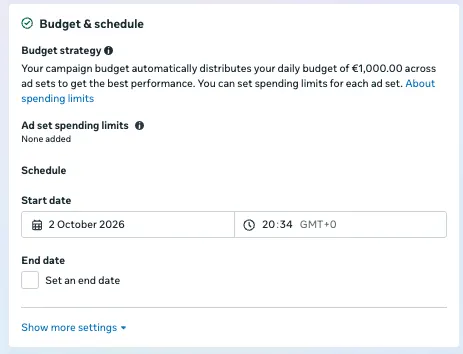
You'll choose between two budget types. A daily budget tells Meta roughly how much to spend each day, averaged across the calendar week (Sunday through Saturday), with room to flex.
Meta may spend up to 75% more than your daily number on a strong day. That's capped at 175% in any single day, and at seven times your daily figure across the full week. A $100 daily budget, for example, won't cross $700 in a week, or $840 if you've turned on budget sharing across ad sets.
A lifetime budget works differently. It's a hard cap for the entire run of the campaign or ad set, and Meta paces spend to hit that number without going over it.
Schedule rides along with whichever budget type you choose. Every ad set needs a start date, set in Ads Manager's Budget & schedule section.
A lifetime budget needs an end date too. That's the boundary Meta paces spend against for the whole campaign. A daily budget can run open-ended (no end date required) until you pause it yourself.
Is $10 a day enough? Only for a narrow slice of goals. Meta publishes a useful rule of thumb here: If you're using its cost per result goal, your daily budget should be at least five times your target cost per result.
That means if you’re aiming for a $5 cost per lead, $25 a day is the realistic floor. At $10 a day, you're budgeting for a $2 target, workable for some awareness or engagement goals and thin for most sales campaigns.
When I set the budget on that same test campaign, I started at $10 a day out of habit, the number that feels safe before you've done any math. I ran that cost-per-result 5x rule against a $5 cost-per-lead target, and it put me $15 short.
Raising it to $25 before I ever reached Publish was the kind of fix that's invisible until you do the arithmetic. Meta buries the rule a few clicks into its own help center.
When you run that same math on a Sales objective, the number shifts. Say your target cost-per-purchase for a lower-priced product sits around $5 to $6. That same cost-per-result 5x floor puts you at $25 to $30 a day, which is a realistic starting budget for a sales campaign chasing that kind of target.
How much do 1,000 clicks cost? Cost per click is set by auction, driven by how many other advertisers want the same audience, so Meta doesn't publish one flat number.
Ad relevance and the time of year factor into that auction too. Cost per click also varies widely by objective and audience.
WordStream's 2026 benchmarks for US campaigns put the median cost per click at $0.60 for traffic campaigns and $1.80 for leads campaigns, so 1,000 clicks run roughly $600 to $1,800.
There's no flat rate behind those medians. Cost per click is set by auction, so it moves with how many other advertisers want the same audience, your ad relevance, and the time of year.
Source: WordStream
Apply that same 5x rule to your own target and watch your cost per result in week one. Adjust your budget from there, based on the real numbers you're seeing.
Step 4: Define Your Audience
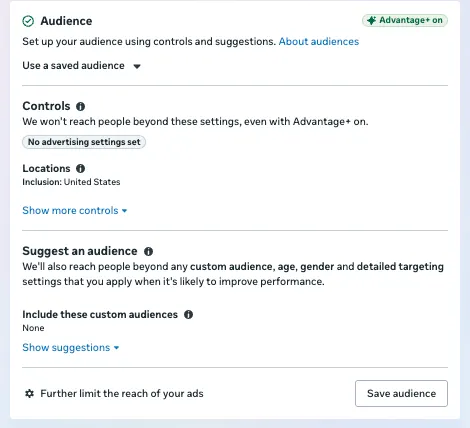
Meta gives you three ways to set an audience here, and most people should start broader than instinct suggests.
Advantage+ audience lets Meta's system automatically find people likely to produce your chosen result from a few inputs you provide (age range, location, any exclusions).
Meta's targeting AI usually has more signal to work with than a manually stacked interest list, which is why Meta recommends testing it for almost every campaign type, retargeting aside.
It's still guessing at what your product is for, and it guesses wrong often enough that checking your results in week one beats setting it and walking away.
Detailed targeting lets you layer interests, behaviors, and demographics manually. Stacking five or six broad interests at the same level is a common mistake. Meta matches anyone who fits at least one of them, which inflates your reach back toward "everyone," the opposite of the point.
Custom and lookalike audiences let you target people who already know you (site visitors, email lists, past customers) or people who resemble them. These are powerful, but only as clean as the source you build them from.
A lookalike built from a poorly targeted audience finds you more of the wrong people, faster.
Step 5: Build Your Ad Creative
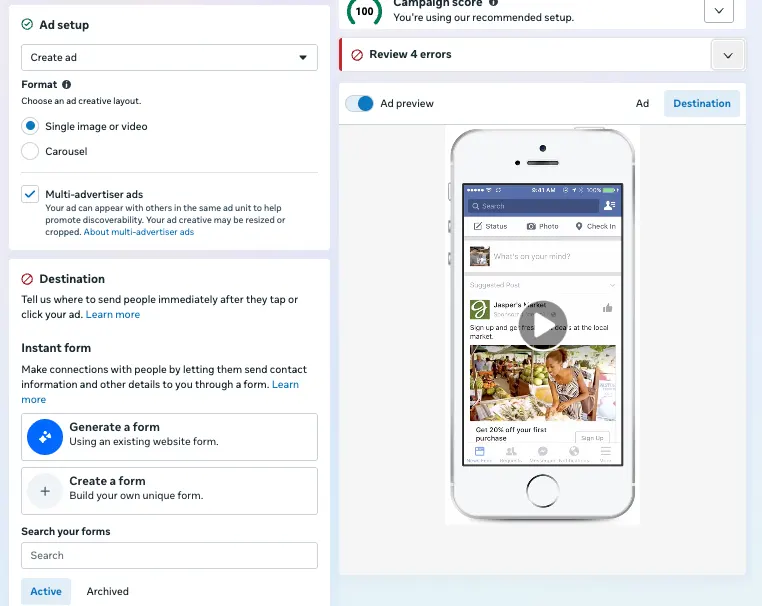
Creative iteration (small tweaks to one idea) is different from creative diversification (several distinct concepts).
Meta's delivery system rewards diversification. Ads that look or feel alike get grouped together and treated as one creative, so 10 near-identical versions of the same idea don't give the system 10 separate things to learn from.
Since Meta's Andromeda update in late 2024, the retrieval system that narrows Meta's ad pool has scaled to handle far more creative at once, and Meta has said it expects to find a more diverse set of ad candidates as the architecture develops.
That's exactly why the iteration-versus-diversification split carries more weight than it used to.
At the ad level, a few small mistakes waste more budget than people expect:
- CTA match: Set the button to match the goal (Shop Now for sales, Sign Up for leads).
- No blank fields: A blank headline or primary text reads as broken, and it costs you attention you already paid to get.
- Aspect ratio: Check it against the placement. Use 4:5 for Feed and 9:16 for Stories and Reels, while 1:1 fits placements that call for square creative.
- Word choice: Copy built around concrete words like "you," "free," "because," "instantly," "now," and "new" gives someone a specific reason to stop and act. Use them only where they're true to the offer. Forced language reads as an ad the moment it stops matching the product.
- Landing page over homepage: Send clicks from a Sales or Traffic ad to a dedicated landing page built around the exact offer. Someone who lands on your homepage or Facebook Page instead has to go hunt for whatever the ad promised, and that extra step turns clicks you already paid for into nothing.
Step 6: Check These Before You Hit Publish
Run through this before you click Publish: it takes about five minutes, and it's the difference between a campaign that tells you something real and one that burns budget.
- Pixel status: Is it firing? A pixel created inside the ad account isn't automatically connected. Check Events Manager for real event activity, or use a pixel-helper browser extension to confirm it live.
- Objective match: Does it match your goal? If the outcome you care about is a purchase, the objective needs to read Sales. Traffic or Engagement won't optimize for purchases.
- Budget math: Does your daily number clear the 5x rule against your target cost per result? A round figure that felt safe doesn't count.
- Targeting sanity: Is it narrow enough to be useful, but not so stacked it cancels itself out? Recheck your estimated audience size before publishing.
- Creative basics: Does every ad have a matched CTA, a filled headline, and the right aspect ratio for its placement?
- Account health: Is your payment method current, and is your ad account clear of any restriction flags?
If you can check every box, publish. If you can't, fix the problem now, as this will be cheaper than fixing it after three days of spend.
Step 7: Publish and Monitor
Click Publish, and your ad enters review. Meta checks images, video, text, your targeting, and where the ad sends people. That review relies primarily on automated systems, with human reviewers used to train those systems and, in some cases, to review ads directly.
Most ads clear review in under 24 hours, though some take longer. An ad can technically be reviewed again even after it's live.
Edit your targeting, creative, optimization event, or billing event after publishing, and it triggers a brand-new review. Change your bid, budget, or schedule, and it doesn't.
There's nothing productive to do while it sits in review. You can refresh the status every few minutes, but it won't speed anything up.
Once it clears and starts running, watch what it does in the account. Cost per result is the number to anchor on for most objectives, and ROAS takes over as the one to watch once Sales is the objective you picked.
Five Mistakes That Wreck a First Campaign
Most of what wrecks a first campaign comes down to one of these, and the same patterns repeat across nearly every account I've looked at. The budget and pixel mistakes both tripped me up firsthand while I put together the test campaign for this guide.
- Budget too small to mean anything: A $5 daily budget in a competitive market like the US, UK, or Australia doesn't go far. It produces roughly $35 after one week or $70 after two, which is nowhere near enough data to judge anything. Budget for the market you're targeting.
- Killing a campaign after 48 hours: Two days of weak numbers usually means the delivery system hasn't finished learning yet. Give it at least a week before making the call.
- A pixel that was never connected: It might exist in your ad account, but if it isn't installed on your site, it tracks nothing. If neither the pixel nor Conversions API is sending website events, Meta loses the event data it needs to measure and optimize website conversions.
- Trusting Advantage+ blindly, or stacking too many interests: Automatic targeting is a strong default that still needs a results check before you walk away from it.
- Changing five things at once: A new audience, new creative, and new copy launched together tell you nothing about which change moved the number. Change one variable, compare it against what you had, and you'll learn something you can repeat.
Reading Your Results in the First Week
Your first week is going to look rockier than you expect, and that's mostly by design.
Every new or significantly edited ad set goes through a learning phase. That's the stretch where Meta's delivery system is still figuring out who to show your ad to and how.
Ad sets typically exit the learning phase after roughly 50 results in the week following your last significant edit.
Shops ads need a specific threshold: 17 purchases on your website plus 5 through Meta.
Three things make the learning phase worse than it needs to be:
- Making a significant edit before the ad set exits learning resets the clock, so resist the urge to tinker every time a number looks off.
- Launching too many ads or ad sets at once spreads that learning thin across all of them, leaving each one short of the results it needs to stabilize.
- A starved budget makes it worse too. It gives Meta's delivery system a bad signal to learn from, so the budget math from Step 3 keeps shaping performance well past publish.
Two columns in Ads Manager are worth checking daily in week one:
- Results counts how many times your ad achieved an outcome, based on your objective and settings.
- Last significant edit tells you whether a change you made is the reason performance looks unsettled.
Once you're past the learning phase and your numbers are holding steady, two questions come next. Is this campaign good relative to your category, or does it only look decent against your own account history? And how do you scale the budget without breaking what's working?
Optimization tools can answer the first one using real market and competitor data. For the second, scaling Meta ad performance comes down to budget-increment math.
If a campaign that was performing well suddenly isn't, don't assume the platform broke. Creative fatigue, audience saturation, and tracking gaps are three of the most common causes, and every one of them is diagnosable.
This breakdown of a performance decline walks through how to diagnose each one.
Managing more than one or two active campaigns turns most of this section into repetitive checking. That means watching results, catching a decline early, and deciding when to scale. Facebook ad automation tools take that repetitive checking off your plate.
How Atria Helps After You Hit Publish
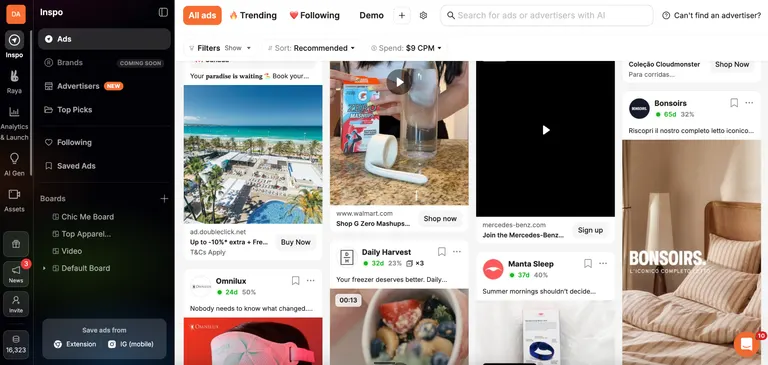
Everything above gets a Facebook ad campaign live and correctly configured. What happens after that is a different problem. You have to work out whether a creative is working, what to make next, and whether performance is normal or already fading.
Atria is a creative intelligence platform for paid social. Raya, its AI creative strategist, works in Slack and runs the loop of research, brief, generate, launch, and analyze, on repeat.
It's trained on more than $9B in real ad spend, more data than your own account alone could show you.
Here's how Atria helps once your campaign is live:
- Ad grading: Radar grades every ad you run and tells you what to fix, drawing on that same $9B of ad spend.
- Competitor research: Tracks what competitors are running and surfaces their top hooks, personas, and landing pages. It adds that context to your own account's data.
- Hook generation: Pulls new ad hooks and angles directly from your own customer reviews for the next round of creative.
- Fatigue alerts: Flags a creative the moment its performance starts declining, early enough to swap it before cost per result drags the whole ad set down.
Atria is built for the stage after launch, when the question shifts from "did I configure this right" to "what do I test next." See what Atria flags in your own ad account. It's free to connect, no credit card required, with 1,000 free credits to start.
Frequently Asked Questions
What is a Facebook ad campaign?
A Facebook ad campaign is the top level of Meta's ad structure, where you set your objective and buying type. It holds one or more ad sets underneath it, each with its own audience, budget, and schedule.
Is $10 a day enough for Facebook ads?
No, $10 is not enough except for a narrow set of goals. If you're bidding on cost per result, Meta's own rule of thumb puts your minimum daily budget at five times your target cost per result.
That means $10 a day only supports a $2 target, which is realistic for some awareness or engagement goals but too thin for most sales campaigns.
How much do 1,000 clicks cost on Facebook?
1,000 clicks cost roughly $600 on a traffic campaign and about $1,800 on a leads campaign, based on WordStream's 2026 medians for US campaigns.
Cost per click is set by auction and moves with audience competition, ad relevance, and time of year, so Meta doesn't publish a flat rate. That's why that cost-per-result 5x rule is a better budget anchor than any single benchmark.
How much does an ad campaign cost on Facebook?
You set a daily or lifetime budget, and Meta paces spend against your objective and bid strategy within it.
Say your target cost-per-purchase runs $5 to $6. That puts a realistic starting point at $25 to $30 a day, enough to clear that cost-per-result 5x rule.
How long does ad review take on Facebook?
Usually under 24 hours, though some take longer. A new review kicks in whenever you touch targeting, creative, the optimization event, or the billing event. Your bid, budget, and schedule are the exceptions, since adjusting any of them leaves the current review untouched.
What is the learning phase in Meta Ads Manager?
The learning phase in Meta Ads Manager is the stretch after you launch or significantly edit an ad set while Meta's delivery system is still learning who to show it to.
Expect a higher cost per result and less stable numbers until you clear roughly 50 results in the week after your last significant edit.