After working on a large performance marketing team running hundreds of ad variants across accounts, here are the exact 11 campaign naming convention practices I use to turn campaign names into a system that makes reporting, filtering, and creative analysis fast instead of frustrating.
The short version: if you can't tell what an ad was testing from its name alone, the name isn't doing its job.
Why campaign naming conventions matter
Analysis and reporting turn into a mess fast without a system, especially when you have hundreds or thousands of ad variants.
Confusing campaign names cost you time and money. You can't tell which hook drove last month's best ROAS. Agencies hand off files that don't match your system, and reports take hours to clean up before you can even read them.
I've lost whole mornings rebuilding a client report because two people on the same team named things differently.
When you format your ad names properly, you pack the most relevant information directly into the name itself. That makes finding, analyzing, and hypothesizing about performance far easier than digging through the Ads Manager.
A clear convention also stops jumbled views where bottom-of-funnel ads mix with top-of-funnel ads, and static images cluster with video ads with no way to separate them.
Instead of a filing problem, your campaign names become a performance tool.
Every name tells you the:
- Platform
- Audience
- Product and
- Creative angle
All without opening a single ad.
This makes filtering, reporting, and presenting on creative analytics a lot easier. Especially with a creative intelligence and insights tool like Atria.
Campaign naming conventions: 11 best practices and examples
Here are the 11 practices for brands and agencies:
1. Build campaign names around funnel position and strategy
A campaign name should tell you the buying stage, the goal, and how money moves, all without opening the campaign.
If I have to open a campaign to remember what it was for, the name has already failed.
Use this structure: funnel position, objective, budget type, bid strategy, custom identifier.
- Funnel position: TOFU, MOFU, or BOFU
- Objective: Awareness, Conversion, Traffic
- Budget type: ABO or CBO
- Bid strategy: Lowest cost, cost cap, bid cap
Example: TOFU_Awareness_CBO_LowestCost_HolidayLaunch
How to implement: Fill in these five fields for every new campaign before you touch ad sets or ad settings. Don't launch until you've addressed funnel position or bid strategy.
2. Build ad set names around audience details
Ad set names carry the targeting logic that campaign names skip. This is where "who" lives.
Use this structure: date, audience type, audience seed, placement type.
- Date: When the ad set launched
- Audience type: How the audience was built, like previous purchasers or interest-based
- Audience seed: Where the audience came from, like a lookalike source or a custom list
- Placement: Where the ad set reaches people, like Feed, Stories, or Reels
Example: Jul26_PastPurchasers_LAL1%_FeedStories
How to implement: Require these four fields in your ad set creation checklist. Skip the audience seed field and you lose the ability to trace which source list performs. That's the field I see dropped most often.
3. Build ad names around creatives
Ad level names need to describe the creative itself. It's a bad idea to repeat campaign or ad set details you already captured upstream.
Repeating upstream detail is the most common mistake I see, and it eats the characters you need for the creative itself.
Use this structure: creative name, ad type, offer, CTA, destination.
- Creative name: The theme, like Valentine's Day or Black Friday
- Ad type: Image, carousel, feed video, story
- Offer: fire sale, new discount, free shipping
- CTA: Shop now, sign up, download
- Destination: Where the ad sends traffic, like a specific landing page or homepage
Example: BlackFriday_Carousel_FireSale_ShopNow_LP1
How to implement: Fill in all five fields before an ad goes live. A missing destination field means you can't tell which landing page was responsible for a spike in conversions later.
4. Separate standard identifiers from testing identifiers
Standard identifiers (date, ad type, budget type, and offer) describe what a campaign, ad set, or ad is. Testing identifiers, like hook number or description variant, are different since they describe what you're experimenting with.
Blending the two into one long string makes it impossible to tell what's a permanent attribute and what's a temporary test. I append testing identifiers to the end of the name, separated from the standard fields, so the permanent part of a name never shifts position.
Example: BlackFriday_Carousel_FireSale_ShopNow_LP1_Hook1 versus BlackFriday_Carousel_FireSale_ShopNow_LP1_Hook2. Same standard identifiers, different testing identifiers at the end.
How to implement: Reserve the last field in every ad name for testing identifiers only. Never let a testing identifier sit in the middle of the string, where it disrupts field order for parsing.
5. Pick one delimiter and never mix it
Delimiters separate the fields in your campaign, ad set, and ad names. Mixing underscores, hyphens, and spaces across tiers breaks automated reporting, since tools split text on a single character.
I use underscores across every tier and every account I set up. They survive UTM encoding and don't get flagged by ad platforms the way some special characters do.
Example: TOFU_Awareness_CBO_LowestCost_HolidayLaunch stays clean in Meta Ads Manager, Google Sheets, and any BI tool. Swap one underscore for a hyphen halfway through, and your parsing script splits the wrong field.
How to implement: Write your delimiter choice at the top of your naming doc in bold. Ban every other separator across all three tiers. I don't make exceptions on this one, because a single stray hyphen can break a month of parsing.
6. Use short codes to keep names scannable
Long, spelled-out names hit character limits and get truncated in reports, especially once you're combining fields across three tiers.
To fix this, standardize two- to four-letter codes for platform and format: FB, IG, TT, GAds, LI for platforms. Vid, Img, Carou, Stat for formats.
I'd keep that glossary short enough to fit on one screen. Once it needs scrolling, people stop checking it and start guessing.
Example: TT_MOFU_Conv_ABO_CostCap_Retarget fits in a narrow spreadsheet column. The fully spelled-out version doesn't, and it gets cut off in most ad platform dashboards.
How to implement: Build a code glossary as a locked reference sheet. Give it to every new team member during onboarding, before their first campaign launch.
7. Match campaign names to UTM parameters
Your campaign name and your 'utm_campaign' value should say the same thing. If there's a mismatch, it breaks the link between ad platform data and website analytics.
If your campaign name is 'TOFU_Awareness_CBO_HolidayLaunch' but your UTM reads 'holiday-2026', you can't join platform data to conversion data without manual mapping.
Example: Set 'utm_campaign=tofu_awareness_cbo_holidaylaunch' to mirror the campaign name, lowercase and delimiter-safe for URLs.
How to implement: Pull the UTM value directly from the campaign name field in your launch checklist, instead of typing it separately. Every UTM mismatch I've had to untangle started with someone typing that value by hand.
8. Add a client or brand code for multi-account work
Agencies managing several clients need a client code as the first field, ahead of funnel position or objective. If you're running multiple product lines, you need the same logic with a brand code.
Without it, scanning a shared dashboard across 15 client accounts means manually cross-referencing account IDs every time you need to filter.
Example: BLU_TOFU_Awareness_CBO_HolidayLaunch, where BLU is a fixed three-letter code for a client called Blume.
How to implement: Assign every client or brand a fixed code in your master naming doc before any campaign launches. Never let two clients share a code, even temporarily. I've watched a "temporary" duplicate survive two quarters.
9. Enforce the convention structurally, then audit quarterly
A three-tier naming system with testing identifiers only works if people apply it correctly at every level, every time. Relying on memory fails once you cross a handful of live campaigns.
You should build your fields as dropdowns in your campaign creation sheet or project management tool instead of free-text fields. This is the first change I'd make, because it fixes compliance without asking anyone to remember anything.
Review the whole system quarterly to add new codes (as you expand into new platforms or markets), but never rename a live campaign mid-flight, as that breaks its reporting history.
Example: Using a shared Google Sheet or Airtable base as the intake form before any campaign goes live:
Campaign-level dropdowns:
- Funnel Position: TOFU / MOFU / BOFU
- Objective: Awareness / Conversion / Traffic
- Budget Type: ABO / CBO
- Bid Strategy: Lowest Cost / Cost Cap / Bid Cap
Ad set-level dropdowns:
- Audience Type: Past Purchasers / Lookalike / Interest-Based / Advantage+ (Broad)
- Audience Seed: LAL 1% / LAL 3% / Custom List / N/A (if Advantage+)
- Placement: Feed / Stories / Reels / Auto
Ad-level dropdowns:
- Ad Type: Image / Carousel / Feed Video / Story
- Offer: Fire Sale / New Discount / Free Shipping / No Offer
- CTA: Shop Now / Sign Up / Download / Learn More
- Testing Identifier: Hook 1-5 / Description Variant A-C (free text capped at one field)
A team member fills in each dropdown, and the sheet auto-generates the full campaign, ad set, and ad name in the correct order with the correct delimiter. Nobody types a name freehand.
How to implement: Set a recurring quarterly reminder to review and extend your naming doc. Log every change with a date so your team can trace when a new code or field was added.
10. Account for platform character limits and truncation
Meta's limit is widely reported at around 400 characters for campaign names.
But Ads Manager columns and most reporting exports truncate visible text well before that, often around 40-60 characters depending on the view. A long, five-tier name with testing identifiers can get cut off exactly where the useful information is.
Google Ads doesn't publish a campaign name limit, though Campaign Manager 360 caps names at 255 characters. If your naming convention runs long across all three tiers plus testing identifiers, you need to know which fields survive truncation and which don't.
Example: 'BLU_TOFU_Awareness_CBO_LowestCost_HolidayLaunch_Hook3_v2' runs 57 characters. In a Meta Ads Manager column set to default width, this gets cut after 'HolidayLaunch', hiding your testing identifier entirely.
How to implement: Front-load the fields you need visible without opening the ad (client code, funnel position, objective) and push less urgent fields like testing identifiers as far left as your hierarchy allows.
Or confirm your reporting tool's column width before finalizing field order. I'd test one full-length name in your own Ads Manager, and in an export, before rolling the convention out account-wide.
11. Adapt your ad set naming for AI-driven campaign types
Advantage+ Sales campaigns on Meta, renamed from Advantage+ Shopping in 2025, and Smart+ campaigns on TikTok let the platform's algorithm handle audience selection instead of you defining an audience seed or interest set.
Andromeda, Meta's retrieval engine, makes this possible. It matches creatives to users across a much wider candidate pool than manual targeting allows.
Your ad set naming convention from Practice 2 above assumes a defined audience type and seed, which doesn't exist in these campaign types.
This is the practice I've added most recently, and it's the one most teams haven't caught up with yet.
Forcing an audience field into an AI-driven ad set name creates false precision. Labeling a broad, algorithm-targeted ad set 'LAL1%_Interest' when no lookalike or interest targeting was applied misleads anyone reading the name later and breaks the trust in your entire naming system.
Example: For a standard ad set, use 'Jul26_PastPurchasers_LAL1%_FeedStories'. For an Advantage+ ad set with no manual audience definition, use 'Jul26_AdvPlus_Broad_AutoPlacement' instead, which replaces the audience type and seed fields with a flag that identifies the campaign as algorithm-driven.
How to implement: Add an 'AdvPlus' or 'Smart' flag to your standard identifier list now, before you launch your next automated campaign.
Document in your naming guide exactly when to use the manual audience structure versus the AI-driven flag, so your team doesn't default to writing in audience details that were never set.
How creative intelligence tools speed up ad reporting
Now that you've adopted the right campaign naming convention, analyzing your data becomes easy with the right tool. A creative intelligence platform picks up where the naming convention stops.
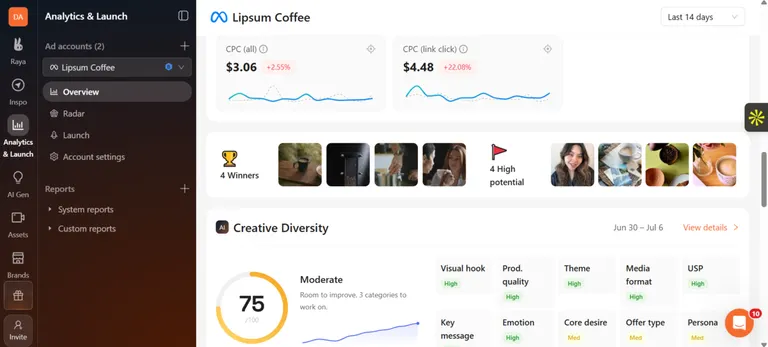
Raya, the AI creative strategist, auto-tags every ad by hook, format, and persona the moment it goes live. Instead of cross-referencing campaign names against a spreadsheet, you get a structured view of performance you can filter, compare, and act on in seconds.
This is the part I wish I'd had back when I was maintaining the naming doc by hand.
A solid naming convention gets your data organized. Atria takes that organized data and turns it into an analysis you can act on in minutes.
Rubix, a performance marketing agency, cut creative analysis time by 40% and lifted ROAS by 15% using Atria's tagging and reporting.
Founder and CEO, Alex Realmuto, says, "Atria is phenomenal, especially from a reporting standpoint. It's going to make your life easier, and it's an easy decision when you look at ROI."
Here's how Atria helps with social ads analytics:
- Pulls creative-level performance without manual filtering: Because Atria auto-tags every ad by hook, format, and persona, you can filter reports by any of those fields instantly instead of exporting a spreadsheet and sorting through campaign names by hand.
- Generates ad reports in a few clicks: Atria builds performance reports directly from your tagged campaign data, so you get a clear view of what's winning by audience, platform, or creative angle without building a dashboard from scratch every time.
- Grades every ad in plain English: Instead of scanning raw metrics across dozens of naming-convention-organized ads, Atria tells you which ad is underperforming and exactly what to change, cutting the analysis step most marketers spend hours on.
- Makes client reporting fast for agencies: Agencies managing multiple accounts can pull a client-specific report straight from Atria and send it along, skipping the usual process of exporting data from Ads Manager, cleaning it up, and rebuilding it in a slide deck or sheet.
A good convention will get you most of the way there on its own. I'd only reach for a tool once the volume stops being something one person can hold in their head.
Want to see your best-performing hooks in minutes? Try Atria for free.
Frequently asked questions
What should I name my campaign?
Name your campaign using the campaign-level structure: funnel position, objective, budget type, bid strategy, and a custom identifier. For example: 'TOFU_Awareness_CBO_LowestCost_HolidayLaunch'.
What are examples of naming conventions?
Some examples of campaign naming conventions include:
- Campaign level: 'TOFU_Awareness_CBO_LowestCost_HolidayLaunch'
- Ad set level: 'Jul26_PastPurchasers_LAL1%_FeedStories'
- Ad set level (Advantage+): 'Jul26_AdvPlus_Broad_AutoPlacement'
- Ad level: 'HolidaySale_Carousel_20PercentOff_ShopNow_LP2_Hook1'
- Google Ads campaign: 'GAds_Search_LeadGen_ProductX_US_Q3'
- LinkedIn campaign: 'LI_Conv_B2B_Webinar_EMEA_Sep26'
How do I choose a campaign name?
Choose a campaign name by filling in your fixed fields for that tier: funnel position, objective, budget type, and bid strategy for a campaign, or creative name, ad type, offer, CTA, and destination for an ad.
Use dropdowns to avoid typos, and check your platform's character limit before finalizing the name.