Your offer works, your targeting is dialed in, but the ad still slides past people mid-scroll like it was never there. The Facebook ad creative is usually the problem.
I review ad accounts regularly, and I often see teams obsessing over targeting and letting the creative go stale. Meta's delivery system decides who sees your ad now, so the image or video and the words around it are the one part of the ad you still fully control, and the part many teams skip.
This is the practitioner's take on what stops the scroll, wastes your spend, and keeps a winner working once you've found one.
What is Facebook ad creative?
Facebook ad creative is everything a person sees and reads in your ad. That includes the image or video, plus the copy wrapped around it. Meta's own documentation calls the creative "an object that contains all the data for visually rendering the ad."
In practice, the copy breaks into 3 fields:
- Primary text: The message that sits above the image or video.
- Headline: The bold line directly below the creative.
- Description: The smaller supporting line under the headline.
Targeting, budget, and placement all affect who sees your ad. The creative decides what happens once they do.
Meta's Andromeda-era delivery system now automates more of the targeting, which means the creative carries a bigger share of the outcome than it did before Andromeda rolled out.
7 Facebook ad creative best practices for 2026
Creative that performs shares a handful of traits, and skipping any one of them can cost you reach:
1. Lead with vertical video
Shoot 9:16 for Reels, Stories, and the mobile feed, and design it to work with the sound off. Bake the captions in from the start.
2. Earn the first 3 seconds
Meta's own guidance points to the 3-second window, and the data backs it up. Open on motion or on the problem, and get your most important message in fast before the viewer's thumb keeps moving.
3. Show real people
A face in frame stops the scroll better than a polished product shot on a blank background. UGC-style creative tends to win with cold prospecting and high-skepticism categories like beauty or supplements, since viewers read it as a real post in their feed.
Warm retargeting and premium positioning can still favor a polished studio shot.
4. Give each creative one job
Keep it to one clear focal point and one message. When you try to cram in a second offer, a third callout, or a competing visual, you're asking the viewer to do the work of figuring out what matters. On a 3-second scroll, they won't do it, and the ad loses before the message even lands.
5. Keep the text short and put the value in the visual
Trim the primary text to a single idea, or even one sentence if you can manage it. The image or video should carry the offer on its own, before anyone reads a word of copy.
If the value only lands after 3 lines of primary text, the visual isn't doing its job, and no amount of clever copy fixes that on a feed where most people are scrolling past in under a second.
6. Brand early without opening on the logo
People should know it's you within the first frames, through a product shot, a packaging color, or a familiar voice.
I'd cut the logo slide every time. A 5-second logo intro burns the exact seconds Meta's delivery system uses to decide whether anyone keeps watching, so the hook doesn’t get a chance to land.
7. Design for sound-off, reward sound-on
Meta still defaults to silent autoplay in the feed, so build every ad to work without audio. Captions carry the dialogue, on-screen text carries the offer, motion carries the hook. I'd rather cut a clever voiceover than lose the message for anyone scrolling with the phone silenced.
Facebook ad creative formats (and when to use each)
Meta gives you 4 workhorse formats. Picking the right one comes down to what you're trying to get the viewer to do:
| Format | Best for | Choose it when |
|---|---|---|
| Single image | One clear offer, fast tests | You need to test a hook or angle cheaply and fast |
| Single video | Demos, motion, storytelling | The product is better shown than described |
| Carousel | Multiple products or a sequence | You have several items, features, or steps to walk through (minimum of 2, maximum of 10 cards) |
| Collection | Mobile shopping from a catalog | You run e-commerce and want tap-to-browse straight from the ad |
A single image is the fastest way to test a new angle. Push it live, read the results, and move on before you sink production time into it.
Carousel only earns its spot when you have an actual sequence, like a 3-step how-it-works or a lineup of products. Don't reach for it just to fill cards.
Whatever format you pick, run it across every placement Meta offers.
Meta says 6 or more placements spreads your test wider. Advantage+ creative, Meta's auto-optimization tool, resizes the asset for each placement on its own, so you're not stuck cropping the same image 3 different ways by hand.
💡 Tip: If you're running more than a handful of creatives at once, telling a winner from a lucky day gets hard fast. Check out our guide on AI tools for creative analysis to see how that read gets easier at scale.
Good vs. bad Facebook ad creative examples
Real ads make the case better than a hypothetical ever could. Here are 4 I pulled from the Meta Ad Library that get it right, and 3 that don't:
Good examples of Facebook ad creative
Rythm Health: a group of friends testing an at-home blood test together
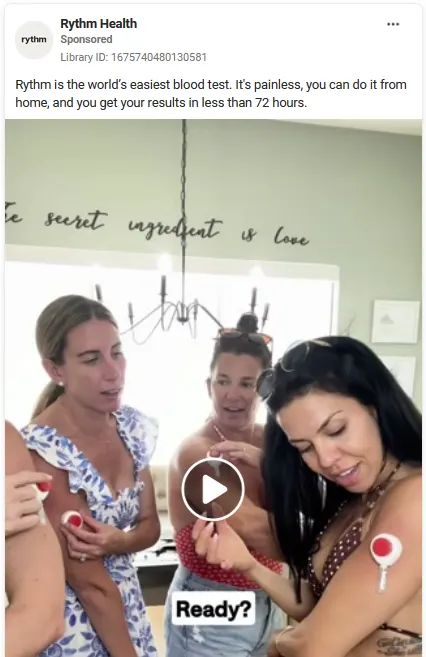
This is what "real people" means. The ad is unscripted, shot in someone's living room, with a caption ("Ready?") doing narrative work instead of only transcribing audio.
I'd rather run this over a studio shoot every time the budget allows it.
Uber: an airport ride reminder
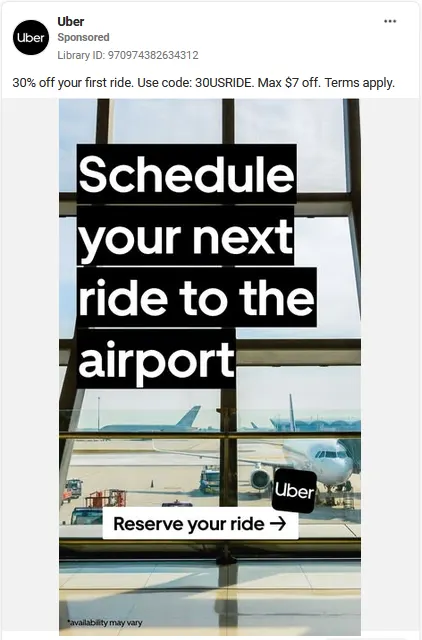
One line of text, one photo, and one CTA makes the message land fast. "Schedule your next ride to the airport" reads off the image before anyone gets to the copy underneath it, and the logo is inside the scene instead of opening the frame.
Whatnot: a haul reveal

A close shot of someone showing off the shoes she bought, with a mid-sentence caption ("Where you're getting") built to catch a scroll.
As the video plays, she works through several more pairs, so the ad doubles as a real haul instead of a single staged product shot. The product is the visual, and nothing needs explaining underneath it.
The Sticky Brand: a sticker pack compared to a pizza
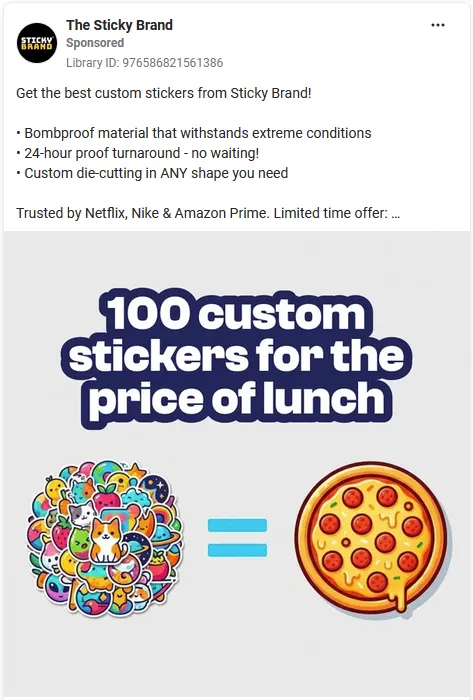
This ad has no people and no UGC, and it still works because the entire pitch lives in one visual joke that a pile of stickers equals a pizza in price.
If the offer needs a paragraph to land, the visual isn't doing its job. This one proves it can be done in a single image.
Examples that don’t quite nail it
Costa Coffee: a prize giveaway

The headline, the product can, a splash graphic, an Uber logo, a car illustration, and a 3-step redemption process are all competing for the same few seconds of attention.
The hook (a £10,000 voucher) is strong enough to earn a glance. Everything after that asks the viewer to do too much work.
Product Alliance: a course discount

This one features 8 company logos, a discount callout, 3 feature icons, and 2 separate CTAs, stacked on a plain background with no actual photo or scene anywhere in the ad. There's nothing for the eye to land on, only text to read.
JD Sports: a back-to-school promo
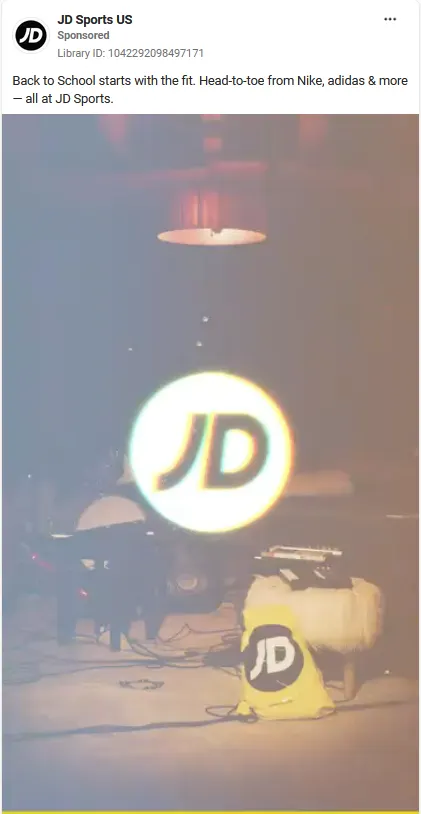
The logo is the biggest, brightest thing in the frame for the opening seconds. People do show up later in the footage, but the ad stays focused on mood and atmosphere over anything close to a product shot or an offer.
The copy promises shoes and clothing from name brands, and the footage doesn’t deliver on that promise visually. No clear product in the first frames, no reason to keep watching.
The Facebook ad creative checklist
Run this before anything goes live. 2 minutes, and it catches most of what's gone wrong in the ads above before it costs you spend:
- Format: Confirm the aspect ratio matches the placement of 9:16 for Reels and Stories, 1:1 or 4:5 for feed. Check that no copy or logo gets cut off at the edges.
- Hook: Watch the first 3 seconds alone. You need motion, a face, or the problem stated plainly in that window, or the rest of the ad might not get seen.
- Focal point: Ask what the single message is. If you can't answer in one sentence, the creative is trying to do 2 jobs at once. I’d cut it back to one.
- Copy: Mute the ad and see if the offer still makes sense from the visual alone, then check the primary text carries only one idea.
- Captions: Turn the sound off and confirm you can still follow every word on screen. If the captions cut out or lag behind, I’d fix that before anything else on this list.
- Brand: Check the first frames for a face, product, or color that says who this is, without a logo slide eating that time.
- CTA button: Confirm the button's promise matches what the landing page shows. A mismatch here is a fast way to waste a good click.
- Mobile check: Preview it on your own phone, sound off. Ads Manager and desktop previews miss things a phone screen catches, like cropped text, a button that's hard to tap, or a hook that reads differently at that size.
- Testing: Confirm 2 or 3 variants of the concept are already queued, so this one isn't the only thing running when it starts to fatigue.
How to test and iterate on Facebook ad creative
Creative works best as an ongoing cycle. That process breaks down into five steps:
Start with research
Before you produce anything, study the ads already running in your category in the Meta Ad Library. What hooks, formats, and angles are your competitors betting on right now? You're looking for the angle they're all missing.
Test at the concept level
5 genuinely different concepts teach you more than 50 tiny color swaps, and each one needs enough spend and time to exit Meta's learning phase before you judge it.
I'd rather launch 3 bold swings than 10 safe variations of the same idea, because those variations mostly confirm what I already suspected.
Watch for fatigue as you go
When frequency climbs, CTR slides, and CPA creeps up with no other change, the creative is wearing out. Refresh the hook first, since that's the part that fatigues fastest.
Tag your results from day one
Tag every creative you launch by hook type, format, persona, and angle. Once every ad carries that label, a quick report shows you which hook drives the ROAS. Many teams automate this step once the ad volume makes doing it by hand impractical.
A couple of months in, you'll start to see which hook styles keep winning and which formats keep falling flat with this audience.
Keep the rotation stocked
A healthy account needs several active creative variants running at once, so one fatiguing ad doesn’t leave you starting from zero. Keeping that pipeline full is a lot of production. I've watched good teams burn out trying to do this manually.
💡 Tip: If production is the bottleneck, check our breakdown of ad creative automation platforms to see which tools keep your pipeline full without hiring more people.
How Atria catches Facebook ad creative fatigue before it costs you
Keeping creative fresh means constant research, testing, and refreshing burned-out hooks, and fatigue often gets caught too late to save the budget. That's the tradeoff many lean teams make when creative velocity isn't built into the process.
Atria is a creative intelligence platform for Meta ads, built around the full performance loop, which is research → brief → generate → launch → analyze, where every campaign sharpens the next. The models are trained on $9B+ in real Meta ad spend, so what you see is what’s working in the market, not what sounds plausible.
Raya is the AI strategist that handles research, briefing, and generation. It pulls competitor hooks and angles from the Ad Library, turns that research into a brief, and produces scripts, copy, and image variants ready to launch. Rubix uses it to cut creative-analysis time 40% and lift ROAS 15%.
Radar is the grading engine that watches your live ads, scoring creative in plain English and flagging decline before it drains spend. It’s the always-on half of the loop that catches fatigue earlier than a weekly review ever could.
Want a clear read on your Facebook ad creative before it fatigues? Try Atria for free today.
Frequently asked questions
What makes a good Facebook ad creative?
A good Facebook ad creative delivers one clear message with a hook in the first 3 seconds, in a mobile-first vertical or square format. UGC-style creative often outperforms polished stock in cold prospecting, captions carry the video on mute, and the value proposition reads off the visual alone.
What are some creative Facebook ad ideas?
Creative Facebook ad ideas that hold up include UGC testimonials, problem-solution hooks, before-and-after reveals, and benefit-led carousels. Test a few distinct concepts at once, then double down on whichever earns the click.
Why does my ad show creative fatigue?
Your ad shows creative fatigue when the same audience has seen it too many times, so frequency rises, click-through rate falls, and cost per result climbs even though nothing in your targeting changed. The fix is to refresh the creative, starting with the hook, before performance craters.
What size should Facebook ad creative be?
Facebook ad creative should be sized to the placement, so 9:16 for Reels and Stories, and 1:1 or 4:5 for the feed. Design to each placement's safe zones so text and logos don't get cropped, and preview the ad on a phone before launch.
How many creative variations should I test at once?
Test 3-5 distinct concepts at once. Give each variant enough budget and time to exit Meta's learning phase, and change one variable like the hook, format, or offer per test so you can tell what moved the result.