
You look at a pair of shoes on a website, close the tab, and open Instagram two minutes later. The same pair of shoes shows up in your feed. That's Facebook retargeting at work.
Retargeting usually converts better than cold prospecting, because everyone it reaches has already shown interest.
I spent four days building a retargeting structure in Meta Ads Manager, from the Pixel through to a finished ad set, ready to turn on. The browser Pixel and the server-side Conversions API didn't agree with each other right away.
By the end, you'll know whether your tracking is clean, which audiences are worth building, and when frequency starts hurting performance.
Facebook Retargeting: TL;DR
- Facebook retargeting uses Custom Audiences to reach people who've interacted with your business through website visits, Meta engagement, or customer lists.
- Setup takes six steps, from confirming your tracking to launching the ad set.
- Build audiences around how ready someone is to buy, starting with cart abandoners and recent visitors.
- Retargeting can still work after iOS privacy changes. Pair the Pixel with CAPI and your own customer data to catch more of what the browser misses.
What Facebook Retargeting Is and How It Works
Facebook retargeting shows Meta ads to people who already did something with your business. They visited your site, watched a video, opened a lead form, or bought something before. Meta groups these people into what it calls a Custom Audience.
Run your retargeting ad set alongside your prospecting campaigns, but check the targeting settings. With Advantage+ Audience, Meta may treat your Custom Audience as a suggestion unless you restrict delivery to that group.
For website-based retargeting, the Pixel and Conversions API send the events Meta uses to build your audience.
The Meta Pixel
The Meta Pixel sends visitor activity to Meta through the browser, which is exactly where it runs into trouble.
The catch here is that a browser can block or limit that signal. Ad blockers, cookie restrictions, and a visitor declining tracking consent can all stop a Pixel event before Meta ever sees it.
The Conversions API
The Conversions API, or CAPI for short, sends the same kinds of events from your own server or e-commerce platform.
With a direct server-side integration, CAPI can send events even when a browser script is blocked. Meta's newer one-click CAPI setup mirrors Pixel events, so that version still depends on the Pixel firing.
Most accounts run the Pixel and CAPI together for a more complete picture. When both send the same event, Meta needs a way to recognize it as one action so it doesn't count it twice. That's deduplication.
To make that work, the browser and server copies of the same event need the same event name and the same event ID.
Meta reports that advertisers using a Conversions API setup for web events saw a 17.8% lower average cost per result compared to accounts without one. That's Meta's own number. Your account's number will depend on your setup.
What You'll Need Before You Start
Prerequisites:
- A Meta ad account connected to a business portfolio (what Meta used to call a Business Manager account) that you can access through Meta Business Suite.
- The Meta Pixel, the Conversions API, or both, installed on the site you're advertising.
- Enough regular site traffic that an audience can fill up. A trickle of visitors a day takes a long time to turn into a usable audience.
- A product catalog uploaded to Commerce Manager, only if you plan to run catalog-based retargeting ads.
Time required: Plan for an afternoon if your tracking is clean. Most of my four days went into getting the Pixel and CAPI events to match.
After that, your audience may need time to populate. Once the ad set starts delivering, it can enter a separate learning phase, and how long that lasts depends on the results the ad set gets.
How to Set Up Facebook Retargeting: Step-by-Step
Step 1: Confirm Your Pixel and Conversions API Both Fire
Check that your tracking works before building anything. Open Events Manager and look for your Pixel's events coming in as you browse your own site.
If you've also set up the Conversions API, check the Event Deduplication tab, where mismatched events between the two are easy to spot. My own deduplication rate landed at roughly 44%. The browser and server weren't sharing one matching event ID for the same action.
Pro tip: A low deduplication rate can point to missing or mismatched event IDs, different event names, or gaps where the Pixel and CAPI send different events. Check the matching keys in Test Events before building your audience.
Step 2: Build Your First Custom Audience
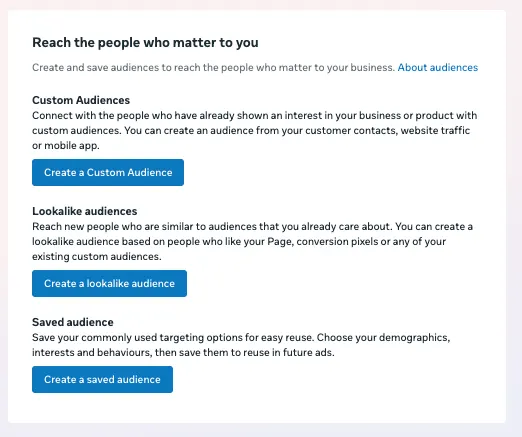
Open Audiences inside Meta Ads Manager, select Create audience, then Custom audience. Choose a Website as your source, then pick your Pixel. Choose which visitor action should count, like viewing a page or adding something to a cart.
That full screen-by-screen process, including customer lists and app-activity sources, covers far more than this step needs.
Our guide to Facebook Custom Audiences covers choosing a source, writing matching rules, and naming conventions in full. The steps below stick to what's specific to retargeting instead.
Step 3: Set Your Audience Retention Window
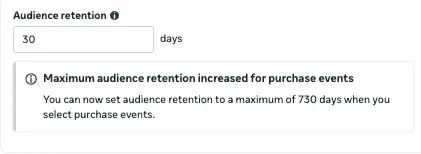
Under Audience retention, choose how many days someone stays in the audience after they take the qualifying action. Meta generally caps website and app-activity Custom Audiences at 180 days, but audiences built from Purchase events can now retain people for up to 730 days.
Someone drops out when their retention window ends unless they qualify again.
A brand-new audience won't show its true size right away. Meta's own guidance is to wait until you have several hundred people in the audience before turning the ad set loose on it.
Step 4: Add Exclusions Before You Turn the Ad Set On

While you're still in the audience setup screen, you can include or exclude people using up to five rules per audience. Use this to keep someone who already converted out of an audience built for people who haven't.
See the fuller exclusion strategy, including Meta's separate exclusion-only audience type, further down.
Step 5: Pick Your Objective and Ad Format
A retargeting ad set built around a purchase usually belongs under Meta's Sales objective.
Sales still delivers across Facebook, Instagram, Messenger, and the Audience Network, so retargeting isn't locked to the Facebook feed.
For the ad format, Meta renamed dynamic ads to Advantage+ catalog ads. You'll still spot the older "dynamic ads" label in a few corners of Meta's own site. Both names point at the same thing: ads that automatically pull in the specific products someone viewed or left in a cart.
Step 6: Set Your Budget and Launch
Set your budget and publish. For a purchase-focused Sales campaign, you'll generally need to monitor frequency in reporting. Meta limits its direct frequency controls to eligible campaign objectives and performance goals. Budget and frequency each get a section below.
The Facebook Retargeting Audiences to Build
Meta offers more audience types than you need, thirteen in total on the custom audience screen. Build only the ones tied to a clear reason someone’s warm.
This guide covers four: Website Visitors, Engagement Audiences, Customer Lists, and Catalog Audiences, since those four handle most retargeting setups.
App activity and offline activity are the two left out, on purpose. App activity only matters if you’re tracking a mobile app through Meta’s SDK, and offline activity runs through a separate upload process from the Pixel and CAPI setup this guide is built around.
How the main audience types stack up by window and purpose:
| Audience | Suggested window | Why |
|---|---|---|
| Cart abandoners | 3 to 7 days | Highest intent, interest fades fast |
| Checkout starters | 7 to 14 days | Close to buying, still worth a longer look |
| Product or content viewers | 14 to 30 days | Still weighing the decision |
| All website visitors | 30 to 180 days | The broadest catch-all pool |
| Video and social engagement | 30 to 90 days | Based on Facebook or Instagram activity directly |
| Customer lists | No expiry, refreshed on upload | Used for upsell, renewal, and loyalty offers |
| Catalog audiences | 7 to 14 days | Tied to specific product views or cart events |
These windows reflect commonly used retargeting segments, like the ones in Shopify's guide to Facebook retargeting. Advertisers still disagree on the exact numbers in that middle column.
Some run a 14-day cart-abandoner window because a seven-day pool gets too small to optimize against. Others go with the shorter window for anything that is close to a purchase. Treat the table as a starting point, then watch your own audience size and adjust.
Website Visitors
A Website Custom Audience can cover every visitor, people who hit specific URLs, or people who completed a specific event like ViewContent or InitiateCheckout. I built mine on a 30-day all-visitors window first, since a brand-new Pixel has no cart-abandoner history to draw from yet.
A broad, all-visitors window like that normally clears Ads Manager's minimum size faster than a narrower website window. Mine flipped from Populating to Ready within two days.
That said, a 30-day catch-all is the wrong audience to leave running once a cart-abandoner or checkout-starter event has enough volume behind it.
Of every audience type here, a broad all-visitors pool carries the highest risk of spend landing on someone who browsed once and had already decided no.
Engagement Audiences
Your website doesn't factor into a Facebook or Instagram engagement audience at all. Meta builds it from video views, Page or profile activity, and instant-form interactions that happened natively on the platform.
These earn a spot when site traffic alone is too thin to fill a website audience, or when the warmest signal you have is someone who watched most of a video. Someone who watched three seconds and scrolled past isn't the same prospect as someone who watched to the end.
When creating a video engagement audience, you choose a viewing threshold, such as three seconds or 95% of the video, to decide who qualifies.
Customer Lists
You already know everyone in a Customer List audience. You upload it as a hashed list of emails or phone numbers, and Meta matches it against its own user base.
You can use the same list to exclude buyers or to run renewal, replenishment, cross-sell, and loyalty campaigns for people who’ve already paid you once. That's a different job from every cold-to-warm audience above it.
It matches against data Meta already has, so mine went from upload to usable the same day, while my website audience was still two days into Populating.
Catalog Audiences
Catalog audiences run through Advantage+ catalog ads, built directly from your product feed to show whatever a shopper looked at or added to a cart. This one took more fixing to get right than any other audience type I built.
The ad is only as reliable as the feed behind it. A wrong catalog ID, a stale availability flag, or a mismatched destination URL usually means the wrong product appears in the ad itself. Check the feed first before you dig into the audience settings.
Match your creative to each audience the same way you match the window. A cart abandoner wants to see the item they left behind.
A pricing-page visitor who's still on the fence usually responds better to proof-driven creative, a review count, or a customer quote over another product shot.
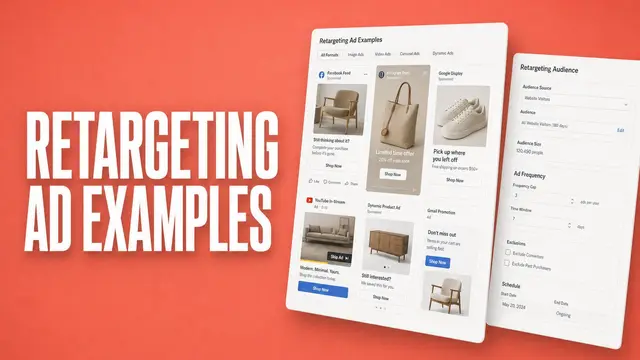
See our collection of retargeting ad examples for how real brands handle this by funnel stage.
Real Retargeting Ads by Funnel Stage
A few formats that work well at different points in the funnel:
- Cart abandoners: Huel skips the discount and adds a bonus item instead, protecting margin while still giving a hesitant buyer a reason to finish checking out.
- Product viewers still weighing it: Flo Mattress stacks dozens of real customer ratings into one ad, since a wall of reviews is harder to dismiss than a single quote.
- Checkout starters comparing options: Neubrain runs a side-by-side comparison chart against competing products, answering the “which one’s better” question before the shopper looks elsewhere.
- Customer lists and repeat buyers: Nike retargets recent buyers with a complementary product instead of the one they already own, lifting order value without wasting an impression on a repeat pitch.
See the full collection of retargeting ad examples for the complete set, organized by format and frequency.
Who to Exclude From Your Retargeting Audience
Exclusions stop you from paying to show a cart-reminder ad to someone who already bought.
A blanket rule to exclude every purchaser is a decent default, but an incomplete one. Exclude someone from the specific message that no longer applies to them, like a first-purchase discount. Keep them eligible for a replenishment, renewal, or loyalty ad set built for people who've already bought.
How far back to exclude is unsettled among advertisers themselves. Some exclude 60-day buyers, others 90, and some exclude anyone who's bought in the last 180 days regardless of product.
Match the window to how often someone would buy again. A weekly consumable and a once-a-year purchase call for different rules.
For a firmer block, Meta also offers exclusion-only Custom Audiences, built from a customer list and usable only to exclude. Once created, an exclusion-only audience can't be converted back to a regular one.
That permanently prevents the list from being used for targeting, but you still need to apply it wherever those people should be excluded. Use it for customer groups you can legitimately upload but don't want to advertise to.
If someone has opted out of having their data used for Meta targeting, keep their information out of uploaded Custom Audiences entirely.
How Much Budget to Give Retargeting vs. Prospecting
No universal percentage works for every account. Retargeting spend is limited by how many eligible people are in the pool. Past a certain point, more budget mostly buys repeat impressions on the same people.
A reasonable starting point for a single retargeting ad set is a small daily budget, often somewhere in the $10 to $30 range. Scale it up once you can see it converting at a cost you're comfortable with.
A shared campaign budget for retargeting and prospecting can cause confusion. Advantage+ campaign budget (what Meta used to call Campaign Budget Optimization) pushes spend toward whichever ad set it predicts will perform best. That can mean your small, warm retargeting audience absorbs the entire daily budget while prospecting sits at $0.
Separate budgets for retargeting and prospecting make it far easier to see which side is carrying the account. Our guide to calculating your Facebook Ads ROI walks through exactly that comparison.
Frequency and Creative Fatigue in Retargeting
Frequency is the average number of times one person sees your ad over a given stretch of time. It deserves more attention in retargeting than in prospecting, because the audiences involved are usually smaller.
Native frequency controls are limited to Awareness and some Engagement campaigns, so a Sales-objective retargeting campaign won't have them. Check frequency in your reporting columns instead.
Meta ties frequency and fatigue together directly. Once performance starts dropping as frequency climbs, that's the point to start checking what's driving it. No single frequency number works the same way for every account.
Retargeting audiences can handle more repeat exposure than cold prospecting audiences, since they already know the brand. Datadrew’s breakdown of creative-fatigue thresholds puts retargeting’s safe frequency ceiling at 5 to 7. A recent buyer seeing a short sale, by contrast, can tolerate more repetition than someone who visited once four months ago.
Before assuming your creative is fatigued, check where your impressions are landing. A performance drop that looks like fatigue can just as easily trace back to one placement soaking up most of the budget. A quick, placement-by-placement check can catch that before you commission new creative you don't need.
Our guide to diagnosing and fixing Meta creative fatigue covers the fuller framework for telling creative fatigue apart from a placement problem or an exhausted audience.
Is Facebook Retargeting Still Effective After iOS and Privacy Changes?
Facebook retargeting is still effective, but it leans on different signals than it did a few years ago.
Apple's App Tracking Transparency rule requires permission before tracking someone across other companies' apps and sites. When people decline, Meta loses some of the signals used to connect activity across apps and websites.
The Conversions API doesn't get around that rule. It still only sends data you have permission to collect and use, but it takes a more reliable path than a browser script, since a server-side event doesn't depend on code a visitor's browser or an ad blocker can stop.
Retargeting built on the Pixel and CAPI together, plus your own first-party data like a customer list, still works well in 2026. The browser Pixel can still support retargeting on its own, but browser restrictions can leave gaps in event coverage.
Common Retargeting Mistakes to Avoid
A few habits undercut retargeting performance:
- No exclusions set up: A cart-abandonment ad shown to someone who already checked out wastes budget and annoys a customer who should be getting a different message.
- One retention window for every audience: A cart abandoner and a six-month-old blog reader aren't the same kind of warm. Treat them the same, and your results flatten.
- Creative blame before checking placement: A performance dip from one placement eating the budget can look like creative fatigue. Check the breakdown first, before you touch the ad.
- A shared budget's behavior treated as a bug: A retargeting audience pulling most of a shared budget is Advantage+ campaign budget working as intended. Split the budgets if you want to see each side clearly.
- The same discount every time: A straight percentage off trains buyers to wait for the next sale. A guarantee, free shipping, or a customer quote often works better than another round of price cuts.
How Atria Helps You Catch Retargeting Fatigue Before It Costs You
Everything above still leaves one problem: catching the moment a specific retargeting ad starts to slip. If left unchecked, a tiring ad can push down ROAS before the decline becomes obvious in the account's overall numbers.
Atria is built around two systems that go after exactly that. Radar grades each of your ads on its own, which means a single ad that's starting to fatigue still gets flagged even while the account's overall numbers look fine.
Atria's AI creative strategist Raya can then write a brief or generate a new image ad based on what that grade shows.
Here's how Atria helps with Facebook retargeting:
- What Radar grades: video ads on hook, retention, click-through rate, and conversion. Static ads on click-through rate and conversion only, plus one overall grade per ad.
- How grading stays current: Radar re-grades your existing ads and keeps updating as you launch new ones, helping you spot ads whose performance is slipping.
- Raya's part: ask her about a graded ad in your own words, and she can write the brief for what to test next.
A retargeting audience is usually small, so a tired creative burns through it fast. Your Pixel, audiences, and exclusions still need to be set up first.
Atria runs inside Slack, and you can try it with 1,000 free credits, no credit card needed.
Frequently Asked Questions
How do you set up retargeting on Facebook?
Facebook retargeting setup runs in six steps, starting with your Pixel and Conversions API and ending with a launched ad set.
A developer may handle a custom Conversions API integration, but for eligible web datasets, Meta now offers a built-in CAPI option inside Events Manager that needs no developer setup. You configure the Pixel there too. The section above covers each step.
Is Facebook retargeting still effective?
Yes, Facebook retargeting is still effective in 2026, especially when you pair the Pixel with CAPI and your own customer data.
Can you do retargeting on Meta ads, or is it Facebook-only?
No, it isn’t Facebook-only. One Custom Audience can run retargeting ads across Facebook, Instagram, Messenger, and the Audience Network.
How long does it take to set up Facebook retargeting?
A few hours of hands-on work gets your tracking and first audience up and running in one sitting. The wait comes after that.
A new audience may need time to populate, and a launched ad set may enter a learning phase. How long either takes depends on audience activity and the results the ad set receives.
What's the hardest part of Facebook retargeting setup?
Getting the Pixel and CAPI events to match is usually the hardest part of Facebook retargeting setup. A low dedup rate usually means the browser and server events don’t match, most often because of a missing event ID or a different event name.