You built a scroll-stopping image. Then Meta cropped your logo out of the Story, or the ad just looked wrong the moment it hit Marketplace instead of Feed.
It’s easy to blame your creative, but the real problem in most cases was the aspect ratio for that placement, or a best practice skipped somewhere along the way.
I've placed enough image ads across Meta's placements to know that the difference between an image that's technically fine and one that's built for where it runs is worth checking before launch.
Below, I’ll show you how to build Facebook image ads that look right across placements.
What are Facebook image ads?
Facebook image ads are single static images, usually JPG or PNG, paired with ad copy and a headline or a CTA button (depending on the placement). Meta also calls them photo ads.
Where that image shows up depends on your campaign setup, but it can run in Feed, Stories, Marketplace, search results, Messenger, the Audience Network, and as an overlay on Reels.
I like this format because it's cheap to make and fast to test. You can try a new angle without committing to a full video shoot.
Facebook image ad specs (verified September 2026)
Start here, because the wrong dimensions can get your image cropped in ways you didn't plan for, and a file that breaks Meta's limits may not upload at all. These are the recommendations from Meta's Ads Guide for Facebook Feed image ads:
| Attribute | Recommendation |
|---|---|
| File type | JPG or PNG |
| Recommended ratio | 4:5 |
| Recommended resolution | 1440 x 1800 px |
| Maximum file size | 30MB |
| Minimum width | 600 px |
| Minimum height | 750 px |
| Primary text | 50 to 150 characters |
| Headline | around 27 characters |
💡 Tip: If you need to produce a lot of on-spec images fast, check out our guide on the best AI ad generators.
Facebook image ad sizes by placement
One master file rarely looks good everywhere. A 4:5 Feed image can end up looking off in a 9:16 Story if the crop cuts into your subject. The recommended dimensions change placement by placement, per Meta’s Feed, Stories, and Marketplace specifications:
| Placement | Recommended size (px) | Ratio |
|---|---|---|
| Facebook Feed | 1440 x 1800 | 4:5 |
| Facebook Stories | 1440 x 2560 | 9:16 |
| Facebook Reels (overlay) | 1080 x 1080 (minimum) | 1:1 |
| Facebook Reels (full screen) | 1080 x 1920 | 9:16 |
| Marketplace | 1080 x 1080 (minimum) | 1:1 |
Design the master at 4:5, then build separate exports for Stories and Reels. The two Reels placements need different files: the overlay that sits on top of a Reel is square, while a full-screen Reels ad takes the same 9:16 export as a Story.
Watch your safe zones on Stories and Reels. Meta's guidance is to keep the top, bottom, and side edges of a 9:16 ad clear of text and logos, since profile info, captions, and the CTA sticker can cover that space.
Preview your Reels overlay separately since it's a different format entirely. If you're adding a disclaimer to a Reels ad, Meta specifically recommends keeping the bottom 40% clear.
💡 Tip: If you need to produce more creative variations for testing, check out our guide on the best bulk-creation software.
Facebook image ad examples (and why they convert)
Studying ads that already work is one of the fastest ways to get better at this format. These 6 cover the most common ways image ads win:
1. The single-product hero
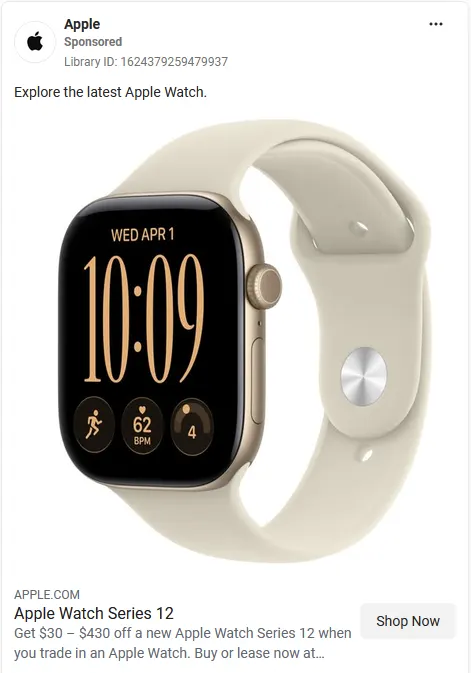
Apple's Apple Watch Series 12 ad keeps it simple. It’s one product shot against a plain background, a short headline, and a trade-in offer. Nothing else competes with the watch itself.
Ads like these work well for DTC brands with a photogenic hero product. Shoot it at 1:1 so it holds the center in Feed and Marketplace.
2. Real people using the product
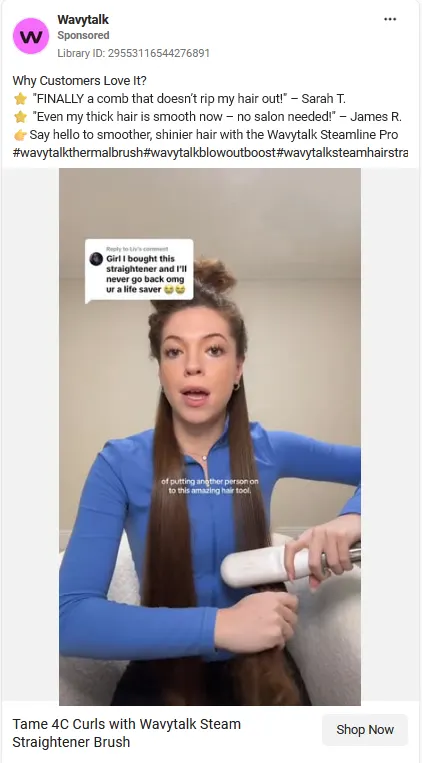
Wavytalk's ad looks like a paused video, complete with a reply-to-comment overlay and a mid-motion pose, but it's a static image. The format borrows video's attention-grabbing cues in hopes of stopping a scrolling viewer.
Ads with real people are ideal for beauty, apparel, and food brands. A screenshot-style static image can outperform a polished product photo since it blends into the feed instead of announcing itself as an ad.
3. The trust-number ad
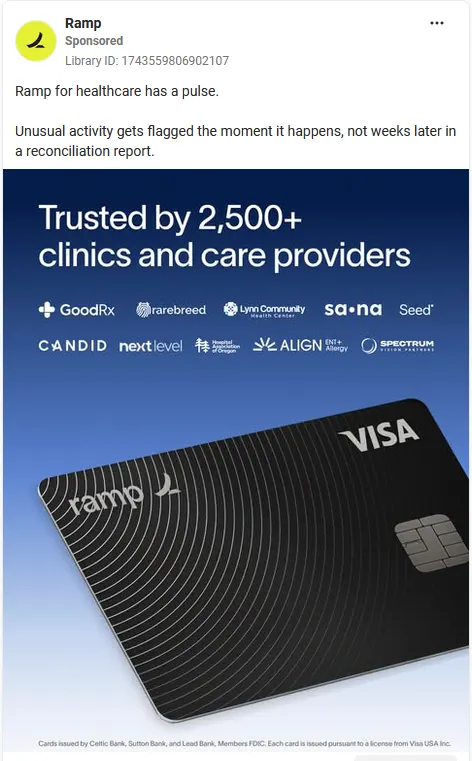
Ramp’s ad for its healthcare vertical leads with "Trusted by 2,500+ clinics and care providers," backed by a row of recognizable logos. The number does the credibility work upfront, before the reader even gets to the pitch about real-time fraud flags.
This is the move for skeptical buyers who want proof before they'll even read your pitch. Just make sure the logos are ones your audience recognizes.
4. The offer-and-urgency ad

Hungryroot's Cyber Sale ad overlays "Get 40% Off" in bold text across a collage of the food itself. The discount sits right on top of the product, so there's no separate lifestyle shot competing for attention.
Best for e-commerce during promos. A high-contrast text banner over a busy image still reads clearly at a glance.
5. The lead-magnet ad

AVEVA's ad offers a free eBook on asset lifecycle management, aimed at engineering and construction buyers navigating capital projects. The image itself, an industrial refinery at dusk, signals the audience immediately, then the "Read the eBook" button does the asking.
This works for lead-gen and top-of-funnel. Name the exact audience in your copy so the download feels built for them.
6. The before-and-after/comparison ad
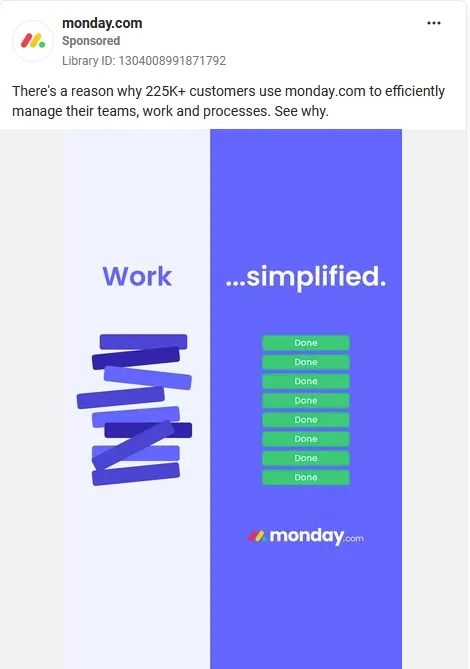
Monday.com splits the frame in two. One is a stack of tangled arrows labeled "Work", and the other is a column of checked-off "Done" tasks labeled "...simplified". The image does the entire pitch without a single sentence of copy.
Best for productivity and workflow tools where the before-and-after is visual and obvious. Keep the two sides equal in size so neither one gets skipped.
Best practices to make your Facebook image ad convert
Specs help your image display properly, and these practices help make your message clear:
- Pick one focal point: Keep it to one subject and one message. A cluttered image gives the eye nowhere to land, and a confused viewer scrolls past.
- Go light on text overlay: Keep your selling in the primary text and headline, and leave the image itself clean. I'd rather read a clean image fast than squint at one crowded with copy.
- Match the CTA to the objective: Shop Now for a product page, Learn More for more detail, or Sign Up for a registration form. When you mismatch the button, people can hesitate instead of clicking.
- Stay on-brand: Consistent logo, colors, and font make your ad recognizable in a crowded feed, so a returning viewer knows it's you before they read a word.
- Ship high-resolution files: Meet or beat the recommended resolution. A soft, pixelated image tells me the advertiser didn't sweat the details.
I'd treat this as a checklist for every asset before launch. If you want the deeper strategic version, check out our guide to Meta's current creative algorithm.
When image ads beat video (and when they don't)
Static images are useful when one frame can carry the idea. Reach for video when motion helps explain it, or carousel when the message needs several cards. This framework helps you decide:
| Use a static image when | Use video or carousel when |
|---|---|
| You need to launch fast and cheap | You're demoing how a product works |
| You have one clear message or offer | You're telling a multi-step story |
| You're testing many concepts at once | You need several reviews or examples to make the case |
| You have a strong single hero shot | You need sound or motion to make the pitch |
| You have one strong review or testimonial | You're running a carousel of related products |
I lean image when I need speed and volume more than polish. One photo shoot or design file can give me several image variations to test, and that matters when I’m still hunting for a winner.
How to test and iterate on image ad dimensions
An image ad that launches well can still fail over the next few weeks if nobody checks it. Watch the dimension, the volume, and the timing of your refresh:
Test across dimensions
A concept built for Feed can need a different crop or treatment in Stories. Check the placement-level breakdown before deciding which version won.
Test volume
Run concepts that differ in offer, hook, product angle, or visual approach, and make sure each one gets enough delivery to produce a real signal. A handful of color swaps on the same concept will only tell you about that one detail.
Watch for fatigue
The clearest sign is frequency climbing while your CTR or conversion rate starts to drop and CPA creeps up.
Before I blame the creative, I rule out anything else that changed, like budget, bids, or targeting. If those signals keep moving together and I can’t find another cause, I’ll treat creative fatigue as the likely issue and test a fresh concept before changing the bid.
How Atria turns image-ad testing into winning creative
What keeps performance up is a constant supply of new concepts, launched across every placement, with fatigue caught before it drains the budget.
At that point, many teams have more ideas than they have time to produce. Atria is a creative intelligence platform built to give you that creative velocity without hiring your way there.
Raya, Atria's AI creative strategist, handles the research-to-launch work of pulling competitor hooks and landing pages, briefing new concepts off what's converting, and batch-uploading placement-ready variants straight to Meta.
Radar, Atria's grading and monitoring engine, watches every live ad, grades it in plain English, and sends an alert the moment performance starts to slip, before CPA climbs.
See what Raya and Radar surface in your own account. Try Atria for free today.
Frequently asked questions
What is the best size for a Facebook image ad?
The recommended size for Facebook Feed image ads is 1440 x 1800 pixels at a 4:5 ratio.
Stories call for 1440 x 2560 pixels at 9:16, full-screen Facebook Reels ads use 1080 x 1920 at 9:16, Reels overlay ads are square at 1080 x 1080 or larger, and Marketplace image ads use a 1:1 square at 1080 × 1080 pixels or larger.
Design one master file, then export the right size for each placement.
What are the Facebook image ad specs?
Facebook image ad specs vary by placement. For Feed, the recommendation is JPG or PNG, up to 30MB, at least 600 px wide, and a 4:5 ratio. Primary text runs 50 to 150 characters, and the headline is around 27 characters.
Other placements, like Stories and Reels, use different ratios and text limits.
Can Facebook image ads be animated?
No, Facebook image ads are static. For movement, use a video ad or a slideshow ad, since both formats support motion that a single image can't.
How do I keep image ads compliant with Meta's ad policies?
To keep ads compliant, follow Meta's Advertising Policies. Avoid misleading claims, and steer clear of prohibited content or claims about someone's personal attributes. Check your ad's review status before you spend heavily, since Meta can flag ads even after they go live.