Search for Revealbot pricing in 2026, and you'll land on a different company name: Bïrch. Plans scale with your monthly ad spend, starting at $45 a month.
Automated rules, the feature most advertisers want, stay locked until you reach Pro. That's the real catch in Bïrch's pricing structure.
I checked every ad spend bracket on Bïrch's pricing page so you can see which tier fits your account before you sign up. If you want the verdict rather than the price list, our Revealbot reviews round-up covers what users say about the rebrand, the rules engine, and support.
Bïrch (Revealbot) pricing at a glance
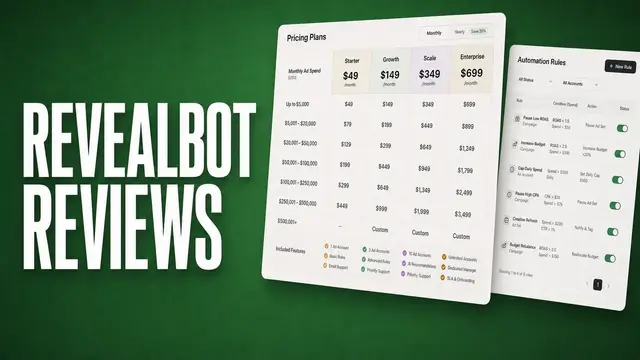
I pulled every Bïrch plan into one table since the pricing page buries this behind an ad spend slider. Here's what each tier costs at the $10K bracket to start:
| 📦 Plan | 💰 Price (billed annually) | 🎯 Best for | 🔑 Key unlock |
|---|---|---|---|
| Essential | $45/month | New or smaller advertisers who want core reporting and boosting tools | Workspaces, post boosting, and reports |
| Pro | $91/month | Teams that want automated rules and audience tools | Automated rules and a lookalike audience builder |
| Enterprise | Custom | Agencies managing several accounts at once | Unlimited ad spend and no overage fees |
*Pricing correct as of August 2026. Verify with vendor.
There are a couple of important things you should know about Bïrch’s pricing:
- Full pricing breaks down by spend bracket: Bïrch's pricing page uses a slider instead of a static table, so the numbers above only reflect the $10K bracket. I've mapped out every bracket, from $10K to $500K+, later in this article.
- Hub is priced separately: If you need server-side tracking through Bïrch's Signals Gateway, that runs on a separate event-based plan.
💡Note: Bïrch charges an overage fee when your spend passes your plan's bracket limit — roughly 0.33% to 1% of your plan price per month depending on tier.
Enterprise is the only plan with no ad spend ceiling and no overage exposure. If your spend fluctuates near a bracket edge, price the next bracket up before you commit.
Bïrch plans and pricing breakdown
Essential and Pro share the exact same core reporting tools. However, when it comes to automation, rules, audience building, and the deeper integrations, all sit behind that Pro upgrade.
Enterprise removes the ad spend ceiling entirely and adds a support layer built for teams running several accounts.
Here's what each tier gets you, with pricing shown at the $10K ad spend bracket:
Essential: From $45/month
- What's included: Workspaces, post boosting, reports, and Slack integration.
- Best for: Small teams that want visibility into performance without touching automation.
- Pros: Core reporting and account organization at Bïrch's lowest price point.
- Cons: Automated rules stay locked here, so you're still checking accounts manually for anything beyond reporting.
Pro: From $91/month
- What's included: Everything in Essential, plus automated rules and strategies, Explorer, Launcher, Stage, Top audiences, an audience builder, custom metrics and timeframes, live chat support, and integrations with Google Sheets, AppsFlyer, and Hyros.
- Best for: Growing teams that want rules handling day-to-day optimization instead of someone watching dashboards.
- Pros: The jump from Essential doubles your monthly cost but unlocks the automation most advertisers come here for.
- Cons: You'll need time to build out rule logic before automation starts saving you real hours.
Enterprise: Custom pricing
- What's included: Everything in Pro, plus onboarding help, tech setup support, and premium support with no ad spend limits.
- Best for: Agencies or in-house teams managing multiple ad accounts across a large combined spend.
- Pros: No overage exposure, since ad spend has no ceiling on this tier.
- Cons: The onboarding and premium support come at a price point built for larger budgets, so smaller teams scaling toward Enterprise may find the jump steep compared to Pro.
Bïrch pricing by ad spend bracket
Every bracket follows the same pattern: Essential's price roughly doubles once you move into Pro, though that gap narrows the higher your spend climbs.
Here's what you'd pay at every bracket Bïrch publishes, monthly and annual side by side:
| 📈 Ad spend up to | 🔹 Essential (monthly) | 🔹 Essential (annual) | 🔶 Pro (monthly) | 🔶 Pro (annual) |
|---|---|---|---|---|
| $10K | $49/month | $45/month | $99/month | $91/month |
| $30K | $149/month | $137/month | $249/month | $228/month |
| $75K | $299/month | $274/month | $499/month | $458/month |
| $150K | $499/month | $458/month | $799/month | $733/month |
| $300K | Not available | Not available | $1,299/month | $1,191/month |
| $500K | Not available | Not available | $1,799/month | $1,649/month |
| $500K+ | Enterprise only | Enterprise only | Enterprise only | Enterprise only |
What Bïrch Hub is, and what it costs
Hub is a separate product from the Performance plans covered above. It's Bïrch's server-side tracking tool, built around something called Signals Gateway.
It solves a new problem, that of collecting first-party data from your website. Browser cookies keep getting restricted, so relying on them alone puts your tracking at risk.
Hub isn’t a replacement for Bïrch Performance’s automation or reporting. Rather, I’d think of Hub as the tracking layer sitting behind your ads.
Most advertisers running Bïrch for Meta rules and reports would only need Hub on top if third-party cookie loss is already hurting how accurately their conversions get attributed.
Pricing scales by tracked events per month instead of ad spend:
| 📡 Events per month | 💰 Price |
|---|---|
| 10,000 | Free |
| 500,000 | $10/month |
| 5,000,000 | $49/month |
| 20,000,000 | $149/month |
| 50,000,000 | $249/month |
| 150,000,000 | $499/month |
*Pricing correct as of August 2026. Confirm with vendor.
💡Note: Each connected data source and destination pair counts as its own gateway, so running Hub across several ad accounts or platforms can multiply your event count faster than it looks at first glance.
Which Bïrch plan should you choose?
The right tier comes down to your monthly ad spend, whether you need automated rules, and how many accounts you're managing.
Choose Essential if you:
- Manage one or a few accounts with modest combined spend and mostly want visibility into performance.
- Rely on manual checks rather than automated rules.
- Need reporting and Slack alerts without paying for automation you won't use.
Choose Pro if you:
- Want rules pausing losing ads or scaling winners without you watching dashboards.
- Build lookalike audiences and need that inside the same platform as your reporting.
- Manage enough spend that manual monitoring eats into time you'd rather spend on creative.
Choose Enterprise if you:
- Manage several ad accounts with a combined spend that crosses $500K a month.
- Need onboarding help and a dedicated support line.
- Want no ad spend ceiling instead of tracking which bracket you're in.
Skip Bïrch Performance entirely if you:
- Manage a single small account and don't need automated rules at all.
- Want a flat subscription instead of pricing that climbs with your ad spend.
- Need deep server-side tracking as your main use case, since that runs through Bïrch's separate Hub product.
Is Bïrch worth the cost?
I'd judge this by one question before any other: does your ad spend justify paying for automation instead of managing accounts by hand? Everything else about Bïrch's pricing only matters once you've answered that.
I'd weigh it based on how you manage accounts:
- It's worth it if: You're spending enough on Meta or Google ads that manually pausing losers and scaling winners eats real hours out of your week, and you're ready to build out rule logic to get that time back.
- It's best for: Performance marketers and agencies running consistent spend who want automated rules doing the daily optimization instead of someone watching dashboards.
- Skip it if: You're running a small, occasional account where manual checks take a few minutes a week. The Pro upgrade won't pay for itself at that scale.
💡 Tip: Want to see how other automation tools compare before you settle on one? Check out our breakdown of AI tools for Facebook ads automation.
Bïrch pricing vs other automation tools
Bïrch's $45 entry price looks competitive against some tools and steep against others, depending on whether you need ad spend scaling. Here's how the starting prices line up:
| 🛠️ Tool | 🔥 Starting price (billed annually) | 🎯 Best for | ⚡ Key difference vs Bïrch |
|---|---|---|---|
| Bïrch | $45/month | Rule-based automation across Meta, Google, TikTok, and Snap | Automation runs on rules you build yourself |
| Smartly | Custom | Large teams running multi-million-dollar monthly budgets | AI decides and executes instead of following preset rules |
| Madgicx | $32/month (spend-based) | Autonomous Meta campaign management with less manual setup | Pairs rule-based automation with AI-generated daily optimization suggestions |
| AdEspresso | $49/month, billed monthly | Small teams running Meta accounts under a $1,000 combined monthly spend cap | Flat pricing at the entry tier instead of scaling with ad spend |
| AdSkull | $23/month | If you want AI creative generation bundled with automation | Adds AI creative generation on top of rule-based automation |
*Pricing correct as of August 2026. Verify with vendor.
💡 Tip: Smartly doesn't publish pricing, and its enterprise quotes typically land well above the flat rates on this list. You'll need to book a demo to get a number.
If you want a closer look at what else is out there before committing to that pricing structure, check out our breakdown of Smartly alternatives.
My bottom line on Bïrch pricing
Automated rules are the entire reason to pay for Bïrch. If you skip those, you're covering Essential's reporting features for a price that a free Meta dashboard mostly replicates.
The math changes fast once you're spending enough that manual pausing and scaling actually costs you hours. At that point, Pro's $99 starts feeling like a worthy investment to buy your afternoons back.
The pricing gets tricky past $150K in spend, since Essential disappears entirely and Pro's cost climbs fast enough that it's worth checking whether Enterprise's custom quote actually undercuts staying on Pro at scale.
Meta ads automation that goes beyond rules and thresholds
Revealbot pricing (Bïrch) buys you a rules engine where you set a condition, name an action, and Bïrch executes it the moment your threshold trips. That covers governance well, but it can't tell you which creative to test next or why one hook is outperforming another.
Atria belongs in a different category. As a creative intelligence platform, it ties every insight back to a specific ad, hook, or angle instead of stopping at a metric threshold. Radar, its grading engine, is what handles that link and it feeds the rest of the workflow from there
In a side-by-side comparison against Bïrch, the split comes down to governance versus strategy: Bïrch decides when to act on a rule you've already written, while Atria decides what to build next.
Here's what the full workflow looks like day to day:
- Performance grading: Radar scores every active ad on hook strength, CTR, and retention, then names the specific solution behind a dip instead of just confirming a number moved.
- Early fatigue detection: Radar flags a declining ad before the drop shows up in your weekly numbers, often ahead of when a rule-based threshold would even trigger.
- Competitor intelligence: Follow a competitor brand and pull their strongest hooks and angles from a database of over 100 million ads, so your next brief starts from something already proven.
- AI-built creative: Turn a winning angle into a new ad concept generated from your own account's performance history instead of a generic template pulled from nowhere.
- Direct Meta launch: Push the approved creative straight into Meta Ads Manager in bulk, skipping the manual export step entirely.
Curious what Atria would flag in your own account? Try Atria for free today.
Frequently asked questions
Is Revealbot the same as Bïrch?
Yes, Revealbot rebranded to Bïrch. The product, features, and team stayed the same, and only the name and branding changed.
Does Bïrch charge overage fees if I go over my plan's spend limit?
No, current Essential and Pro plans show "no overages apply" on Bïrch's pricing page. Older legacy plans from before Bïrch introduced its current tier structure do carry an overage fee based on a percentage of your plan.
Is there a free trial for Bïrch?
Yes, Bïrch offers a 14-day free trial with access to its full feature set. You'll need to pick a plan based on your monthly ad spend to keep using it once the trial ends.
Can I cancel my Bïrch subscription anytime?
Yes, you can cancel your Bïrch subscription anytime from the billing page, and your subscription stays active until the end of your current billing cycle. Bïrch doesn't prorate a refund for the unused portion of that cycle.